Category: PHP

  • PHP Exception Handling

    What is an Exception

    An exception is a signal that indicates some sort of exceptional event or error has occurred. Exceptions can be caused due to various reasons, for example, database connection or query fails, file that you’re trying to access doesn’t exist, and so on.

    PHP provides a powerful exception handling mechanism that allows you to handle exceptions in a graceful way. As opposed to PHP’s traditional error-handling system, exception handling is the object-oriented method for handling errors, which provides more controlled and flexible form of error reporting. Exception model was first introduced in PHP 5.

    Using Throw and Try…Catch Statements

    In exception-based approach, program code is written in a try block, an exception can be thrown using the throw statement when an exceptional event occurs during the execution of code in a try block. It is then caught and resolved by one or more catch blocks.

    The following example demonstrates how exception handling works:

    Example

    <?php
    function division($dividend, $divisor){
        // Throw exception if divisor is zero
        if($divisor == 0){
            throw new Exception('Division by zero.');
        } else{
            $quotient = $dividend / $divisor;
            echo "<p>$dividend / $divisor = $quotient</p>";
        }
    }
     
    try{
        division(10, 2);
        division(30, -4);
        division(15, 0);
        
        // If exception is thrown following line won't execute
        echo '<p>All divisions performed successfully.</p>';
    } catch(Exception $e){
        // Handle the exception
        echo "<p>Caught exception: " . $e->getMessage() . "</p>";
    }
     
    // Continue execution
    echo "<p>Hello World!</p>";
    ?>

    You might be wondering what this code was all about. Well, let’s go through each part of this code one by one for a better understanding.

    Explanation of Code

    The PHP’s exception handling system has basically four parts: trythrowcatch, and the Exception class. The following list describes how each part exactly works.

    • The division() function in the example above checks if a divisor is equal to zero. If it is, an exception is thrown via PHP’s throw statement. Otherwise this function perform the division using given numbers and display the result.
    • Later, the division() function is called within a try block with different arguments. If an exception is generated while executing the code within the try block, PHP stops execution at that point and attempt to find the corresponding catch block. If it is found, the code within that catch block is executed, if not, a fatal error is generated.
    • The catch block typically catch the exception thrown within the try block and creates an object ($e) containing the exception information. The error message from this object can be retrieved using the Exception’s getMessage() method.

    The PHP’s Exception class also provides getCode()getFile()getLine() and getTraceAsString() methods that can be used to generate detailed debugging information.

    Example

    <?php
    // Turn off default error reporting
    error_reporting(0);
     
    try{
        $file = "somefile.txt";
        
        // Attempt to open the file
        $handle = fopen($file, "r");
        if(!$handle){
            throw new Exception("Cannot open the file!", 5);
        }
        
        // Attempt to read the file contents
        $content = fread($handle, filesize($file));
        if(!$content){
            throw new Exception("Could not read file!", 10);
        }
        
        // Closing the file handle
        fclose($handle);
        
        // Display file contents
        echo $content;
    } catch(Exception $e){
        echo "<h3>Caught Exception!</h3>";
        echo "<p>Error message: " . $e->getMessage() . "</p>";    
        echo "<p>File: " . $e->getFile() . "</p>";
        echo "<p>Line: " . $e->getLine() . "</p>";
        echo "<p>Error code: " . $e->getCode() . "</p>";
        echo "<p>Trace: " . $e->getTraceAsString() . "</p>";
    }
    ?>

    The Exception’s constructor optionally takes an exception message and an exception code. While the exception message is typically used to display generic information on what went wrong, the exception code can be used to categorize the errors. The exception code provided can be retrieved later via Exception’s getCode() method.

    Tip: Exception should only be used to denote exceptional conditions; they should not be used to control normal application flow e.g., jump to another place in the script at a particular point. Doing that would adversely affect your application’s performance.


    Defining Custom Exceptions

    You can even define your own custom exception handlers to treat different types of exceptions in a different way. It allows you to use a separate catch block for each exception type.

    You can define a custom exception by extending the Exception class, because Exception is the base class for all exceptions. The custom exception class inherits all the properties and methods from PHP’s Exception class. You can also add your custom methods to the custom exception class. Let’s check out the following example:

    Example

    <?php
    // Extending the Exception class
    class EmptyEmailException extends Exception {}
    class InvalidEmailException extends Exception {}
     
    $email = "[email protected]";
     
    try{
        // Throw exception if email is empty
        if($email == ""){
            throw new EmptyEmailException("<p>Please enter your E-mail address!</p>");
        }
        
        // Throw exception if email is not valid
        if(filter_var($email, FILTER_VALIDATE_EMAIL) === FALSE) {           
            throw new InvalidEmailException("<p><b>$email</b> is not a valid E-mail address!</p>");
        }
        
        // Display success message if email is valid
        echo "<p>SUCCESS: Email validation successful.</p>";
    } catch(EmptyEmailException $e){
        echo $e->getMessage();
    } catch(InvalidEmailException $e){
        echo $e->getMessage();
    }
    ?>

    In the above example we’ve derived two new exception classes: EmptyEmailException, and InvalidEmailException from the Exception base class. Multiple catch blocks are used to display different error messages, depending on the type of exception generated.

    Since these custom exception classes inherits the properties and methods from the Exception class, so we can use the Exception’s class methods like getMessage()getLine()getFile(), etc. to retrieve error information from the exception object.


    Setting a Global Exception Handler

    As we’ve discussed earlier in this chapter if an exception is not caught, PHP generates a Fatal Error with an “Uncaught Exception …” message. This error message may contain sensitive information like file name and line number where the problem occurs. If you don’t want to expose such information to the user, you can create a custom function and register it with the set_exception_handler() function to handle all uncaught exceptions.

    Example

    <?php
    function handleUncaughtException($e){
        // Display generic error message to the user
        echo "Opps! Something went wrong. Please try again, or contact us if the problem persists.";
        
        // Construct the error string
        $error = "Uncaught Exception: " . $message = date("Y-m-d H:i:s - ");
        $error .= $e->getMessage() . " in file " . $e->getFile() . " on line " . $e->getLine() . "\n";
        
        // Log details of error in a file
        error_log($error, 3, "var/log/exceptionLog.log");
    }
     
    // Register custom exception handler
    set_exception_handler("handleUncaughtException");
     
    // Throw an exception
    throw new Exception("Testing Exception!");
    ?>
  • PHP Regular Expressions

    What is Regular Expression

    Regular Expressions, commonly known as “regex” or “RegExp“, are a specially formatted text strings used to find patterns in text. Regular expressions are one of the most powerful tools available today for effective and efficient text processing and manipulations. For example, it can be used to verify whether the format of data i.e. name, email, phone number, etc. entered by the user was correct or not, find or replace matching string within text content, and so on.

    PHP (version 5.3 and above) supports Perl style regular expressions via its preg_ family of functions. Why Perl style regular expressions? Because Perl (Practical Extraction and Report Language) was the first mainstream programming language that provided integrated support for regular expressions and it is well known for its strong support of regular expressions and its extraordinary text processing and manipulation capabilities.

    Let’s begin with a brief overview of the commonly used PHP’s built-in pattern-matching functions before delving deep into the world of regular expressions.

    FunctionWhat it Does
    preg_match()Perform a regular expression match.
    preg_match_all()Perform a global regular expression match.
    preg_replace()Perform a regular expression search and replace.
    preg_grep()Returns the elements of the input array that matched the pattern.
    preg_split()Splits up a string into substrings using a regular expression.
    preg_quote()Quote regular expression characters found within a string.

    Note: The PHP preg_match() function stops searching after it finds the first match, whereas the preg_match_all() function continues searching until the end of the string and find all possible matches instead of stopping at the first match.


    Regular Expression Syntax

    Regular expression syntax includes the use of special characters (do not confuse with the HTML special characters). The characters that are given special meaning within a regular expression, are: . * ? + [ ] ( ) { } ^ $ | \. You will need to backslash these characters whenever you want to use them literally. For example, if you want to match “.”, you’d have to write \.. All other characters automatically assume their literal meanings.

    The following sections describe the various options available for formulating patterns:

    Character Classes

    Square brackets surrounding a pattern of characters are called a character class e.g. [abc]. A character class always matches a single character out of a list of specified characters that means the expression [abc] matches only a, b or c character.

    Negated character classes can also be defined that match any character except those contained within the brackets. A negated character class is defined by placing a caret (^) symbol immediately after the opening bracket, like this [^abc].

    You can also define a range of characters by using the hyphen (-) character inside a character class, like [0-9]. Let’s look at some examples of character classes:

    RegExpWhat it Does
    [abc]Matches any one of the characters a, b, or c.
    [^abc]Matches any one character other than a, b, or c.
    [a-z]Matches any one character from lowercase a to lowercase z.
    [A-Z]Matches any one character from uppercase a to uppercase z.
    [a-Z]Matches any one character from lowercase a to uppercase Z.
    [0-9]Matches a single digit between 0 and 9.
    [a-z0-9]Matches a single character between a and z or between 0 and 9.

    The following example will show you how to find whether a pattern exists in a string or not using the regular expression and PHP preg_match() function:

    Example

    <?php
    $pattern = "/ca[kf]e/";
    $text = "He was eating cake in the cafe.";
    if(preg_match($pattern, $text)){
        echo "Match found!";
    } else{
        echo "Match not found.";
    }
    ?>

    Similarly, you can use the preg_match_all() function to find all matches within a string:

    Example

    <?php
    $pattern = "/ca[kf]e/";
    $text = "He was eating cake in the cafe.";
    $matches = preg_match_all($pattern, $text, $array);
    echo $matches . " matches were found.";
    ?>

    Tip: Regular expressions aren’t exclusive to PHP. Languages such as Java, Perl, Python, etc. use the same notation for finding patterns in text.


    Predefined Character Classes

    Some character classes such as digits, letters, and whitespaces are used so frequently that there are shortcut names for them. The following table lists those predefined character classes:

    ShortcutWhat it Does
    .Matches any single character except newline \n.
    \dmatches any digit character. Same as [0-9]
    \DMatches any non-digit character. Same as [^0-9]
    \sMatches any whitespace character (space, tab, newline or carriage return character). Same as [ \t\n\r]
    \SMatches any non-whitespace character. Same as [^ \t\n\r]
    \wMatches any word character (definned as a to z, A to Z,0 to 9, and the underscore). Same as [a-zA-Z_0-9]
    \WMatches any non-word character. Same as [^a-zA-Z_0-9]

    The following example will show you how to find and replace space with a hyphen character in a string using regular expression and PHP preg_replace() function:

    Example

    <?php
    $pattern = "/\s/";
    $replacement = "-";
    $text = "Earth revolves around\nthe\tSun";
    // Replace spaces, newlines and tabs
    echo preg_replace($pattern, $replacement, $text);
    echo "<br>";
    // Replace only spaces
    echo str_replace(" ", "-", $text);
    ?>

    Repetition Quantifiers

    In the previous section we’ve learnt how to match a single character in a variety of fashions. But what if you want to match on more than one character? For example, let’s say you want to find out words containing one or more instances of the letter p, or words containing at least two p’s, and so on. This is where quantifiers come into play. With quantifiers you can specify how many times a character in a regular expression should match.

    The following table lists the various ways to quantify a particular pattern:

    RegExpWhat it Does
    p+Matches one or more occurrences of the letter p.
    p*Matches zero or more occurrences of the letter p.
    p?Matches zero or one occurrences of the letter p.
    p{2}Matches exactly two occurrences of the letter p.
    p{2,3}Matches at least two occurrences of the letter p, but not more than three occurrences of the letter p.
    p{2,}Matches two or more occurrences of the letter p.
    p{,3}Matches at most three occurrences of the letter p

    The regular expression in the following example will splits the string at comma, sequence of commas, whitespace, or combination thereof using the PHP preg_split() function:

    Example

    <?php
    $pattern = "/[\s,]+/";
    $text = "My favourite colors are red, green and blue";
    $parts = preg_split($pattern, $text);
     
    // Loop through parts array and display substrings
    foreach($parts as $part){
        echo $part . "<br>";
    }
    ?>

    Position Anchors

    There are certain situations where you want to match at the beginning or end of a line, word, or string. To do this you can use anchors. Two common anchors are caret (^) which represent the start of the string, and the dollar ($) sign which represent the end of the string.

    RegExpWhat it Does
    ^pMatches the letter p at the beginning of a line.
    p$Matches the letter p at the end of a line.

    The regular expression in the following example will display only those names from the names array which start with the letter “J” using the PHP preg_grep() function:

    Example

    <?php
    $pattern = "/^J/";
    $names = array("Jhon Carter", "Clark Kent", "John Rambo");
    $matches = preg_grep($pattern, $names);
     
    // Loop through matches array and display matched names
    foreach($matches as $match){
        echo $match . "<br>";
    }
    ?>

    Pattern Modifiers

    A pattern modifier allows you to control the way a pattern match is handled. Pattern modifiers are placed directly after the regular expression, for example, if you want to search for a pattern in a case-insensitive manner, you can use the i modifier, like this: /pattern/i. The following table lists some of the most commonly used pattern modifiers.

    ModifierWhat it Does
    iMakes the match case-insensitive manner.
    mChanges the behavior of ^ and $ to match against a newline boundary (i.e. start or end of each line within a multiline string), instead of a string boundary.
    gPerform a global match i.e. finds all occurrences.
    oEvaluates the expression only once.
    sChanges the behavior of . (dot) to match all characters, including newlines.
    xAllows you to use whitespace and comments within a regular expression for clarity.

    The following example will show you how to perform a global case-insensitive search using the i modifier and the PHP preg_match_all() function.

    Example

    <?php
    $pattern = "/color/i";
    $text = "Color red is more visible than color blue in daylight.";
    $matches = preg_match_all($pattern, $text, $array);
    echo $matches . " matches were found.";
    ?>

    Similarly, the following example shows how to match at the beginning of every line in a multi-line string using ^ anchor and m modifier with PHP preg_match_all() function.

    Example

    <?php
    $pattern = "/^color/im";
    $text = "Color red is more visible than \ncolor blue in daylight.";
    $matches = preg_match_all($pattern, $text, $array);
    echo $matches . " matches were found.";
    ?>

    Word Boundaries

    A word boundary character ( \b) helps you search for the words that begins and/or ends with a pattern. For example, the regexp /\bcar/ matches the words beginning with the pattern car, and would match cart, carrot, or cartoon, but would not match oscar.

    Similarly, the regexp /car\b/ matches the words ending with the pattern car, and would match scar, oscar, or supercar, but would not match cart. Likewise, the /\bcar\b/ matches the words beginning and ending with the pattern car, and would match only the word car.

    The following example will highlight the words beginning with car in bold:

    Example

    <?php
    $pattern = '/\bcar\w*/';
    $replacement = '<b>$0</b>';
    $text = 'Words begining with car: cart, carrot, cartoon. Words ending with car: scar, oscar, supercar.';
    echo preg_replace($pattern, $replacement, $text);
    ?>

    We hope you have understood the basics of regular expression. To learn how to validate form data using regular expression, please check out the tutorial on PHP Form Validation.

  • PHP JSON Parsing

    What is JSON

    JSON stands for JavaScript Object Notation. JSON is a standard lightweight data-interchange format which is quick and easy to parse and generate.

    JSON, like XML, is a text-based format that’s easy to write and easy to understand for both humans and computers, but unlike XML, JSON data structures occupy less bandwidth than their XML versions. JSON is based on two basic structures:

    • Object: This is defined as a collection of key/value pairs (i.e. key:value). Each object begins with a left curly bracket { and ends with a right curly bracket }. Multiple key/value pairs are separated by a comma ,.
    • Array: This is defined as an ordered list of values. An array begins with a left bracket [ and ends with a right bracket ]. Values are separated by a comma ,.

    In JSON, keys are always strings, while the value can be a stringnumbertrue or falsenull or even an object or an array. Strings must be enclosed in double quotes " and can contain escape characters such as \n\t and \. A JSON object may look like this:

    Example

    Run this code »

    {
        "book": {
            "name": "Harry Potter and the Goblet of Fire",
            "author": "J. K. Rowling",
            "year": 2000,
            "genre": "Fantasy Fiction",
            "bestseller": true
        }
    }

    Whereas an example of JSON array would look something like this:

    Example

    Run this code »

    {
        "fruits": [
            "Apple",
            "Banana",
            "Strawberry",
            "Mango"
        ]
    }

    Tip: A data-interchange format is a text format which is used to interchange or exchange data between different platforms and operating systems. JSON is the most popular and lightweight data-interchange format for web applications.


    Parsing JSON with PHP

    JSON data structures are very similar to PHP arrays. PHP has built-in functions to encode and decode JSON data. These functions are json_encode() and json_decode(), respectively. Both functions only works with UTF-8 encoded string data.

    Encoding JSON Data in PHP

    In PHP the json_encode() function is used to encode a value to JSON format. The value being encoded can be any PHP data type except a resource, like a database or file handle. The below example demonstrates how to encode a PHP associative array into a JSON object:

    Example

    <?php
    // An associative array
    $marks = array("Peter"=>65, "Harry"=>80, "John"=>78, "Clark"=>90);
     
    echo json_encode($marks);
    ?>

    The output of the above example will look like this:

    {“Peter”:65,”Harry”:80,”John”:78,”Clark”:90}

    Similarly, you can encode the PHP indexed array into a JSON array, like this:

    Example

    <?php
    // An indexed array
    $colors = array("Red", "Green", "Blue", "Orange", "Yellow");
     
    echo json_encode($colors);
    ?>

    The output of the above example will look like this:

    [“Red”,”Green”,”Blue”,”Orange”,”Yellow”]

    You can also force json_encode() function to return an PHP indexed array as JSON object by using the JSON_FORCE_OBJECT option, as shown in the example below:

    Example

    <?php
    // An indexed array
    $colors = array("Red", "Green", "Blue", "Orange");
     
    echo json_encode($colors, JSON_FORCE_OBJECT);
    ?>

    The output of the above example will look like this:

    {“0″:”Red”,”1″:”Green”,”2″:”Blue”,”3″:”Orange”}

    As you can see in the above examples a non-associative array can be encoded as array or object. However, an associative array always encoded as object.


    Decoding JSON Data in PHP

    Decoding JSON data is as simple as encoding it. You can use the PHP json_decode() function to convert the JSON encoded string into appropriate PHP data type. The following example demonstrates how to decode or convert a JSON object to PHP object.

    Example

    <?php
    // Store JSON data in a PHP variable
    $json = '{"Peter":65,"Harry":80,"John":78,"Clark":90}';
     
    var_dump(json_decode($json));
    ?>

    The output of the above example will look something like this:

    object(stdClass)#1 (4) { [“Peter”]=> int(65) [“Harry”]=> int(80) [“John”]=> int(78) [“Clark”]=> int(90) }

    By default the json_decode() function returns an object. However, you can optionally specify a second parameter $assoc which accepts a boolean value that when set as true JSON objects are decoded into associative arrays. It is false by default. Here’s an example:

    Example

    <?php
    // Store JSON data in a PHP variable
    $json = '{"Peter":65,"Harry":80,"John":78,"Clark":90}';
     
    var_dump(json_decode($json, true));
    ?>

    The output of the above example will look something like this:

    array(4) { [“Peter”]=> int(65) [“Harry”]=> int(80) [“John”]=> int(78) [“Clark”]=> int(90) }

    Now let’s check out an example that will show you how to decode the JSON data and access individual elements of the JSON object or array in PHP.

    Example

    <?php
    // Assign JSON encoded string to a PHP variable
    $json = '{"Peter":65,"Harry":80,"John":78,"Clark":90}';
     
    // Decode JSON data to PHP associative array
    $arr = json_decode($json, true);
    // Access values from the associative array
    echo $arr["Peter"];  // Output: 65
    echo $arr["Harry"];  // Output: 80
    echo $arr["John"];   // Output: 78
    echo $arr["Clark"];  // Output: 90
     
    // Decode JSON data to PHP object
    $obj = json_decode($json);
    // Access values from the returned object
    echo $obj->Peter;   // Output: 65
    echo $obj->Harry;   // Output: 80
    echo $obj->John;    // Output: 78
    echo $obj->Clark;   // Output: 90
    ?>

    You can also loop through the decoded data using foreach() loop, like this:

    Example

    <?php
    // Assign JSON encoded string to a PHP variable
    $json = '{"Peter":65,"Harry":80,"John":78,"Clark":90}';
     
    // Decode JSON data to PHP associative array
    $arr = json_decode($json, true);
     
    // Loop through the associative array
    foreach($arr as $key=>$value){
        echo $key . "=>" . $value . "<br>";
    }
    echo "<hr>";
    // Decode JSON data to PHP object
    $obj = json_decode($json);
     
    // Loop through the object
    foreach($obj as $key=>$value){
        echo $key . "=>" . $value . "<br>";
    }
    ?>

    Extracting Values from Nested JSON Data in PHP

    JSON objects and arrays can also be nested. A JSON object can arbitrarily contains other JSON objects, arrays, nested arrays, arrays of JSON objects, and so on. The following example will show you how to decode a nested JSON object and print all its values in PHP.

    Example

    <?php
    // Define recursive function to extract nested values
    function printValues($arr) {
        global $count;
        global $values;
        
        // Check input is an array
        if(!is_array($arr)){
            die("ERROR: Input is not an array");
        }
        
        /*
        Loop through array, if value is itself an array recursively call the
        function else add the value found to the output items array,
    
  • PHP Magic Constants

    What is Magic Constants

    In the PHP constants chapter we’ve learned how to define and use constants in PHP script.

    PHP moreover also provide a set of special predefined constants that change depending on where they are used. These constants are called magic constants. For example, the value of __LINE__ depends on the line that it’s used on in your script.

    Magic constants begin with two underscores and end with two underscores. The following section describes some of the most useful magical PHP constants.

    __LINE__

    The __LINE__ constant returns the current line number of the file, like this:

    Example

    <?php
    echo "Line number " . __LINE__ . "<br>"; // Displays: Line number 2
    echo "Line number " . __LINE__ . "<br>"; // Displays: Line number 3
    echo "Line number " . __LINE__ . "<br>"; // Displays: Line number 4
    ?>

    __FILE__

    The __FILE__ constant returns full path and name of the PHP file that’s being executed. If used inside an include, the name of the included file is returned.

    Example

    <?php
    // Displays the absolute path of this file
    echo "The full path of this file is: " . __FILE__;
    ?>

    __DIR__

    The __DIR__ constant returns the directory of the file. If used inside an include, the directory of the included file is returned. Here’s an example:

    Example

    <?php
    // Displays the directory of this file
    echo "The directory of this file is: " . __DIR__;
    ?>

    __FUNCTION__

    The __FUNCTION__ constant returns the name of the current function.

    Example

    <?php
    function myFunction(){
        echo  "The function name is - " . __FUNCTION__;
    }
    myFunction(); // Displays: The function name is - myFunction
    ?>

    __CLASS__

    The __CLASS__ constant returns the name of the current class. Here’s an example:

    Example

    <?php
    class MyClass
    {
        public function getClassName(){
            return __CLASS__;
        }
    }
    $obj = new MyClass();
    echo $obj->getClassName(); // Displays: MyClass
    ?>

    __METHOD__

    The __METHOD__ constant returns the name of the current class method.

    Example

    <?php
    class Sample
    {
        public function myMethod(){
            echo __METHOD__;
        }
    }
    $obj = new Sample();
    $obj->myMethod(); // Displays: Sample::myMethod
    ?>

    __NAMESPACE__

    The __NAMESPACE__ constant returns the name of the current namespace.

    Example

    <?php
    namespace MyNamespace;
    class MyClass
    {
        public function getNamespace(){
            return __NAMESPACE__;
        }
    }
    $obj = new MyClass();
    echo $obj->getNamespace(); // Displays: MyNamespace
    ?>
  • PHP Classes and Objects

    What is Object Oriented Programming

    Object-Oriented Programming (OOP) is a programming model that is based on the concept of classes and objects. As opposed to procedural programming where the focus is on writing procedures or functions that perform operations on the data, in object-oriented programming the focus is on the creations of objects which contain both data and functions together.

    Object-oriented programming has several advantages over conventional or procedural style of programming. The most important ones are listed below:

    • It provides a clear modular structure for the programs.
    • It helps you adhere to the “don’t repeat yourself” (DRY) principle, and thus make your code much easier to maintain, modify and debug.
    • It makes it possible to create more complicated behavior with less code and shorter development time and high degree of reusability.

    The following sections will describe how classes and objects work in PHP.

    Tip: The idea behind Don’t Repeat Yourself (DRY) principle is reducing the repetition of code by abstracting out the code that are common for the application and placing them at a single place and reuse them instead of repeating it.


    Understanding Classes and Objects

    Classes and objects are the two main aspects of object-oriented programming. A class is a self-contained, independent collection of variables and functions which work together to perform one or more specific tasks, while objects are individual instances of a class.

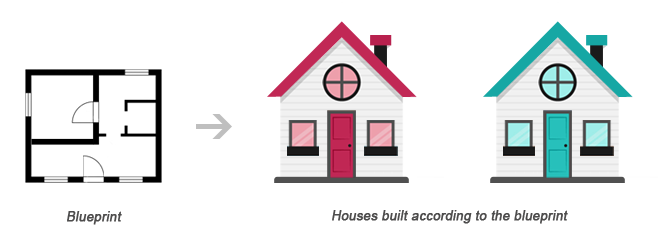
    A class acts as a template or blueprint from which lots of individual objects can be created. When individual objects are created, they inherit the same generic properties and behaviors, although each object may have different values for certain properties.

    For example, think of a class as a blueprint for a house. The blueprint itself is not a house, but is a detailed plan of the house. While, an object is like an actual house built according to that blueprint. We can build several identical houses from the same blueprint, but each house may have different paints, interiors and families inside, as shown in the illustration below.

    Class Object Relationship Illustration

    A class can be declared using the class keyword, followed by the name of the class and a pair of curly braces ({}), as shown in the following example.

    Let’s create a PHP file named Rectangle.php and put the following example code inside it so that our class code should be separated from rest of the program. We can then use it wherever it’s needed by simply including the Rectangle.php file.

    Example

    <?php
    class Rectangle
    {
        // Declare  properties
        public $length = 0;
        public $width = 0;
        
        // Method to get the perimeter
        public function getPerimeter(){
            return (2 * ($this->length + $this->width));
        }
        
        // Method to get the area
        public function getArea(){
            return ($this->length * $this->width);
        }
    }
    ?>

    The public keyword before the properties and methods in the example above, is an access modifier, which indicates that this property or method is accessible from anywhere. We will learn more about this a little later in this chapter.

    Note: Syntactically, variables within a class are called properties, whereas functions are called methods. Also class names conventionally are written in PascalCase i.e. each concatenated word starts with an uppercase letter (e.g. MyClass).

    Once a class has been defined, objects can be created from the class with the new keyword. Class methods and properties can directly be accessed through this object instance.

    Create another PHP file name test.php and put the following code inside it.

    Example

    <?php
    // Include class definition
    require "Rectangle.php";
     
    // Create a new object from Rectangle class
    $obj = new Rectangle;
     
    // Get the object properties values
    echo $obj->length; // 0utput: 0
    echo $obj->width; // 0utput: 0
     
    // Set object properties values
    $obj->length = 30;
    $obj->width = 20;
     
    // Read the object properties values again to show the change
    echo $obj->length; // 0utput: 30
    echo $obj->width; // 0utput: 20
     
     
    // Call the object methods
    echo $obj->getPerimeter(); // 0utput: 100
    echo $obj->getArea(); // Output: 600
    ?>

    The arrow symbol (->) is an OOP construct that is used to access contained properties and methods of a given object. Whereas, the pseudo-variable $this provides a reference to the calling object i.e. the object to which the method belongs.

    The real power of object oriented programming becomes evident when using multiple instances of the same class, as shown in the following example:

    Example

    <?php
    // Include class definition
    require "Rectangle.php";
     
    // Create multiple objects from the Rectangle class
    $obj1 = new Rectangle;
    $obj2 = new Rectangle;
     
    // Call the methods of both the objects
    echo $obj1->getArea(); // Output: 0
    echo $obj2->getArea(); // Output: 0
     
    // Set $obj1 properties values
    $obj1->length = 30;
    $obj1->width = 20;
     
    // Set $obj2 properties values
    $obj2->length = 35;
    $obj2->width = 50;
     
    // Call the methods of both the objects again
    echo $obj1->getArea(); // Output: 600
    echo $obj2->getArea(); // Output: 1750
    ?>

    As you can see in the above example, calling the getArea() method on different objects causes that method to operate on a different set of data. Each object instance is completely independent, with its own properties and methods, and thus can be manipulated independently, even if they’re of the same class.


    Using Constructors and Destructors

    To make the object-oriented programming easier, PHP provides some magic methods that are executed automatically when certain actions occur within an object.

    For example, the magic method __construct() (known as constructor) is executed automatically whenever a new object is created. Similarly, the magic method __destruct() (known as destructor) is executed automatically when the object is destroyed. A destructor function cleans up any resources allocated to an object once the object is destroyed.

    Example

    <?php
    class MyClass
    {
        // Constructor
        public function __construct(){
            echo 'The class "' . __CLASS__ . '" was initiated!<br>';
        }
        
        // Destructor
        public function __destruct(){
            echo 'The class "' . __CLASS__ . '" was destroyed.<br>';
        }
    }
     
    // Create a new object
    $obj = new MyClass;
     
    // Output a message at the end of the file
    echo "The end of the file is reached.";
    ?>

    The PHP code in the above example will produce the following output:

    The class “MyClass” was initiated!
    The end of the file is reached.
    The class “MyClass” was destroyed.

    A destructor is called automatically when a scripts ends. However, to explicitly trigger the destructor, you can destroy the object using the PHP unset() function, as follow:

    Example

    <?php
    class MyClass
    {
        // Constructor
        public function __construct(){
            echo 'The class "' . __CLASS__ . '" was initiated!<br>';
        }
        
        // Destructor
        public function __destruct(){
        echo 'The class "' . __CLASS__ . '" was destroyed.<br>';
        }
    }
     
    // Create a new object
    $obj = new MyClass;
     
    // Destroy the object
    unset($obj);
     
    // Output a message at the end of the file
    echo "The end of the file is reached.";
    ?>

    Now, the PHP code in the above example will produce the following output:

    The class “MyClass” was initiated!
    The class “MyClass” was destroyed.
    The end of the file is reached.

    Tip: PHP automatically clean up all resources allocated during execution when the script is finished, e.g. closing database connections, destroying objects, etc.

    Note: The __CLASS__ is a magic constant which contains the name of the class in which it is occur. It is empty, if it occurs outside of the class.


    Extending Classes through Inheritance

    Classes can inherit the properties and methods of another class using the extends keyword. This process of extensibility is called inheritance. It is probably the most powerful reason behind using the object-oriented programming model.

    Example

    <?php
    // Include class definition
    require "Rectangle.php";
     
    // Define a new class based on an existing class
    class Square extends Rectangle
    {   
        // Method to test if the rectangle is also a square
        public function isSquare(){
            if($this->length == $this->width){
                return true; // Square
            } else{
                return false; // Not a square
            }
        }
    }
     
    // Create a new object from Square class
    $obj = new Square;
     
    // Set object properties values
    $obj->length = 20;
    $obj->width = 20;
     
    // Call the object methods
    if($obj->isSquare()){
        echo "The area of the square is ";
    } else{
        echo "The area of the rectangle is ";
    };
    echo $obj->getArea();
    ?>

    The PHP code in the above example will produce the following output:

    The area of the square is 400

    As you can see in the above example, even though the class definition of Square doesn’t explicitly contain getArea() method nor the $length and $width property, instances of the Square class can use them, as they inherited from the parent Rectangle class.

    Tip: Since a child class is derived from a parent class, it is also referred to as a derived class, and its parent is called the base class.


    Controlling the Visibility of Properties and Methods

    When working with classes, you can even restrict access to its properties and methods using the visibility keywords for greater control. There are three visibility keywords (from most visible to least visible): publicprotectedprivate, which determines how and from where properties and methods can be accessed and modified.

    • public — A public property or method can be accessed anywhere, from within the class and outside. This is the default visibility for all class members in PHP.
    • protected — A protected property or method can only be accessed from within the class itself or in child or inherited classes i.e. classes that extends that class.
    • private — A private property or method is accessible only from within the class that defines it. Even child or inherited classes cannot access private properties or methods.

    The following example will show you how this visibility actually works:

    Example

    <?php
    // Class definition
    class Automobile
    {
        // Declare  properties
        public $fuel;
        protected $engine;
        private $transmission;
    }
    class Car extends Automobile
    {
        // Constructor
        public function __construct(){
            echo 'The class "' . __CLASS__ . '" was initiated!<br>';
        }
    }
     
    // Create an object from Automobile class
    $automobile = new Automobile;
     
    // Attempt to set $automobile object properties
    $automobile->fuel = 'Petrol'; // ok
    $automobile->engine = '1500 cc'; // fatal error
    $automobile->transmission = 'Manual'; // fatal error
     
    // Create an object from Car class
    $car = new Car;
     
    // Attempt to set $car object properties
    $car->fuel = 'Diesel'; // ok
    $car->engine = '2200 cc'; // fatal error
    $car->transmission = 'Automatic'; // undefined
    ?>

    Static Properties and Methods

    In addition to the visibility, properties and methods can also be declared as static, which makes them accessible without needing an instantiation of the class. Static properties and methods can be accessed using the scope resolution operator (::), like this: ClassName::$property and ClassName::method().

    A property declared as static cannot be accessed via the object of that class though a static method can be, as demonstrated in the following example:

    Example

    <?php
    // Class definition
    class HelloClass
    {
        // Declare a static property
        public static $greeting = "Hello World!";
        
        // Declare a static method
        public static function sayHello(){
            echo self::$greeting;
        }
    }
    // Attempt to access static property and method directly
    echo HelloClass::$greeting; // Output: Hello World!
    HelloClass::sayHello(); // Output: Hello World!
     
    // Attempt to access static property and method via object
    $hello = new HelloClass;
    echo $hello->greeting; // Strict Warning
    $hello->sayHello(); // Output: Hello World!
    ?>

    The keyword self in the above example means “the current class”. It is never preceded by a dollar sign ($) and always followed by the :: operator (e.g. self::$name).

    The self keyword is different from the this keyword which means “the current object” or  “the current instance of a class”. The this keyword is always preceded by a dollar sign ($) and followed by the -> operator (e.g. $this->name).

    Note: Since static methods can be called without an instance of a class (i.e. object), the pseudo-variable $this is not available inside the method declared as static.

    We hope you’ve understood the basic concepts of object-oriented programming by now. You’ll find more examples on OOP in PHP and MySQL database section.

  • PHP Error Handling

    Handling Errors

    Sometimes your application will not run as it supposed to do, resulting in an error. There are a number of reasons that may cause errors, for example:

    • The Web server might run out of disk space
    • A user might have entered an invalid value in a form field
    • The file or database record that you were trying to access may not exist
    • The application might not have permission to write to a file on the disk
    • A service that the application needs to access might be temporarily unavailable

    These types of errors are known as runtime errors, because they occur at the time the script runs. They are distinct from syntax errors that need to be fixed before the script will run.

    A professional application must have the capabilities to handle such runtime error gracefully. Usually this means informing the user about the problem more clearly and precisely.

    Understanding Error Levels

    Usually, when there’s a problem that prevents a script from running properly, the PHP engine triggers an error. Each error is represented by an integer value and an associated constant. The following table list some of the common error levels:

    Error LevelValueDescription
    E_ERROR1A fatal run-time error, that can’t be recovered from. The execution of the script is stopped immediately.
    E_WARNING2A run-time warning. It is non-fatal and most errors tend to fall into this category. The execution of the script is not stopped.
    E_NOTICE8A run-time notice. Indicate that the script encountered something that could possibly an error, although the situation could also occur when running a script normally.
    E_USER_ERROR256A fatal user-generated error message. This is like an E_ERROR, except it is generated by the PHP script using the function trigger_error() rather than the PHP engine.
    E_USER_WARNING512A non-fatal user-generated warning message. This is like an E_WARNING, except it is generated by the PHP script using the function trigger_error() rather than the PHP. engine
    E_USER_NOTICE1024A user-generated notice message. This is like an E_NOTICE, except it is generated by the PHP script using the function trigger_error() rather than the PHP engine.
    E_STRICT2048Not strictly an error, but triggered whenever PHP encounters code that could lead to problems or forward incompatibilities
    E_ALL8191All errors and warnings, except of E_STRICT prior to PHP 5.4.0.

    For more error levels, please check out the reference on PHP Error Levels.

    The PHP engine triggers an error whenever it encounters a problem with your script, but you can also trigger errors yourself to generate more user friendly error messages. This way you can make your application more sofisticated. The following section describes some of common methods used for handling errors in PHP:

    Basic Error Handling Using the die() Function

    Consider the following example that simply tries to open a text file for reading only.

    Example

    Download

    <?php
    // Try to open a non-existent file
    $file = fopen("sample.txt", "r");
    ?>

    If the file does not exist you might get an error like this:

    Warning: fopen(sample.txt) [function.fopen]: failed to open stream: No such file or directory in C:\wamp\www\project\test.php on line 2

    If we follow some simple steps we can prevent the users from getting such error message.

    Example

    Download

    <?php
    if(file_exists("sample.txt")){
        $file = fopen("sample.txt", "r");
    } else{
        die("Error: The file you are trying to access doesn't exist.");
    }
    ?>

    Now if you run the above script you will get the error message like this:

    Error: The file you are trying to access doesn’t exist.

    As you can see by implementing a simple check whether the file exist or not before trying to access it, we can generate an error message that is more meaningful to the user.

    The die() function used above simply display the custom error message and terminate the current script if ‘sample.txt’ file is not found.


    Creating a Custom Error Handler

    You can create your own error handler function to deal with the run-time error generated by PHP engine. The custom error handler provides you greater flexibility and better control over the errors, it can inspect the error and decide what to do with the error, it might display a message to the user, log the error in a file or database or send by e-mail, attempt to fix the problem and carry on, exit the execution of the script or ignore the error altogether.

    The custom error handler function must be able to handle at least two parameters (errno and errstr), however it can optionally accept an additional three parameters (errfile, errline, and errcontext), as described below:

    ParameterDescription
    Required — The following parameters are required
    errnoSpecifies the level of the error, as an integer. This corresponds to the appropriate error level constant ( E_ERRORE_WARNING, and so on)
    errstrSpecifies the error message as a string
    Optional — The following parameters are optional
    errfileSpecifies the filename of the script file in which the error occurred, as a string
    errlineSpecifies the line number on which the error occurred, as a string
    errcontextSpecifies an array containing all the variables and their values that existed at the time the error occurred. Useful for debugging

    Here’s an example of a simple custom error handling function. This handler, customError() is triggered whenever an error occurred, no matter how trivial. It then outputs the details of the error to the browser and stops the execution of the script.

    Example

    <?php
    // Error handler function
    function customError($errno, $errstr){
        echo "<b>Error:</b> [$errno] $errstr";
    }
    ?>

    You need to tell the PHP to use your custom error handler function — just call the built-in set_error_handler() function, passing in the name of the function.

    Example

    <?php
    // Error handler function
    function customError($errno, $errstr){
        echo "<b>Error:</b> [$errno] $errstr";
    }
     
    // Set error handler
    set_error_handler("customError");
     
    // Trigger error
    echo($test);
    ?>

    Error Logging

    Log Error Messages in a Text File

    You can also logs details of the error to the log file, like this:

    Example

    <?php
    function calcDivision($dividend, $divisor){
        if($divisor == 0){
            trigger_error("calcDivision(): The divisor cannot be zero", E_USER_WARNING);
            return false;
        } else{
            return($dividend / $divisor);
        }
    }
    function customError($errno, $errstr, $errfile, $errline, $errcontext){
        $message = date("Y-m-d H:i:s - ");
        $message .= "Error: [" . $errno ."], " . "$errstr in $errfile on line $errline, ";
        $message .= "Variables:" . print_r($errcontext, true) . "\r\n";
        
        error_log($message, 3, "logs/app_errors.log");
        die("There was a problem, please try again.");
    }
    set_error_handler("customError");
    echo calcDivision(10, 0);
    echo "This will never be printed.";
    ?>

    Send Error Messages by E-Mail

    You can also send e-mail with the error details using the same error_log() function.

    Example

    <?php
    function calcDivision($dividend, $divisor){
        if ($divisor == 0){
            trigger_error("calcDivision(): The divisor cannot be zero", E_USER_WARNING);
            return false;
        } else{
            return($dividend / $divisor);
        }
    }
    function customError($errno, $errstr, $errfile, $errline, $errcontext){
        $message = date("Y-m-d H:i:s - ");
        $message .= "Error: [" . $errno ."], " . "$errstr in $errfile on line $errline, ";
        $message .= "Variables:" . print_r($errcontext, true) . "\r\n";
        
        error_log($message, 1, "[email protected]");
        die("There was a problem, please try again. Error report submitted to webmaster.");
    }
    set_error_handler("customError");
    echo calcDivision(10, 0);
    echo "This will never be printed.";
    ?>

    Trigger an Error

    Although the PHP engine triggers an error whenever it encounters a problem with your script, however you can also trigger errors yourself. This can help to make your application more robust, because it can flag potential problems before they turn into serious errors.

    To trigger an error from within your script, call the trigger_error() function, passing in the error message that you want to generate:

    trigger_error(“There was a problem.”);

    Consider the following function that calculates division of the two numbers.

    Example

    <?php
    function calcDivision($dividend, $divisor){
        return($dividend / $divisor);
    }
     
    // Calling the function
    echo calcDivision(10, 0);
    ?>

    If a value of zero (0) is passed as the $divisor parameter, the error generated by the PHP engine will look something like this:

    Warning: Division by zero in C:\wamp\www\project\test.php on line 3

    This message doesn’t look very informative. Consider the following example that uses the trigger_error() function to generate the error.

    Example

    <?php
    function calcDivision($dividend, $divisor){
        if($divisor == 0){
            trigger_error("The divisor cannot be zero", E_USER_WARNING);
            return false;
        } else{
            return($dividend / $divisor);
        }
    }
     
    // Calling the function
    echo calcDivision(10, 0);
    ?>

    Now the script generates this error message:

    Warning: The divisor cannot be zero in C:\wamp\www\project\error.php on line 4

    As you can see the error message generated by the second example explains the problem more clearly as compared to the previous one.

  • PHP Filters

    Validating and Sanitizing Data with Filters

    Sanitizing and validating user input is one of the most common tasks in a web application. To make this task easier PHP provides native filter extension that you can use to sanitize or validate data such as e-mail addresses, URLs, IP addresses, etc.

    To validate data using filter extension you need to use the PHP’s filter_var() function. The basic syntax of this function can be given with:

    filter_var(variablefilteroptions)

    This function takes three parameters out of which the last two are optional. The first parameter is the value to be filtered, the second parameter is the ID of the filter to apply, and the third parameter is the array of options related to filter. Let’s see how it works.

    Sanitize a String

    The following example will sanitize a string by removing all HTML tags from it:

    Example

    <?php
    // Sample user comment
    $comment = "<h1>Hey there! How are you doing today?</h1>";
     
    // Sanitize and print comment string
    $sanitizedComment = filter_var($comment, FILTER_SANITIZE_STRING);
    echo $sanitizedComment;
    ?>

    The output of the above example will look something like this:

    Hey there! How are you doing today?


    Validate Integer Values

    The following example will validate whether the value is a valid integer or not.

    Example

    <?php
    // Sample integer value
    $int = 20;
     
    // Validate sample integer value
    if(filter_var($int, FILTER_VALIDATE_INT)){
        echo "The <b>$int</b> is a valid integer";
    } else{
        echo "The <b>$int</b> is not a valid integer";
    }
    ?>

    In the above example, if variable $int is set to 0, the example code will display invalid integer message. To fix this problem, you need to explicitly test for the value 0, as follow:

    Example

    <?php
    // Sample integer value
    $int = 0;
     
    // Validate sample integer value
    if(filter_var($int, FILTER_VALIDATE_INT) === 0 || filter_var($int, FILTER_VALIDATE_INT)){
        echo "The <b>$int</b> is a valid integer";
    } else{
        echo "The <b>$int</b> is not a valid integer";
    }
    ?>

    Validate IP Addresses

    The following example will validate whether the value is a valid IP address or not.

    Example

    <?php
    // Sample IP address
    $ip = "172.16.254.1";
     
    // Validate sample IP address
    if(filter_var($ip, FILTER_VALIDATE_IP)){
        echo "The <b>$ip</b> is a valid IP address";
    } else {
        echo "The <b>$ip</b> is not a valid IP address";
    }
    ?>

    You can further apply validation for IPV4 or IPV6 IP addresses by using the FILTER_FLAG_IPV4 or FILTER_FLAG_IPV6 flags, respectively. Here’s an example:

    Example

    <?php
    // Sample IP address
    $ip = "172.16.254.1";
     
    // Validate sample IP address
    if(filter_var($ip, FILTER_VALIDATE_IP, FILTER_FLAG_IPV6)){
        echo "The <b>$ip</b> is a valid IPV6 address";
    } else {
        echo "The <b>$ip</b> is not a valid IPV6 address";
    }
    ?>

    Sanitize and Validate Email Addresses

    The following example will show you how to sanitize and validate an e-mail address.

    Example

    <?php
    // Sample email address
    $email = "someone@@example.com";
     
    // Remove all illegal characters from email
    $sanitizedEmail = filter_var($email, FILTER_SANITIZE_EMAIL);
     
    // Validate email address
    if($email == $sanitizedEmail && filter_var($email, FILTER_VALIDATE_EMAIL)){
        echo "The $email is a valid email address";
    } else{
        echo "The $email is not a valid email address";
    }
    ?>

    Note: The FILTER_SANITIZE_EMAIL filter removes all invalid characters from the provided email address string except letters, digits and !#$%&'*+-=?^_`{|}~@.[].


    Sanitize and Validate URLs

    The following example will show you how to sanitize and validate a url.

    Example

    <?php
    // Sample website url
    $url = "http:://www.example.com";
     
    // Remove all illegal characters from url
    $sanitizedUrl = filter_var($url, FILTER_SANITIZE_URL);
     
    // Validate website url
    if($url == $sanitizedUrl && filter_var($url, FILTER_VALIDATE_URL)){
        echo "The $url is a valid website url";
    } else{
        echo "The $url is not a valid website url";
    }
    ?>

    Note: The FILTER_SANITIZE_URL filter removes all invalid characters from the provided URL string except letters, digits and $-_.+!*'(),{}|\\^~[]`<>#%";/?:@&=.

    You can also check whether a URL contains query string or not by using the flag FILTER_FLAG_QUERY_REQUIRED, as shown in the following example:

    Example

    <?php
    // Sample website url
    $url = "http://www.example.com?topic=filters";
     
    // Validate website url for query string
    if(filter_var($url, FILTER_VALIDATE_URL, FILTER_FLAG_QUERY_REQUIRED)){
        echo "The <b>$url</b> contains query string";
    } else{
        echo "The <b>$url</b> does not contain query string";
    }
    ?>

    See the tutorial on HTML URL to learn about the different components of a URL.


    Validate Integers Within a Range

    The following example will validate whether the supplied value is an integer or not, as well as whether it lies within the range of 0 to 100 or not.

    Example

    <?php
    // Sample integer value
    $int = 75;
     
    // Validate sample integer value
    if(filter_var($int, FILTER_VALIDATE_INT, array("options" => array("min_range" => 0,"max_range" => 100)))){
        echo "The <b>$int</b> is within the range of 0 to 100";
    } else{
        echo "The <b>$int</b> is not within the range of 0 to 100";
    }
    ?>
  • PHP Form Validation

    Sanitizing and Validating Form Data

    As you have seen in the previous tutorial, the process of capturing and displaying the submitted form data is quite simple. In this tutorial you will learn how to implement a simple contact form on your website that allows the user to send their comment and feedback through email. We will use the same PHP mail() function to send the emails.

    We are also going to implement some basic security feature like sanitization and validation of the user’s input so that user can not insert potentially harmful data that compromise the website security or might break the application.

    The following is our all-in-one PHP script which does the following things:

    • It will ask the users to enter his comments about the website.
    • The same script displays the contact form and process the submitted form data.
    • The script sanitizes and validates the user inputs. If any required field (marked with *) is missing or validation failed due to incorrect inputs the script redisplays the form with an error message for corresponding form field.
    • The script remembers which fields the user has already filled in, and prefills those fields when the form redisplayed due to validation error.
    • If the data submitted by the user are acceptable and everything goes well it will send an email to the website administrator and display a success message to the user.

    Type the following code in “contact.php” file and save in your project root directory:

    Example

    <?php
    // Functions to filter user inputs
    function filterName($field){
        // Sanitize user name
        $field = filter_var(trim($field), FILTER_SANITIZE_STRING);
        
        // Validate user name
        if(filter_var($field, FILTER_VALIDATE_REGEXP, array("options"=>array("regexp"=>"/^[a-zA-Z\s]+$/")))){
            return $field;
        } else{
            return FALSE;
        }
    }    
    function filterEmail($field){
        // Sanitize e-mail address
        $field = filter_var(trim($field), FILTER_SANITIZE_EMAIL);
        
        // Validate e-mail address
        if(filter_var($field, FILTER_VALIDATE_EMAIL)){
            return $field;
        } else{
            return FALSE;
        }
    }
    function filterString($field){
        // Sanitize string
        $field = filter_var(trim($field), FILTER_SANITIZE_STRING);
        if(!empty($field)){
            return $field;
        } else{
            return FALSE;
        }
    }
     
    // Define variables and initialize with empty values
    $nameErr = $emailErr = $messageErr = "";
    $name = $email = $subject = $message = "";
     
    // Processing form data when form is submitted
    if($_SERVER["REQUEST_METHOD"] == "POST"){
     
        // Validate user name
        if(empty($_POST["name"])){
            $nameErr = "Please enter your name.";
        } else{
            $name = filterName($_POST["name"]);
            if($name == FALSE){
                $nameErr = "Please enter a valid name.";
            }
        }
        
        // Validate email address
        if(empty($_POST["email"])){
            $emailErr = "Please enter your email address.";     
        } else{
            $email = filterEmail($_POST["email"]);
            if($email == FALSE){
                $emailErr = "Please enter a valid email address.";
            }
        }
        
        // Validate message subject
        if(empty($_POST["subject"])){
            $subject = "";
        } else{
            $subject = filterString($_POST["subject"]);
        }
        
        // Validate user comment
        if(empty($_POST["message"])){
            $messageErr = "Please enter your comment.";     
        } else{
            $message = filterString($_POST["message"]);
            if($message == FALSE){
                $messageErr = "Please enter a valid comment.";
            }
        }
        
        // Check input errors before sending email
        if(empty($nameErr) && empty($emailErr) && empty($messageErr)){
            // Recipient email address
            $to = '[email protected]';
            
            // Create email headers
            $headers = 'From: '. $email . "\r\n" .
            'Reply-To: '. $email . "\r\n" .
            'X-Mailer: PHP/' . phpversion();
            
            // Sending email
            if(mail($to, $subject, $message, $headers)){
                echo '<p class="success">Your message has been sent successfully!</p>';
            } else{
                echo '<p class="error">Unable to send email. Please try again!</p>';
            }
        }
    }
    ?>
    <!DOCTYPE html>
    <html lang="en">
    <head>
        <meta charset="UTF-8">
        <title>Contact Form</title>
        <style type="text/css">
            .error{ color: red; }
            .success{ color: green; }
        </style>
    </head>
    <body>
        <h2>Contact Us</h2>
        <p>Please fill in this form and send us.</p>
        <form action="contact.php" method="post">
            <p>
                <label for="inputName">Name:<sup>*</sup></label>
                <input type="text" name="name" id="inputName" value="<?php echo $name; ?>">
                <span class="error"><?php echo $nameErr; ?></span>
            </p>
            <p>
                <label for="inputEmail">Email:<sup>*</sup></label>
                <input type="text" name="email" id="inputEmail" value="<?php echo $email; ?>">
                <span class="error"><?php echo $emailErr; ?></span>
            </p>
            <p>
                <label for="inputSubject">Subject:</label>
                <input type="text" name="subject" id="inputSubject" value="<?php echo $subject; ?>">
            </p>
            <p>
                <label for="inputComment">Message:<sup>*</sup></label>
                <textarea name="message" id="inputComment" rows="5" cols="30"><?php echo $message; ?></textarea>
                <span class="error"><?php echo $messageErr; ?></span>
            </p>
            <input type="submit" value="Send">
            <input type="reset" value="Reset">
        </form>
    </body>
    </html>

    Explanation of code

    You might think what that code was all about. OK, let’s get straight into it.

    • The filterName() function (line no-03) validate input value as person’s name. A valid name can only contain alphabetical characters (a-z, A-Z).
    • The filterEmail() function (line no-14) validate input value as email address.
    • The filterString() function (line no-25) only sanitize the input value by stripping HTML tags and special characters. It doesn’t validate the input value against anything.
    • The attribute action="contact.php" (line no-111) inside the <form> tag specifies that the same contact.php file display the form as well as process the form data.
    • The PHP code inside the value attribute of <input> and <textarea> e.g. <?php echo $name; ?> display prefilled value when form is redisplayed upon validation error.
    • The PHP code inside the .error class e.g. <span class="error"><?php echo $nameErr; ?></span> display error for corresponding field.

    Rest the thing we have already covered in previous chapters. To learn more about sanitize and validate filters, please check out the PHP Filter reference.

  • PHP Form Handling

    Creating a Simple Contact Form

    In this tutorial we are going to create a simple HMTL contact form that allows users to enter their comment and feedback then displays it to the browser using PHP.

    Open up your favorite code editor and create a new PHP file. Now type the following code and save this file as “contact-form.php” in the root directory of your project.

    Example

    <!DOCTYPE html>
    <html lang="en">
    <head>
        <meta charset="UTF-8">
        <title>Contact Form</title>
    </head>
    <body>
        <h2>Contact Us</h2>
        <p>Please fill in this form and send us.</p>
        <form action="process-form.php" method="post">
            <p>
                <label for="inputName">Name:<sup>*</sup></label>
                <input type="text" name="name" id="inputName">
            </p>
            <p>
                <label for="inputEmail">Email:<sup>*</sup></label>
                <input type="text" name="email" id="inputEmail">
            </p>
            <p>
                <label for="inputSubject">Subject:</label>
                <input type="text" name="subject" id="inputSubject">
            </p>
            <p>
                <label for="inputComment">Message:<sup>*</sup></label>
                <textarea name="message" id="inputComment" rows="5" cols="30"></textarea>
            </p>
            <input type="submit" value="Submit">
            <input type="reset" value="Reset">
        </form>
    </body>
    </html>

    Explanation of code

    Notice that there are two attributes within the opening <form> tag:

    • The action attribute references a PHP file “process-form.php” that receives the data entered into the form when user submit it by pressing the submit button.
    • The method attribute tells the browser to send the form data through POST method.

    Rest of the elements inside the form are basic form controls to receive user inputs. To learn more about HTML form elements please check out the HTML Forms tutorial.


    Capturing Form Data with PHP

    To access the value of a particular form field, you can use the following superglobal variables. These variables are available in all scopes throughout a script.

    SuperglobalDescription
    $_GETContains a list of all the field names and values sent by a form using the get method (i.e. via the URL parameters).
    $_POSTContains a list of all the field names and values sent by a form using the post method (data will not visible in the URL).
    $_REQUESTContains the values of both the $_GET and $_POST variables as well as the values of the $_COOKIE superglobal variable.

    When a user submit the above contact form through clicking the submit button, the form data is sent to the “process-form.php” file on the server for processing. It simply captures the information submitted by the user and displays it to browser.

    The PHP code of “process-form.php” file will look something like this:

    Example

    <!DOCTYPE html>
    <html lang="en">
    <head>
        <meta charset="UTF-8">
        <title>Contact Form</title>
    </head>
    <body>
        <h1>Thank You</h1>
        <p>Here is the information you have submitted:</p>
        <ol>
            <li><em>Name:</em> <?php echo $_POST["name"]?></li>
            <li><em>Email:</em> <?php echo $_POST["email"]?></li>
            <li><em>Subject:</em> <?php echo $_POST["subject"]?></li>
            <li><em>Message:</em> <?php echo $_POST["message"]?></li>
        </ol>
    </body>
    </html>

    The PHP code above is quite simple. Since the form data is sent through the post method, you can retrieve the value of a particular form field by passing its name to the $_POST superglobal array, and displays each field value using echo() statement.

    In real world you cannot trust the user inputs; you must implement some sort of validation to filter the user inputs before using them. In the next chapter you will learn how sanitize and validate this contact form data and send it through the email using PHP.

  • PHP Send Emails

    The PHP mail() Function

    Sending email messages are very common for a web application, for example, sending welcome email when a user create an account on your website, sending newsletters to your registered users, or getting user feedback or comment through website’s contact form, and so on.

    You can use the PHP built-in mail() function for creating and sending email messages to one or more recipients dynamically from your PHP application either in a plain-text form or formatted HTML. The basic syntax of this function can be given with:

    mail(tosubjectmessageheadersparameters)

    The following table summarizes the parameters of this function.

    ParameterDescription
    Required — The following parameters are required
    toThe recipient’s email address.
    subjectSubject of the email to be sent. This parameter i.e. the subject line cannot contain any newline character (\n).
    messageDefines the message to be sent. Each line should be separated with a line feed-LF (\n). Lines should not exceed 70 characters.
    Optional — The following parameters are optional
    headersThis is typically used to add extra headers such as “From”, “Cc”, “Bcc”. The additional headers should be separated with a carriage return plus a line feed-CRLF (\r\n).
    parametersUsed to pass additional parameters.

    Sending Plain Text Emails

    The simplest way to send an email with PHP is to send a text email. In the example below we first declare the variables — recipient’s email address, subject line and message body — then we pass these variables to the mail() function to send the email.

    Example

    <?php
    $to = '[email protected]';
    $subject = 'Marriage Proposal';
    $message = 'Hi Jane, will you marry me?'; 
    $from = '[email protected]';
     
    // Sending email
    if(mail($to, $subject, $message)){
        echo 'Your mail has been sent successfully.';
    } else{
        echo 'Unable to send email. Please try again.';
    }
    ?>

    Sending HTML Formatted Emails

    When you send a text message using PHP, all the content will be treated as simple text. We’re going to improve that output, and make the email into a HTML-formatted email.

    To send an HTML email, the process will be the same. However, this time we need to provide additional headers as well as an HTML formatted message.

    Example

    <?php
    $to = '[email protected]';
    $subject = 'Marriage Proposal';
    $from = '[email protected]';
     
    // To send HTML mail, the Content-type header must be set
    $headers  = 'MIME-Version: 1.0' . "\r\n";
    $headers .= 'Content-type: text/html; charset=iso-8859-1' . "\r\n";
     
    // Create email headers
    $headers .= 'From: '.$from."\r\n".
        'Reply-To: '.$from."\r\n" .
        'X-Mailer: PHP/' . phpversion();
     
    // Compose a simple HTML email message
    $message = '<html><body>';
    $message .= '<h1 style="color:#f40;">Hi Jane!</h1>';
    $message .= '<p style="color:#080;font-size:18px;">Will you marry me?</p>';
    $message .= '</body></html>';
     
    // Sending email
    if(mail($to, $subject, $message, $headers)){
        echo 'Your mail has been sent successfully.';
    } else{
        echo 'Unable to send email. Please try again.';
    }
    ?>

    Note: However, the PHP mail() function is a part of the PHP core but you need to set up a mail server on your machine to make it really work.

    In the next two chapters (PHP Form Handling and PHP Form Validation) you will learn how to implement an interactive contact form on your website to receive the user’s comment and feedback through emails using this PHP send mail feature.