Blog

  • First Python Program

    In this Section, we will discuss the basic syntax of Python, we will run a simple program to print Hello World on the console.

    Python provides us the two ways to run a program:

    • Using Interactive interpreter prompt
    • Using a script file

    Let’s discuss each one of them in detail.

    Interactive interpreter prompt

    Python provides us the feature to execute the Python statement one by one at the interactive prompt. It is preferable in the case where we are concerned about the output of each line of our Python program.

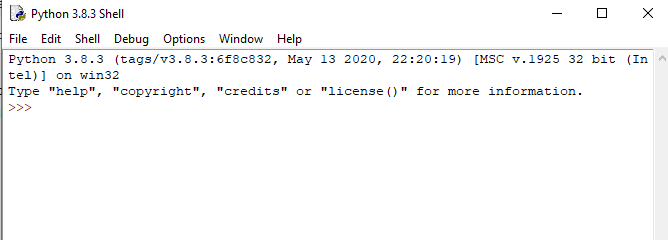
    To open the interactive mode, open the terminal (or command prompt) and type python (python3 in case if you have Python2 and Python3 both installed on your system).

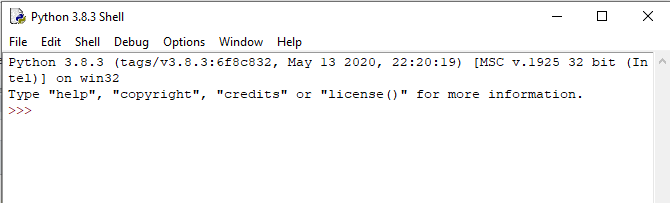
    It will open the following prompt where we can execute the Python statement and check their impact on the console.

    First Python Program

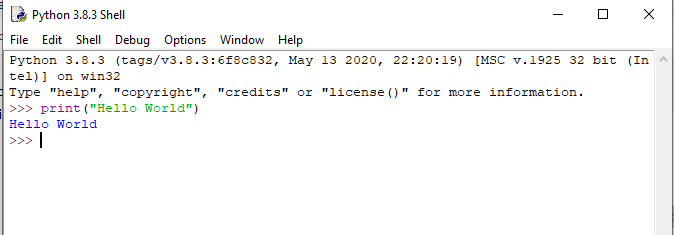
    After writing the print statement, press the Enter key.

    First Python Program

    Here, we get the message “Hello World !” printed on the console.

    Using a script file (Script Mode Programming)

    The interpreter prompt is best to run the single-line statements of the code. However, we cannot write the code every-time on the terminal. It is not suitable to write multiple lines of code.

    Using the script mode, we can write multiple lines code into a file which can be executed later. For this purpose, we need to open an editor like notepad, create a file named and save it with .py extension, which stands for “Python”. Now, we will implement the above example using the script mode.

    1. print (“hello world”); #here, we have used print() function to print the message on the console.    

    To run this file named as first.py, we need to run the following command on the terminal.

    First Python Program

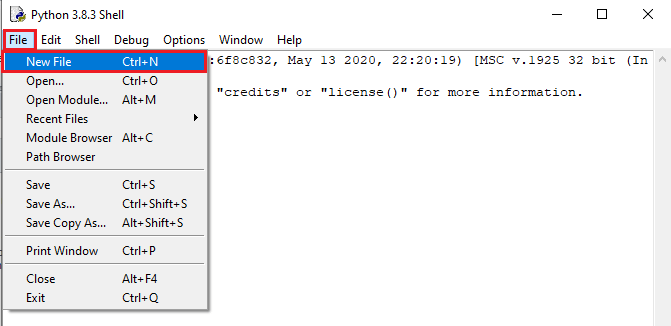
    Step – 1: Open the Python interactive shell, and click “File” then choose “New”, it will open a new blank script in which we can write our code.

    First Python Program

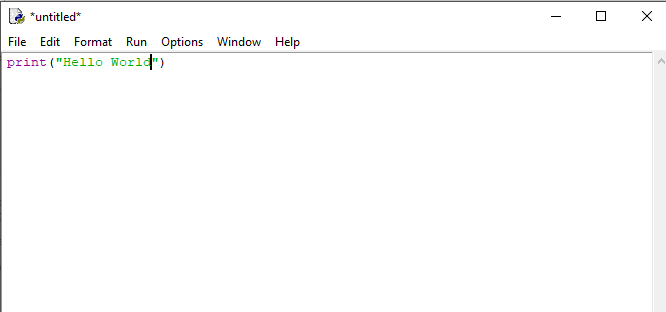
    Step -2: Now, write the code and press “Ctrl+S” to save the file.

    First Python Program

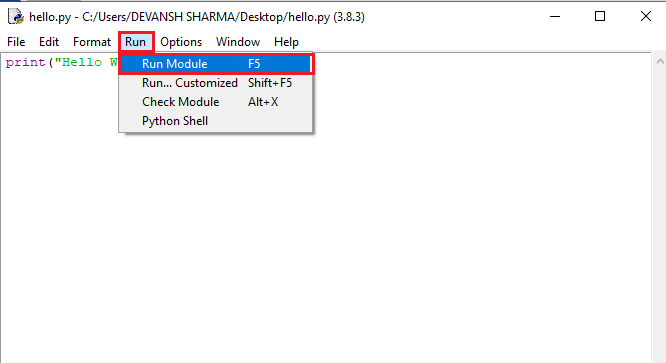
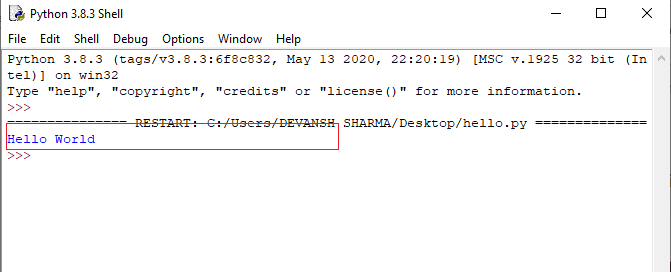
    Step – 3: After saving the code, we can run it by clicking “Run” or “Run Module”. It will display the output to the shell.

    First Python Program

    The output will be shown as follows.

    First Python Program

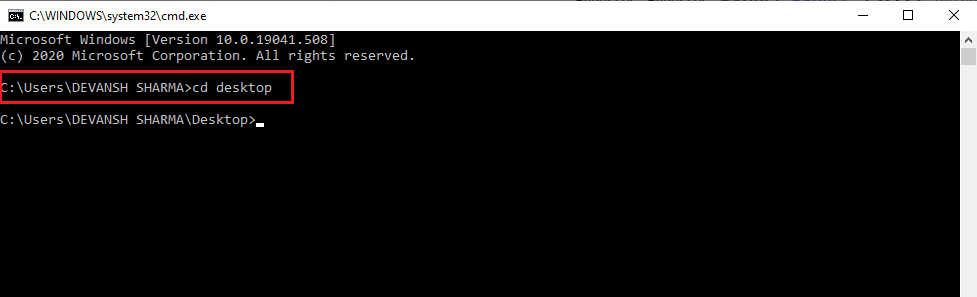
    Step – 4: Apart from that, we can also run the file using the operating system terminal. But, we should be aware of the path of the directory where we have saved our file.

    • Open the command line prompt and navigate to the directory.
    First Python Program
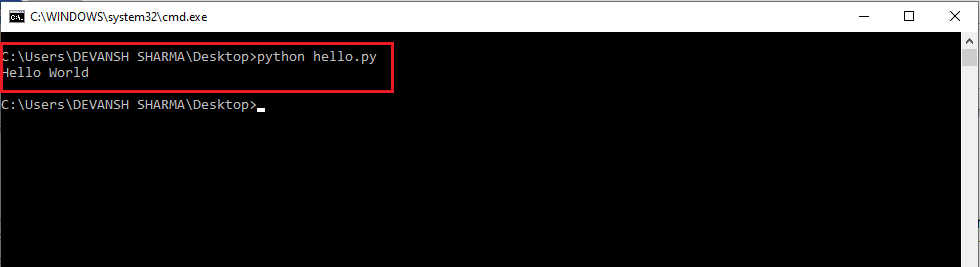
    • We need to type the python keyword, followed by the file name and hit enter to run the Python file.
    First Python Program

    Multi-line Statements

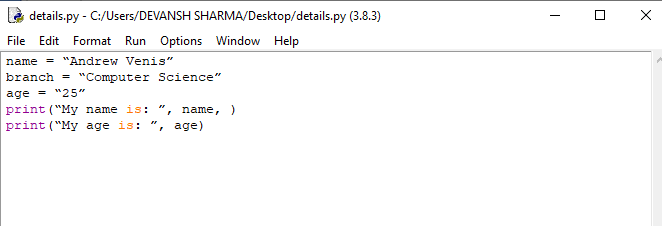
    Multi-line statements are written into the notepad like an editor and saved it with .py extension. In the following example, we have defined the execution of the multiple code lines using the Python script.

    Code:

    1. name = “Andrew Venis”  
    2. branch = “Computer Science”  
    3. age = “25”  
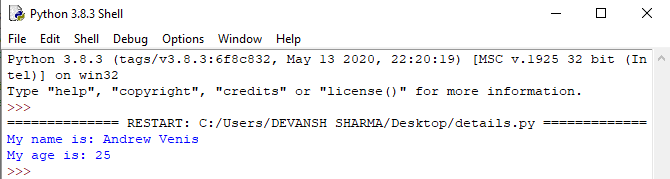
    4. print(“My name is: “, name, )  
    5. print(“My age is: “, age)  

    Script File:

    First Python Program
    First Python Program

    Pros and Cons of Script Mode

    The script mode has few advantages and disadvantages as well. Let’s understand the following advantages of running code in script mode.

    • We can run multiple lines of code.
    • Debugging is easy in script mode.
    • It is appropriate for beginners and also for experts.

    Let’s see the disadvantages of the script mode.

    • We have to save the code every time if we make any change in the code.
    • It can be tedious when we run a single or a few lines of code.

    Get Started with PyCharm

    In our first program, we have used gedit on our CentOS as an editor. On Windows, we have an alternative like notepad or notepad++ to edit the code. However, these editors are not used as IDE for python since they are unable to show the syntax related suggestions.

    JetBrains provides the most popular and a widely used cross-platform IDE PyCharm to run the python programs.

    PyCharm installation

    As we have already stated, PyCharm is a cross-platform IDE, and hence it can be installed on a variety of the operating systems. In this section of the tutorial, we will cover the installation process of PyCharm on Windows, MacOSCentOS, and Ubuntu.

    Windows

    Installing PyCharm on Windows is very simple. To install PyCharm on Windows operating system, visit the link https://www.jetbrains.com/pycharm/download/download-thanks.html?platform=windows to download the executable installer. Double click the installer (.exe) file and install PyCharm by clicking next at each step.

    To create a first program to Pycharm follows the following step.

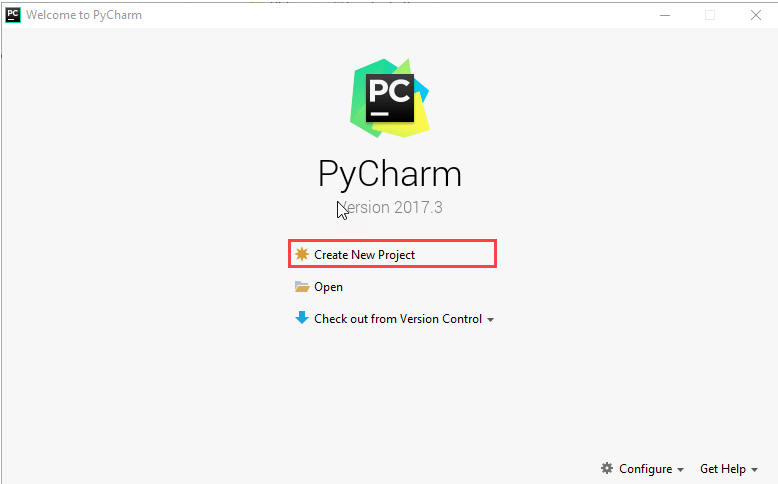
    Step – 1. Open Pycharm editor. Click on “Create New Project” option to create new project.

    First Python Program

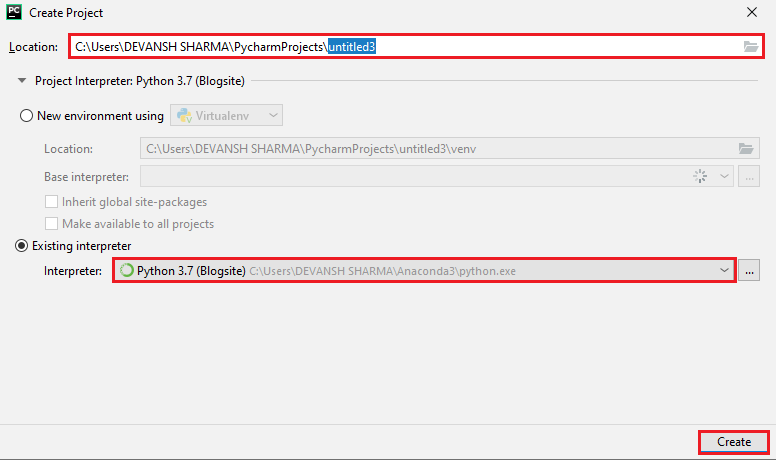
    Step – 2. Select a location to save the project.

    1. We can save the newly created project at desired memory location or can keep file location as it is but atleast change the project default name untitled to “FirstProject” or something meaningful.
    2. Pycharm automatically found the installed Python interpreter.
    3. After change the name click on the “Create” Button.
    First Python Program

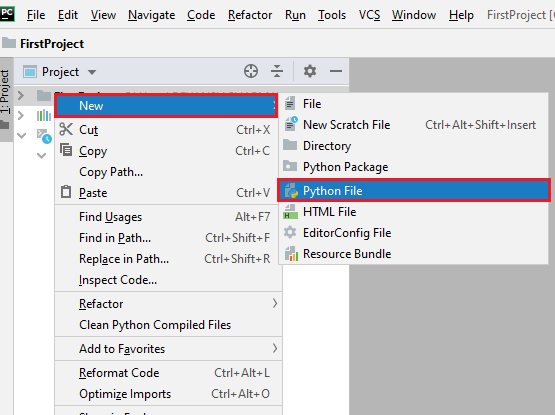
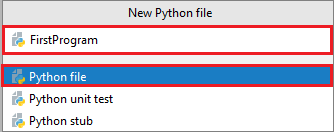
    Step – 3. Click on “File” menu and select “New”. By clicking “New” option it will show various file formats. Select the “Python File”.

    First Python Program

    Step – 4. Now type the name of the Python file and click on “OK”. We have written the “FirstProgram”.

    First Python Program

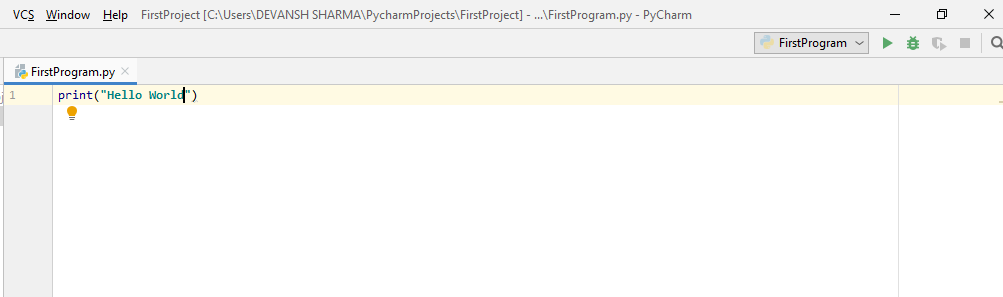
    Step – 5. Now type the first program – print(“Hello World”) then click on the “Run” menu to run program.

    First Python Program

    Step – 6. The output will appear at the bottom of the screen.

    First Python Program

    Basic Syntax of Python

    Indentation and Comment in Python

    Indentation is the most significant concept of the Python programming language. Improper use of indentation will end up “IndentationError” in our code.

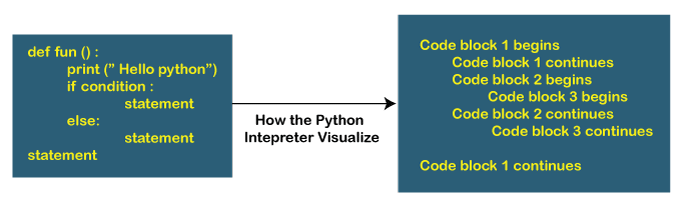
    Indentation is nothing but adding whitespaces before the statement when it is needed. Without indentation Python doesn’t know which statement to be executed to next. Indentation also defines which statements belong to which block. If there is no indentation or improper indentation, it will display “IndentationError” and interrupt our code.

    First Python Program

    Python indentation defines the particular group of statements belongs to the particular block. The programming languages such as CC++java use the curly braces {} to define code blocks.

    In Python, statements that are the same level to the right belong to the same block. We can use four whitespaces to define indentation. Let’s see the following lines of code.

    Example –

    list1 = [1, 2, 3, 4, 5]  
    
    for i in list1:  
    
        print(i)  
    
        if i==4:  
    
           break  
    
    print("End of for loop")

    Output:1 2 3 4 End of for loop

    Explanation:

    In the above code, for loop has a code blocks and if the statement has its code block inside for loop. Both indented with four whitespaces. The last print() statement is not indented; that’s means it doesn’t belong to for loop.

    Comments in Python

    Comments are essential for defining the code and help us and other to understand the code. By looking the comment, we can easily understand the intention of every line that we have written in code. We can also find the error very easily, fix them, and use in other applications.

    In Python, we can apply comments using the # hash character. The Python interpreter entirely ignores the lines followed by a hash character. A good programmer always uses the comments to make code under stable. Let’s see the following example of a comment.

    1. name  = “Thomas”   # Assigning string value to the name variable   

    We can add comment in each line of the Python code.

    Fees = 10000      # defining course fees is 10000  
    
    Fees = 20000      # defining course fees is 20000

    It is good idea to add code in any line of the code section of code whose purpose is not obvious. This is a best practice to learn while doing the coding.

    Types of Comment

    Python provides the facility to write comments in two ways- single line comment and multi-line comment.

    Single-Line Comment – Single-Line comment starts with the hash # character followed by text for further explanation.

    # defining the marks of a student   
    
    Marks = 90

    We can also write a comment next to a code statement. Consider the following example.

    Name = "James"   # the name of a student is James  
    
    Marks = 90            # defining student's marks  
    
    Branch = "Computer Science"   # defining student branch

    Multi-Line Comments – Python doesn’t have explicit support for multi-line comments but we can use hash # character to the multiple lines. For example –

    # we are defining for loop  
    
    # To iterate the given list.  
    
    # run this code.

    We can also use another way.

    " " "   
    
    This is an example  
    
    Of multi-line comment  
    
    Using triple-quotes   
    
    " " "

    This is the basic introduction of the comments. Visit our Python Comment tutorial to learn it in detail.

    Python Identifiers

    Python identifiers refer to a name used to identify a variable, function, module, class, module or other objects. There are few rules to follow while naming the Python Variable.

    • A variable name must start with either an English letter or underscore (_).
    • A variable name cannot start with the number.
    • Special characters are not allowed in the variable name.
    • The variable’s name is case sensitive.

    Let’s understand the following example.

    Example –

    number = 10  
    
    print(num)  


    _a = 100  
    
    print(_a)  


    x_y = 1000  
    
    print(x_y)

    Output:10 100 1000

    We have defined the basic syntax of the Python programming language. We must be familiar with the core concept of any programming languages. Once we memorize the concepts as mentioned above. The journey of learning Python will become easier.

  • How to Install Python

    Python is a popular high-level, general-use programming language. Python is a programming language that enables rapid development as well as more effective system integration. Python has two main different versions: Python 2 and Python 3. Both are really different.

    Python develops new versions with changes periodically and releases them according to version numbers. Python is currently at version 3.11.3.

    Python is much simpler to learn and programme in. Any plain text editor, such as notepad or notepad++, may be used to create Python programs. To make it easier to create these routines, one may also utilise an online IDE for Python or even install one on their machine. IDEs offer a variety of tools including a user-friendly code editor, the debugger, compiler, etc.

    One has to have Python installed on their system in order to start creating Python code and carrying out many fascinating and helpful procedures. The first step in learning how to programming in Python is to install or update Python on your computer. There are several ways to install Python: you may use a package manager, get official versions from Python.org, or install specialised versions for embedded devices, scientific computing, and the Internet of Things.

    In order to become Python developer, the first step is to learn how to install or update Python on a local machine or computer. In this tutorial, we will discuss the installation of Python on various operating systems.

    Installation on Windows

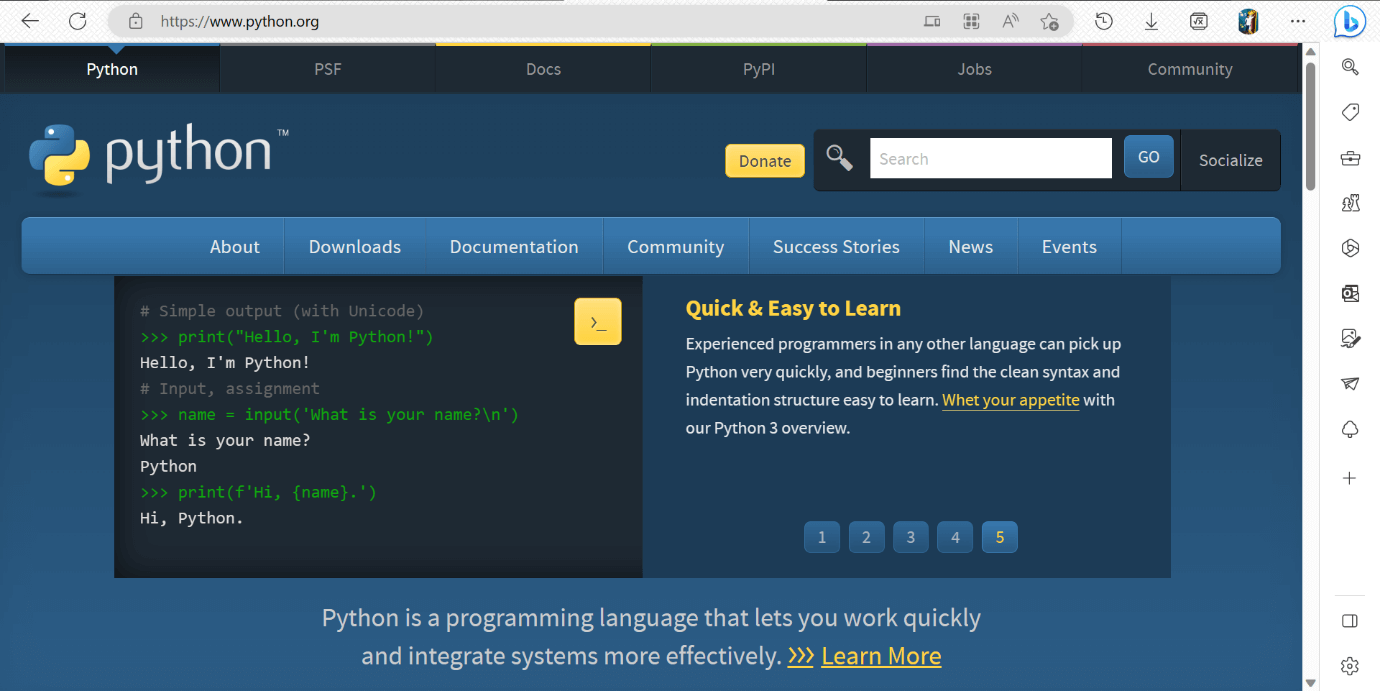
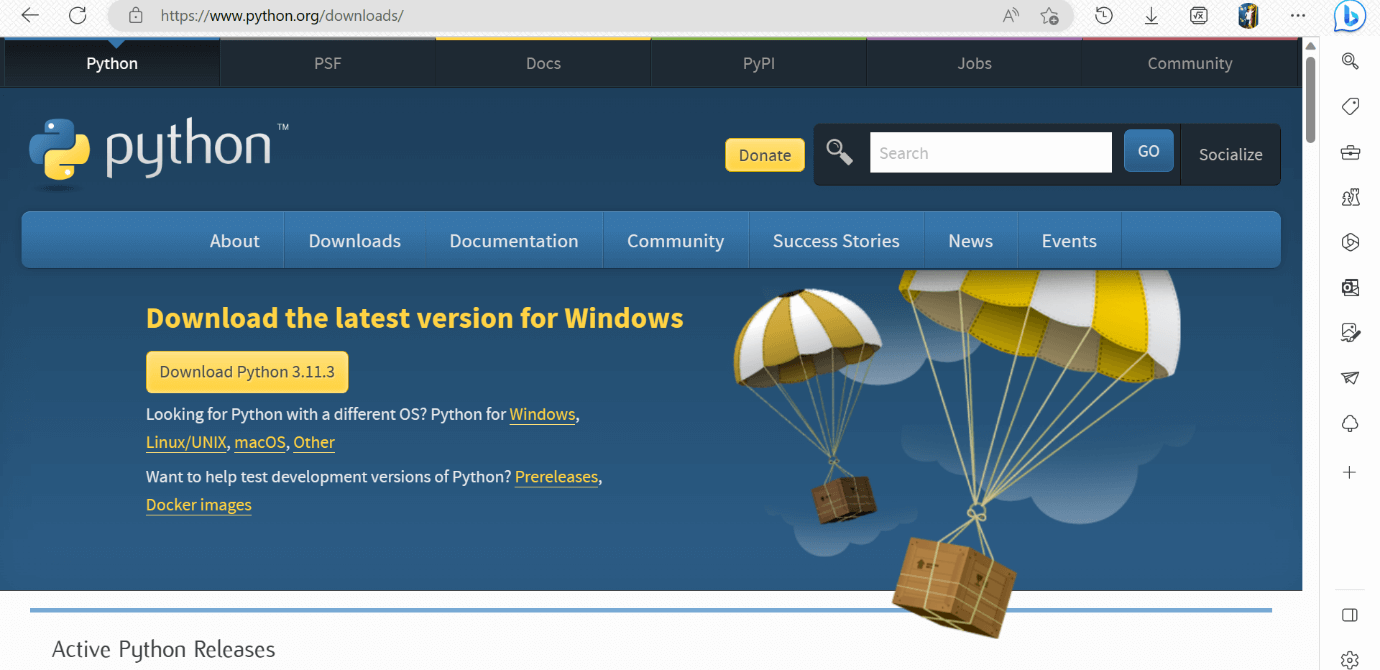
    Visit the link https://www.python.org to download the latest release of Python. In this process, we will install Python 3.11.3 on our Windows operating system. When we click on the above link, it will bring us the following page.

    Python Environment Set-up

    Step – 1: Select the Python’s version to download.

    Click on the download button to download the exe file of Python.

    Python Environment Set-up

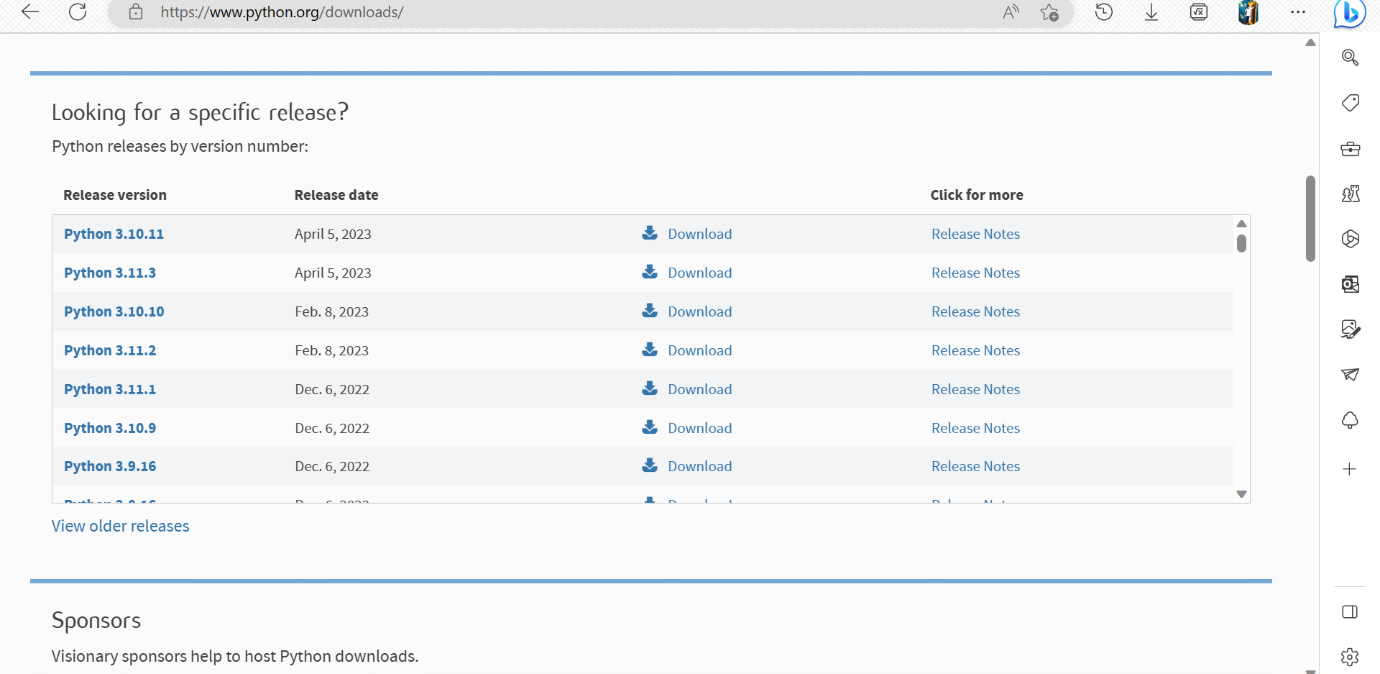
    If in case you want to download the specific version of Python. Then, you can scroll down further below to see different versions from 2 and 3 respectively. Click on download button right next to the version number you want to download.

    Python Environment Set-up

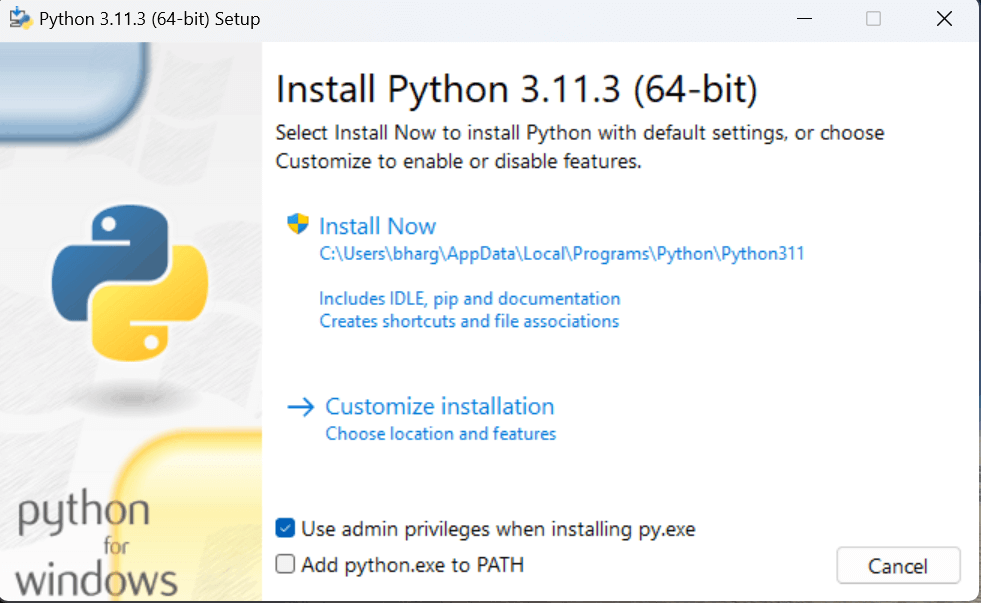
    Step – 2: Click on the Install Now

    Double-click the executable file, which is downloaded.

    Python Environment Set-up

    The following window will open. Click on the Add Path check box, it will set the Python path automatically.

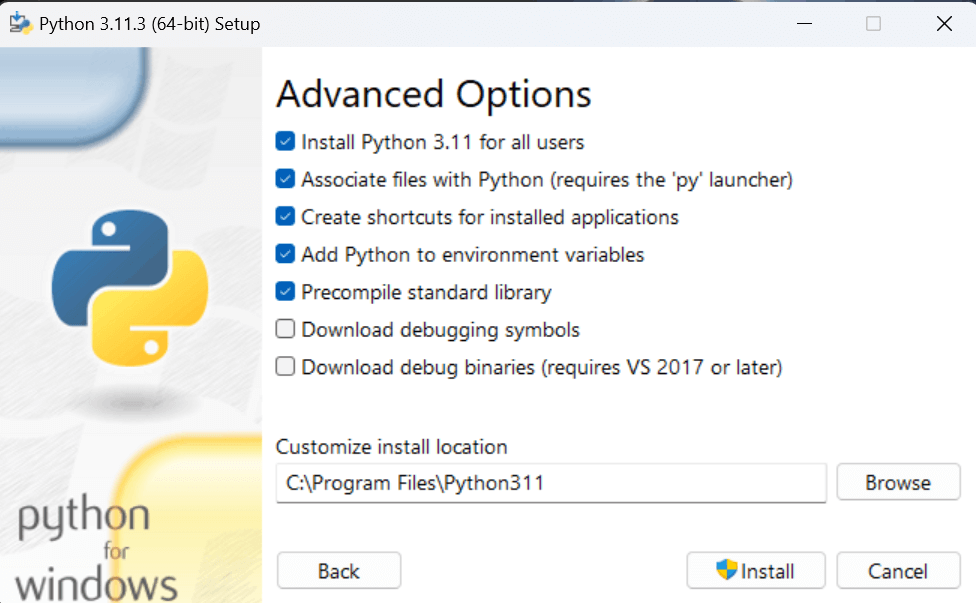
    Now, Select Customize installation and proceed. We can also click on the customize installation to choose desired location and features. Other important thing is install launcher for the all user must be checked.

    Here, under the advanced options, click on the checkboxes of ” Install Python 3.11 for all users “, which is previously not checked in. This will checks the other option ” Precompile standard library ” automatically. And the location of the installation will also be changed. We can change it later, so we leave the install location default. Then, click on the install button to finally install.

    Python Environment Set-up

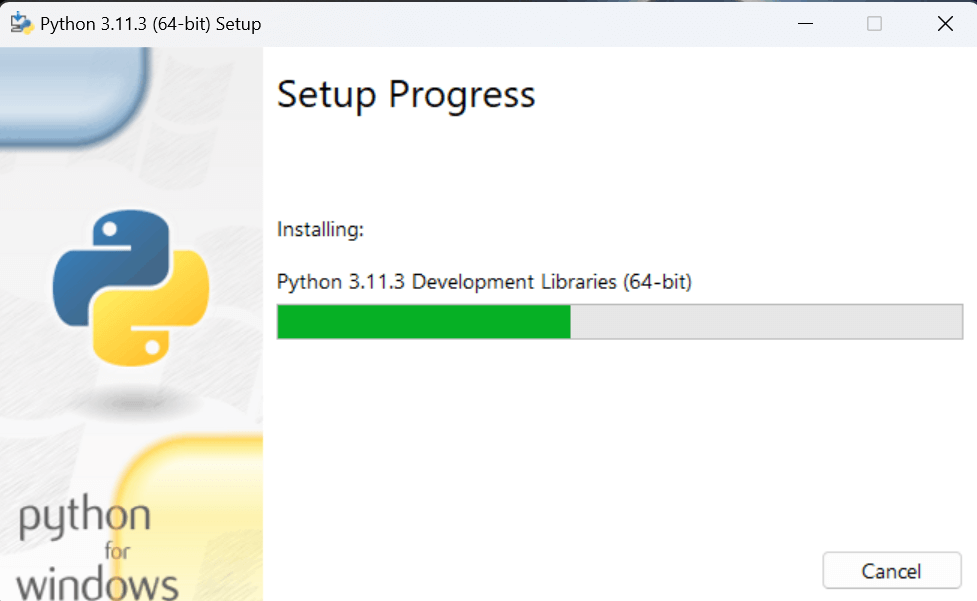
    Step – 3 Installation in Process

    Python Environment Set-up

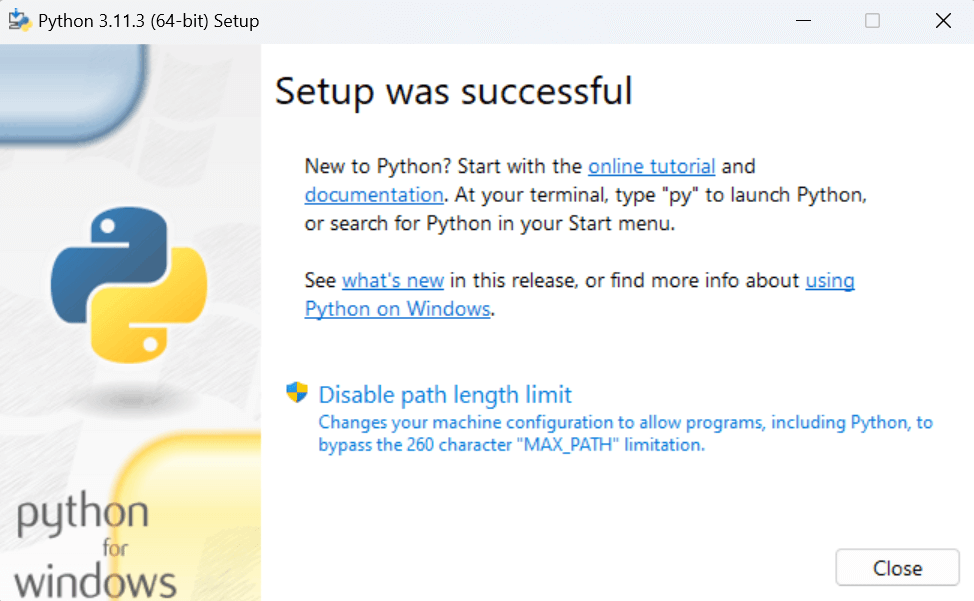
    The set up is in progress. All the python libraries, packages, and other python default files will be installed in our system. Once the installation is successful, the following page will appear saying ” Setup was successful “.

    Python Environment Set-up

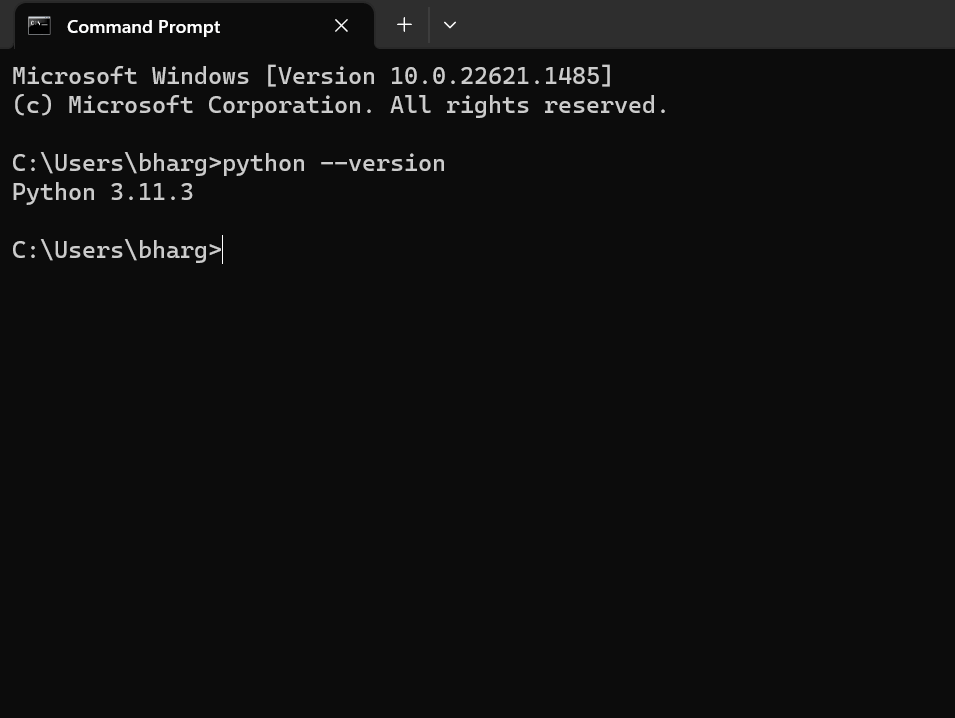
    Step – 4: Verifying the Python Installation

    To verify whether the python is installed or not in our system, we have to do the following.

    • Go to “Start” button, and search ” cmd “.
    • Then type, ” python – – version “.
    • If python is successfully installed, then we can see the version of the python installed.
    • If not installed, then it will print the error as ” ‘python’ is not recognized as an internal or external command, operable program or batch file. “.
    Python Environment Set-up

    We are ready to work with the Python.

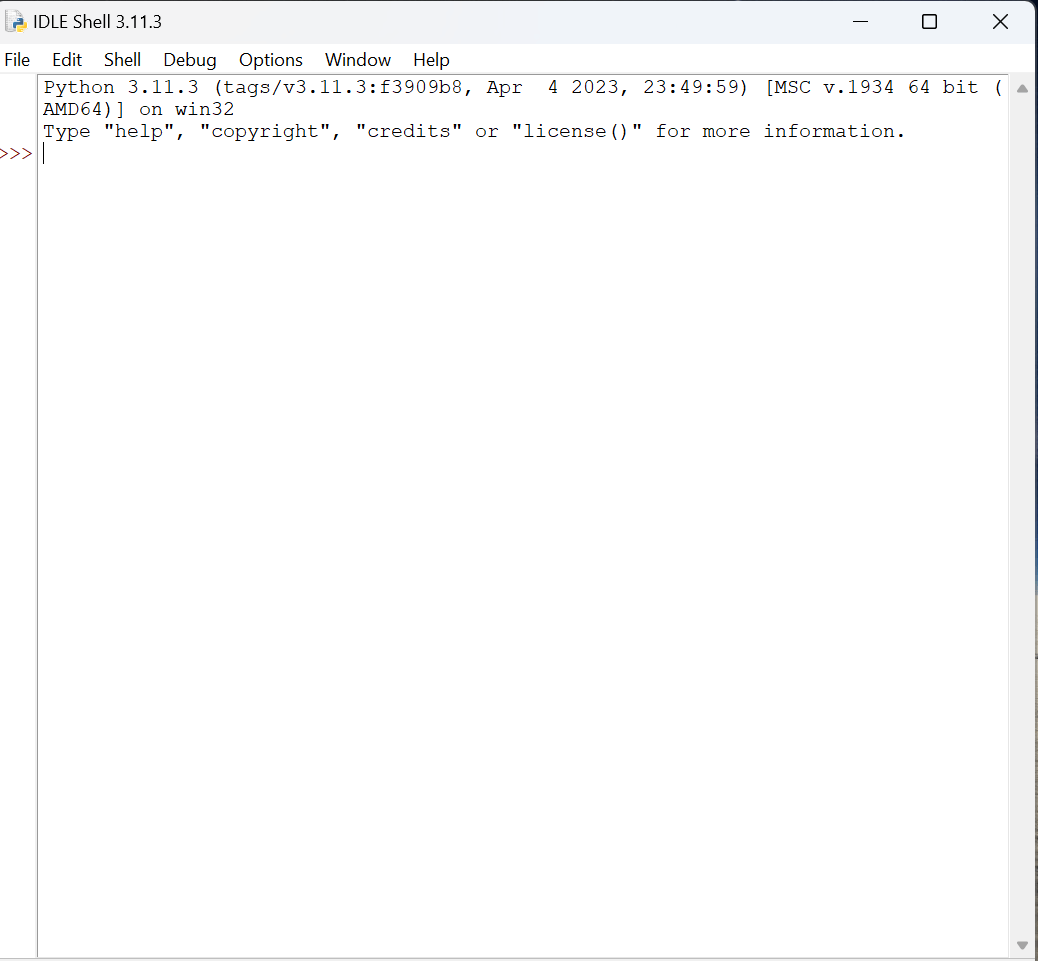
    Step – 5: Opening idle

    Now, to work on our first python program, we will go the interactive interpreter prompt(idle). To open this, go to “Start” and type idle. Then, click on open to start working on idle.

    Python Environment Set-up
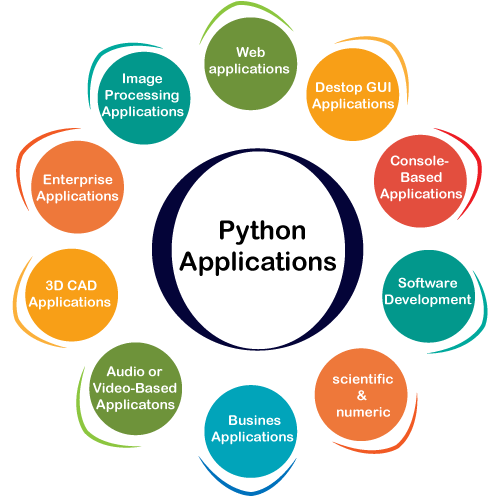
  • Python Applications

    Python is known for its general-purpose nature that makes it applicable in almost every domain of software development. Python makes its presence in every emerging field. It is the fastest-growing programming language and can develop any application.

    Here, we are specifying application areas where Python can be applied.

    Python Applications

    1) Web Applications

    We can use Python to develop web applications. It provides libraries to handle internet protocols such as HTML and XML, JSON, Email processing, request, beautifulSoup, Feedparser, etc. One of Python web-framework named Django is used on Instagram. Python provides many useful frameworks, and these are given below:

    • Django and Pyramid framework(Use for heavy applications)
    • Flask and Bottle (Micro-framework)
    • Plone and Django CMS (Advance Content management)

    2) Desktop GUI Applications

    The GUI stands for the Graphical User Interface, which provides a smooth interaction to any application. Python provides a Tk GUI library to develop a user interface. Some popular GUI libraries are given below.

    • Tkinter or Tk
    • wxWidgetM
    • Kivy (used for writing multitouch applications )
    • PyQt or Pyside

    3) Console-based Application

    Console-based applications run from the command-line or shell. These applications are computer program which are used commands to execute. This kind of application was more popular in the old generation of computers. Python can develop this kind of application very effectively. It is famous for having REPL, which means the Read-Eval-Print Loop that makes it the most suitable language for the command-line applications.

    Python provides many free library or module which helps to build the command-line apps. The necessary IO libraries are used to read and write. It helps to parse argument and create console help text out-of-the-box. There are also advance libraries that can develop independent console apps.

    4) Software Development

    Python is useful for the software development process. It works as a support language and can be used to build control and management, testing, etc.

    • SCons is used to build control.
    • Buildbot and Apache Gumps are used for automated continuous compilation and testing.
    • Round or Trac for bug tracking and project management.

    5) Scientific and Numeric

    This is the era of Artificial intelligence where the machine can perform the task the same as the human. Python language is the most suitable language for Artificial intelligence or machine learning. It consists of many scientific and mathematical libraries, which makes easy to solve complex calculations.

    Implementing machine learning algorithms require complex mathematical calculation. Python has many libraries for scientific and numeric such as Numpy, Pandas, Scipy, Scikit-learn, etc. If you have some basic knowledge of Python, you need to import libraries on the top of the code. Few popular frameworks of machine libraries are given below.

    • SciPy
    • Scikit-learn
    • NumPy
    • Pandas
    • Matplotlib

    6) Business Applications

    Business Applications differ from standard applications. E-commerce and ERP are an example of a business application. This kind of application requires extensively, scalability and readability, and Python provides all these features.

    Oddo is an example of the all-in-one Python-based application which offers a range of business applications. Python provides a Tryton platform which is used to develop the business application.

    7) Audio or Video-based Applications

    Python is flexible to perform multiple tasks and can be used to create multimedia applications. Some multimedia applications which are made by using Python are TimPlayer, cplay, etc. The few multimedia libraries are given below.

    • Gstreamer
    • Pyglet
    • QT Phonon

    8) 3D CAD Applications

    The CAD (Computer-aided design) is used to design engineering related architecture. It is used to develop the 3D representation of a part of a system. Python can create a 3D CAD application by using the following functionalities.

    • Fandango (Popular )
    • CAMVOX
    • HeeksCNC
    • AnyCAD
    • RCAM

    9) Enterprise Applications

    Python can be used to create applications that can be used within an Enterprise or an Organization. Some real-time applications are OpenERP, Tryton, Picalo, etc.

    10) Image Processing Application

    Python contains many libraries that are used to work with the image. The image can be manipulated according to our requirements. Some libraries of image processing are given below.

    • OpenCV
    • Pillow
    • SimpleITK

    In this topic, we have described all types of applications where Python plays an essential role in the development of these applications. In the next tutorial, we will learn more concepts about Python.

  • Python History and Versions

    • Python laid its foundation in the late 1980s.
    • The implementation of Python was started in December 1989 by Guido Van Rossum at CWI in Netherland.
    • In February 1991, Guido Van Rossum published the code (labeled version 0.9.0) to alt.sources.
    • In 1994, Python 1.0 was released with new features like lambda, map, filter, and reduce.
    • Python 2.0 added new features such as list comprehensions, garbage collection systems.
    • On December 3, 2008, Python 3.0 (also called “Py3K”) was released. It was designed to rectify the fundamental flaw of the language.
    • ABC programming language is said to be the predecessor of Python language, which was capable of Exception Handling and interfacing with the Amoeba Operating System.
    • The following programming languages influence Python:
      • ABC language.
      • Modula-3
    • Why the Name Python?
    • There is a fact behind choosing the name PythonGuido van Rossum was reading the script of a popular BBC comedy series “Monty Python’s Flying Circus“. It was late on-air 1970s.
    • Van Rossum wanted to select a name which unique, sort, and little-bit mysterious. So he decided to select naming Python after the “Monty Python’s Flying Circus” for their newly created programming language.
    • The comedy series was creative and well random. It talks about everything. Thus it is slow and unpredictable, which made it very interesting.
    • Python is also versatile and widely used in every technical field, such as Machine LearningArtificial Intelligence, Web Development, Mobile Application, Desktop Application, Scientific Calculation, etc.
    • Python Version List
    • Python programming language is being updated regularly with new features and supports. There are lots of update in Python versions, started from 1994 to current release.
    • A list of Python versions with its released date is given below.
    • Tips to Keep in Mind While Learning Python
    • The most common question asked by the beginners – “What is the best way to learn Python”? It is the initial and relevant question because first step in learning any programming language is to know how to learn.
    • The proper way of learning will help us to learn fast and become a good Python developer.
    • In this section, we will discuss various tips that we should keep in mind while learning Python.
    • 1. Make it Clear Why We Want to Learn
    • The goal should be clear before learning the Python. Python is an easy, a vast language as well. It includes numbers of libraries, modules, in-built functions and data structures. If the goal is unclear then it will be a boring and monotonous journey of learning Python. Without any clear goal, you perhaps won’t make it done.
    • So, first figure out the motivation behind learning, which can anything be such as knowing something new, develop projects using Python, switch to Python, etc. Below are the general areas where Python is widely used. Pick any of them.
    • Data Analysis and Processing
    • Artificial Intelligence
    • Games
    • Hardware/Sensor/Robots
    • Desktop Applications
    • Choose any one or two areas according to your interest and start the journey towards learning Python.
    • 2. Learn the Basic Syntax
    • It is the most essential and basic step to learn the syntax of the Python programming language. We have to learn the basic syntax before dive deeper into learning it. As we have discussed in our earlier tutorial, Python is easy to learn and has a simple syntax. It doesn’t use semicolon and brackets. Its syntax is like the English language.
    • So it will take minimum amount of time to learning its syntax. Once we get its syntax properly, further learning will be easier and quicker getting to work on projects.
    • Note – Learn Python 3, not Python 2.7, because the industry no longer uses it. Our Python tutorial is based on its latest version Python 3.
    • 3. Write Code by Own
    • Writing the code is the most effective and robust way to learn Python. First, try to write code on paper and run in mind (Dry Run) then move to the system. Writing code on paper will help us get familiar quickly with the syntax and the concept store in the deep memory. While writing the code, try to use proper functions and suitable variables names.
    • There are many editors available for Python programming which highlights the syntax related issue automatically. So we don’t need to pay lot of attention of these mistakes.
    • 4. Keep Practicing
    • The next important step is to do the practice. It needs to implementing the Python concepts through the code. We should be consistence to our daily coding practice.
    • Consistency is the key of success in any aspect of life not only in programming. Writing code daily will help to develop muscle memory.
    • We can do the problem exercise of related concepts or solve at least 2 or 3 problems of Python. It may seem hard but muscle memory plays large part in programing. It will take us ahead from those who believe only the reading concept of Python is sufficient.
    • 5. Make Notes as Needed
    • Creating notes by own is an excellent method to learn the concepts and syntax of Python. It will establish stability and focus that helps you become a Python developer. Make brief and concise notes with relevant information and include appropriate examples of the subject concerned.
    • Maintain own notes are also helped to learn fast. A study published in Psychological Science that –
    • The students who were taking longhand notes in the studies were forced to be more selective — because you can’t write as fast as you can type.
    • 6. Discuss Concepts with Other
    • Coding seems to be solitary activity, but we can enhance our skills by interacting with the others. We should discuss our doubts to the expert or friends who are learning Python. This habit will help to get additional information, tips and tricks, and solution of coding problems. One of the best advantages of Python, it has a great community. Therefore, we can also learn from passionate Python enthusiasts.
    • 7. Do small Projects
    • After understanding Python’s basic concept, a beginner should try to work on small projects. It will help to understand Python more deeply and become more component in it. Theoretical knowledge is not enough to get command over the Python language. These projects can be anything as long as they teach you something. You can start with the small projects such as calculator app, a tic-toc-toe game, an alarm clock app, a to-do list, student or customer management system, etc.
    • Once you get handy with a small project, you can easily shift toward your interesting domain (Machine Learning, Web Development, etc.).
    • 8. Teach Others
    • There is a famous saying that “If you want to learn something then you should teach other”. It is also true in case of learning Python. Share your information to other students via creating blog posts, recording videos or taking classes in local training center. It will help us to enhance the understanding of Python and explore the unseen loopholes in your knowledge. If you don’t want to do all these, join the online forum and post your answers on Python related questions.
    • 9. Explore Libraries and Frameworks
    • Python consists of vast libraries and various frameworks. After getting familiar with Python’s basic concepts, the next step is to explore the Python libraries. Libraries are essential to work with the domain specific projects. In the following section, we describe the brief introduction of the main libraries.
    • TensorFlow – It is an artificial intelligence library which allows us to create large scale AI based projects.
    • Django – It is an open source framework that allows us to develop web applications. It is easy, flexible, and simple to manage.
    • Flask – It is also an open source web framework. It is used to develop lightweight web applications.
    • Pandas – It is a Python library which is used to perform scientific computations.
    • Keras – It is an open source library, which is used to work around the neural network.
    • There are many libraries in Python. Above, we have mentioned a few of them.
    • 10. Contribute to Open Source
    • As we know, Python is an open source language that means it is freely available for everyone. We can also contribute to Python online community to enhance our knowledge. Contributing to open source projects is the best way to explore own knowledge. We also receive the feedback, comments or suggestions for work that we submitted. The feedback will enable the best practices for Python programming and help us to become a good Python developer.
    • Usage of Python
    • Python is a general purpose, open source, high-level programming language and also provides number of libraries and frameworks. Python has gained popularity because of its simplicity, easy syntax and user-friendly environment. The usage of Python as follows.
    • Desktop Applications
    • Web Applications
    • Data Science
    • Artificial Intelligence
    • Machine Learning
    • Scientific Computing
    • Robotics
    • Internet of Things (IoT)
    • Gaming
    • Mobile Apps
    • Data Analysis and Preprocessing
    • In the next topic, we will discuss the Python Application, where we have defined Python’s usage in detail.
  • Python Features

    Python provides many useful features which make it popular and valuable from the other programming languages. It supports object-oriented programming, procedural programming approaches and provides dynamic memory allocation. We have listed below a few essential features.

    1) Easy to Learn and Use

    Python is easy to learn as compared to other programming languages. Its syntax is straightforward and much the same as the English language. There is no use of the semicolon or curly-bracket, the indentation defines the code block. It is the recommended programming language for beginners.

    2) Expressive Language

    Python can perform complex tasks using a few lines of code. A simple example, the hello world program you simply type print(“Hello World”). It will take only one line to execute, while Java or C takes multiple lines.

    3) Interpreted Language

    Python is an interpreted language; it means the Python program is executed one line at a time. The advantage of being interpreted language, it makes debugging easy and portable.

    4) Cross-platform Language

    Python can run equally on different platforms such as Windows, Linux, UNIX, and Macintosh, etc. So, we can say that Python is a portable language. It enables programmers to develop the software for several competing platforms by writing a program only once.

    5) Free and Open Source

    Python is freely available for everyone. It is freely available on its official website www.python.org. It has a large community across the world that is dedicatedly working towards make new python modules and functions. Anyone can contribute to the Python community. The open-source means, “Anyone can download its source code without paying any penny.”

    6) Object-Oriented Language

    Python supports object-oriented language and concepts of classes and objects come into existence. It supports inheritance, polymorphism, and encapsulation, etc. The object-oriented procedure helps to programmer to write reusable code and develop applications in less code.

    7) Extensible

    It implies that other languages such as C/C++ can be used to compile the code and thus it can be used further in our Python code. It converts the program into byte code, and any platform can use that byte code.

    8) Large Standard Library

    It provides a vast range of libraries for the various fields such as machine learning, web developer, and also for the scripting. There are various machine learning libraries, such as Tensor flow, Pandas, Numpy, Keras, and Pytorch, etc. Django, flask, pyramids are the popular framework for Python web development.

    9) GUI Programming Support

    Graphical User Interface is used for the developing Desktop application. PyQT5, Tkinter, Kivy are the libraries which are used for developing the web application.

    10) Integrated

    It can be easily integrated with languages like C, C++, and JAVA, etc. Python runs code line by line like C,C++ Java. It makes easy to debug the code.

    11. Embeddable

    The code of the other programming language can use in the Python source code. We can use Python source code in another programming language as well. It can embed other language into our code.

    12. Dynamic Memory Allocation

    In Python, we don’t need to specify the data-type of the variable. When we assign some value to the variable, it automatically allocates the memory to the variable at run time. Suppose we are assigned integer value 15 to x, then we don’t need to write int x = 15. Just write x = 15.

  • Python Tutorial | Python Programming Language

    Python tutorial provides basic and advanced concepts of Python. Our Python tutorial is designed for beginners and professionals.

    Python is a simple, general purpose, high level, and object-oriented programming language.

    Python is an interpreted scripting language also. Guido Van Rossum is known as the founder of Python programming.

    Our Python tutorial includes all topics of Python Programming such as installation, control statements, Strings, Lists, Tuples, Dictionary, Modules, Exceptions, Date and Time, File I/O, Programs, etc. There are also given Python interview questions to help you better understand Python Programming.

    What is Python

    Python is a general-purpose, dynamic, high-level, and interpreted programming language. It supports Object Oriented programming approach to develop applications. It is simple and easy to learn and provides lots of high-level data structures.

    Python is an easy-to-learn yet powerful and versatile scripting language, which makes it attractive for Application Development.

    With its interpreted nature, Python’s syntax and dynamic typing make it an ideal language for scripting and rapid application development.

    Python supports multiple programming patterns, including object-oriented, imperative, and functional or procedural programming styles.

    Python is not intended to work in a particular area, such as web programming. It is a multipurpose programming language because it can be used with web, enterprise, 3D CAD, etc.

    We don’t need to use data types to declare variable because it is dynamically typed, so we can write a=10 to assign an integer value in an integer variable.

    Python makes development and debugging fast because no compilation step is included in Python development, and the edit-test-debug cycle is very fast.

    Python has many web-based assets, open-source projects, and a vibrant community. Learning the language, working together on projects, and contributing to the Python ecosystem are all made very easy for developers.

    Because of its straightforward language framework, Python is easier to understand and write code in. This makes it a fantastic programming language for novices. Additionally, it assists seasoned programmers in writing clearer, error-free code.

    Python is an open-source, cost-free programming language. It is utilized in several sectors and disciplines as a result.

    In Python, code readability and maintainability are important. As a result, even if the code was developed by someone else, it is easy to understand and adapt by some other developer.

    Python has many third-party libraries that can be used to make its functionality easier. These libraries cover many domains, for example, web development, scientific computing, data analysis, and more.

    Python Basic Syntax

    There is no use of curly braces or semicolon in Python programming language. It is English-like language. But Python uses the indentation to define a block of code. Indentation is nothing but adding whitespace before the statement when it is needed. For example –

    def func():  
    
           statement 1  
    
           statement 2  
    
           …………………  
    
           …………………  
    
             statement N

    In the above example, the statements that are the same level to the right belong to the function. Generally, we can use four whitespaces to define indentation.

    Instead of Semicolon as used in other languages, Python ends its statements with a NewLine character.

    Python is a case-sensitive language, which means that uppercase and lowercase letters are treated differently. For example, ‘name’ and ‘Name’ are two different variables in Python.

    In Python, comments can be added using the ‘#’ symbol. Any text written after the ‘#’ symbol is considered a comment and is ignored by the interpreter. This trick is useful for adding notes to the code or temporarily disabling a code block. It also helps in understanding the code better by some other developers.

    ‘If’, ‘otherwise’, ‘for’, ‘while’, ‘try’, ‘except’, and ‘finally’ are a few reserved keywords in Python that cannot be used as variable names. These terms are used in the language for particular reasons and have fixed meanings. If you use these keywords, your code may include errors, or the interpreter may reject them as potential new Variables.

    Why learn Python?

    Python provides many useful features to the programmer. These features make it the most popular and widely used language. We have listed below few-essential features of Python.

    • Easy to use and Learn: Python has a simple and easy-to-understand syntax, unlike traditional languages like C, C++, Java, etc., making it easy for beginners to learn.
    • Expressive Language: It allows programmers to express complex concepts in just a few lines of code or reduces Developer’s Time.
    • Interpreted Language: Python does not require compilation, allowing rapid development and testing. It uses Interpreter instead of Compiler.
    • Object-Oriented Language: It supports object-oriented programming, making writing reusable and modular code easy.
    • Open Source Language: Python is open source and free to use, distribute and modify.
    • Extensible: Python can be extended with modules written in C, C++, or other languages.
    • Learn Standard Library: Python’s standard library contains many modules and functions that can be used for various tasks, such as string manipulation, web programming, and more.
    • GUI Programming Support: Python provides several GUI frameworks, such as Tkinter and PyQt, allowing developers to create desktop applications easily.
    • Integrated: Python can easily integrate with other languages and technologies, such as C/C++, Java, and . NET.
    • Embeddable: Python code can be embedded into other applications as a scripting language.
    • Dynamic Memory Allocation: Python automatically manages memory allocation, making it easier for developers to write complex programs without worrying about memory management.
    • Wide Range of Libraries and Frameworks: Python has a vast collection of libraries and frameworks, such as NumPy, Pandas, Django, and Flask, that can be used to solve a wide range of problems.
    • Versatility: Python is a universal language in various domains such as web development, machine learning, data analysis, scientific computing, and more.
    • Large Community: Python has a vast and active community of developers contributing to its development and offering support. This makes it easy for beginners to get help and learn from experienced developers.
    • Career Opportunities: Python is a highly popular language in the job market. Learning Python can open up several career opportunities in data science, artificial intelligence, web development, and more.
    • High Demand: With the growing demand for automation and digital transformation, the need for Python developers is rising. Many industries seek skilled Python developers to help build their digital infrastructure.
    • Increased Productivity: Python has a simple syntax and powerful libraries that can help developers write code faster and more efficiently. This can increase productivity and save time for developers and organizations.
    • Big Data and Machine Learning: Python has become the go-to language for big data and machine learning. Python has become popular among data scientists and machine learning engineers with libraries like NumPy, Pandas, Scikit-learn, TensorFlow, and more.

    Where is Python used?

    Python is a general-purpose, popular programming language, and it is used in almost every technical field. The various areas of Python use are given below.

    • Data Science: Data Science is a vast field, and Python is an important language for this field because of its simplicity, ease of use, and availability of powerful data analysis and visualization libraries like NumPy, Pandas, and Matplotlib.
    • Desktop Applications: PyQt and Tkinter are useful libraries that can be used in GUI – Graphical User Interface-based Desktop Applications. There are better languages for this field, but it can be used with other languages for making Applications.
    • Console-based Applications: Python is also commonly used to create command-line or console-based applications because of its ease of use and support for advanced features such as input/output redirection and piping.
    • Mobile Applications: While Python is not commonly used for creating mobile applications, it can still be combined with frameworks like Kivy or BeeWare to create cross-platform mobile applications.
    • Software Development: Python is considered one of the best software-making languages. Python is easily compatible with both from Small Scale to Large Scale software.
    • Artificial Intelligence: AI is an emerging Technology, and Python is a perfect language for artificial intelligence and machine learning because of the availability of powerful libraries such as TensorFlow, Keras, and PyTorch.
    • Web Applications: Python is commonly used in web development on the backend with frameworks like Django and Flask and on the front end with tools like JavaScript and HTML.
    • Enterprise Applications: Python can be used to develop large-scale enterprise applications with features such as distributed computing, networking, and parallel processing.
    • 3D CAD Applications: Python can be used for 3D computer-aided design (CAD) applications through libraries such as Blender.
    • Machine Learning: Python is widely used for machine learning due to its simplicity, ease of use, and availability of powerful machine learning libraries.
    • Computer Vision or Image Processing Applications: Python can be used for computer vision and image processing applications through powerful libraries such as OpenCV and Scikit-image.
    • Speech Recognition: Python can be used for speech recognition applications through libraries such as SpeechRecognition and PyAudio.
    • Scientific computing: Libraries like NumPy, SciPy, and Pandas provide advanced numerical computing capabilities for tasks like data analysis, machine learning, and more.
    • Education: Python’s easy-to-learn syntax and availability of many resources make it an ideal language for teaching programming to beginners.
    • Testing: Python is used for writing automated tests, providing frameworks like unit tests and pytest that help write test cases and generate reports.
    • Gaming: Python has libraries like Pygame, which provide a platform for developing games using Python.
    • IoT: Python is used in IoT for developing scripts and applications for devices like Raspberry Pi, Arduino, and others.
    • Networking: Python is used in networking for developing scripts and applications for network automation, monitoring, and management.
    • DevOps: Python is widely used in DevOps for automation and scripting of infrastructure management, configuration management, and deployment processes.
    • Finance: Python has libraries like Pandas, Scikit-learn, and Statsmodels for financial modeling and analysis.
    • Audio and Music: Python has libraries like Pyaudio, which is used for audio processing, synthesis, and analysis, and Music21, which is used for music analysis and generation.
    • Writing scripts: Python is used for writing utility scripts to automate tasks like file operations, web scraping, and data processing.

    Python Popular Frameworks and Libraries

    Python has wide range of libraries and frameworks widely used in various fields such as machine learning, artificial intelligence, web applications, etc. We define some popular frameworks and libraries of Python as follows.

    • Web development (Server-side) – Django Flask, Pyramid, CherryPy
    • GUIs based applications – Tk, PyGTK, PyQt, PyJs, etc.
    • Machine Learning – TensorFlow, PyTorch, Scikit-learn, Matplotlib, Scipy, etc.
    • Mathematics – Numpy, Pandas, etc.
    • BeautifulSoup: a library for web scraping and parsing HTML and XML
    • Requests: a library for making HTTP requests
    • SQLAlchemy: a library for working with SQL databases
    • Kivy: a framework for building multi-touch applications
    • Pygame: a library for game development
    • Pytest: a testing framework for Python
    • Django REST framework: a toolkit for building RESTful APIs
    • FastAPI: a modern, fast web framework for building APIs
    • Streamlit: a library for building interactive web apps for machine learning and data science
    • NLTK: a library for natural language processing

    Python Conditional Statements

    Conditional statements help us to execute a particular block for a particular condition. In this tutorial, we will learn how to use conditional expression to execute a different block of statements. Python provides if and else keywords to set up logical conditions. The elif keyword is also used as a conditional statement.

    Example code for if..else statement

    x = 10  
    
    y = 5  


    if x > y:  
    
        print("x is greater than y")  
    
    else:  
    
        print("y is greater than or equal to x")

    In the above code, we have two variables, x, and y, with 10 and 5, respectively. Then we used an if..else statement to check if x is greater than y or vice versa. If the first condition is true, the statement “x is greater than y” is printed. If the first condition is false, the statement “y is greater than or equal to x” is printed instead.

    The if keyword checks the condition is true and executes the code block inside it. The code inside the else block is executed if the condition is false. This way, the if..else statement helps us to execute different blocks of code based on a condition.

    We will learn about this in more detail in the further article for the Python tutorial.

    Python Loops

    Sometimes we may need to alter the flow of the program. The execution of a specific code may need to be repeated several times. For this purpose, the programming languages provide various loops capable of repeating some specific code several times. Consider the following tutorial to understand the statements in detail.

    Python For Loop

    fruits = ["apple", "banana", "cherry"]  
    
    for x in fruits:  
    
    print(x)

    Python While Loop

    i = 1   
    
    while i < 6:   
    
    print(i)   
    
    i += 1

    In the above example code, we have demonstrated using two types of loops in Python – For loop and While loop.

    The For loop is used to iterate over a sequence of items, such as a list, tuple, or string. In the example, we defined a list of fruits and used a for loop to print each fruit, but it can also be used to print a range of numbers.

    The While loop repeats a code block if the specified condition is true. In the example, we have initialized a variable i to 1 and used a while loop to print the value of i until it becomes greater than or equal to 6. The i += 1 statement is used to increment the value of i in each iteration.

    We will learn about them in the tutorial in detail.

    Python Functional Programming

    This section of the Python tutorial defines some important tools related to functional programming, such as lambda and recursive functions. These functions are very efficient in accomplishing complex tasks. We define a few important functions, such as reduce, map, and filter. Python provides the functools module that includes various functional programming tools. Visit the following tutorial to learn more about functional programming.

    Recent versions of Python have introduced features that make functional programming more concise and expressive. For example, the “walrus operator”:= allows for inline variable assignment in expressions, which can be useful when working with nested function calls or list comprehensions.

    Python Function

    1. Lambda Function – A lambda function is a small, anonymous function that can take any number of arguments but can only have one expression. Lambda functions are often used in functional programming to create functions “on the fly” without defining a named function.
    2. Recursive Function – A recursive function is a function that calls itself to solve a problem. Recursive functions are often used in functional programming to perform complex computations or to traverse complex data structures.
    3. Map Function – The map() function applies a given function to each item of an iterable and returns a new iterable with the results. The input iterable can be a list, tuple, or other.
    4. Filter Function – The filter() function returns an iterator from an iterable for which the function passed as the first argument returns True. It filters out the items from an iterable that do not meet the given condition.
    5. Reduce Function – The reduce() function applies a function of two arguments cumulatively to the items of an iterable from left to right to reduce it to a single value.
    6. functools Module – The functools module in Python provides higher-order functions that operate on other functions, such as partial() and reduce().
    7. Currying Function – A currying function is a function that takes multiple arguments and returns a sequence of functions that each take a single argument.
    8. Memoization Function – Memoization is a technique used in functional programming to cache the results of expensive function calls and return the cached Result when the same inputs occur again.
    9. Threading Function – Threading is a technique used in functional programming to run multiple tasks simultaneously to make the code more efficient and faster.

    Python Modules

    Python modules are the program files that contain Python code or functions. Python has two types of modules – User-defined modules and built-in modules. A module the user defines, or our Python code saved with .py extension, is treated as a user-define module.

    Built-in modules are predefined modules of Python. To use the functionality of the modules, we need to import them into our current working program.

    Python modules are essential to the language’s ecosystem since they offer reusable code and functionality that can be imported into any Python program. Here are a few examples of several Python modules, along with a brief description of each:

    Math: Gives users access to mathematical constants and pi and trigonometric functions.

    Datetime: Provides classes for a simpler way of manipulating dates, times, and periods.

    Os – Enables interaction with the base operating system, including administration of processes and file system activities.

    Random – The random function offers tools for generating random integers and picking random items from a list.

    JSON – JSON is a data structure that can be encoded and decoded and is frequently used in online APIs and data exchange. This module allows dealing with JSON.

    Re – Supports regular expressions, a potent text-search and text-manipulation tool.

    Collections – Provides alternative data structures such as sorted dictionaries, default dictionaries, and named tuples.

    Numpy is a core toolkit for scientific computing that supports numerical operations on arrays and matrices.

    Pandas: It provides high-level data structures and operations for dealing with time series and other structured data types.

    Requests: Offers a simple user interface for web APIs and performs HTTP requests.

    Python File I/O

    Files are used to store data in a computer disk. In this tutorial, we explain the built-in file object of Python. We can open a file using Python script and perform various operations such as writing, reading, and appending. There are various ways of opening a file. We are explained with the relevant example. We will also learn to perform read/write operations on binary files.

    Python’s file input/output (I/O) system offers programs to communicate with files stored on a disc. Python’s built-in methods for the file object let us carry out actions like reading, writing, and adding data to files.

    The open() method in Python makes a file object when working with files. The name of the file to be opened and the mode in which the file is to be opened are the two parameters required by this function. The mode can be used according to work that needs to be done with the file, such as “r” for reading, “w” for writing, or “a” for attaching.

    After successfully creating an object, different methods can be used according to our work. If we want to write in the file, we can use the write() functions, and if you want to read and write both, then we can use the append() function and, in cases where we only want to read the content of the file we can use read() function.

    Binary files containing data in a binary rather than a text format may also be worked with using Python. Binary files are written in a manner that humans cannot directly understand. The rb and wb modes can read and write binary data in binary files.

    Python Exceptions

    An exception can be defined as an unusual condition in a program resulting in an interruption in the flow of the program.

    Whenever an exception occurs, the program stops the execution, and thus the other code is not executed. Therefore, an exception is the run-time errors that are unable to handle to Python script. An exception is a Python object that represents an error.

    Python exceptions are an important aspect of error handling in Python programming. When a program encounters an unexpected situation or error, it may raise an exception, which can interrupt the normal flow of the program.

    In Python, exceptions are represented as objects containing information about the error, including its type and message. The most common type of Exception in Python is the Exception class, a base class for all other built-in exceptions.

    To handle exceptions in Python, we use the try and except statements. The try statement is used to enclose the code that may raise an exception, while the except statement is used to define a block of code that should be executed when an exception occurs.

    For example, consider the following code:

    try:  
    
        x = int ( input ("Enter a number: "))  
    
        y = 10 / x  
    
        print ("Result:", y)  
    
    except ZeroDivisionError:  
    
        print ("Error: Division by zero")  
    
    except ValueError:  
    
        print ("Error: Invalid input")

    In this code, we use the try statement to attempt to perform a division operation. If either of these operations raises an exception, the matching except block is executed.

    Python also provides many built-in exceptions that can be raised in similar situations. Some common built-in exceptions include IndexErrorTypeError, and NameError. Also, we can define our custom exceptions by creating a new class that inherits from the Exception class.

    Python CSV

    A CSV stands for “comma separated values”, which is defined as a simple file format that uses specific structuring to arrange tabular data. It stores tabular data such as spreadsheets or databases in plain text and has a common format for data interchange. A CSV file opens into the Excel sheet, and the rows and columns data define the standard format.

    We can use the CSV.reader function to read a CSV file. This function returns a reader object that we can use to repeat over the rows in the CSV file. Each row is returned as a list of values, where each value corresponds to a column in the CSV file.

    For example, consider the following code:

    import csv  


    with open('data.csv', 'r') as file:  
    
        reader = csv.reader(file)  
    
        for row in reader:  
    
            print(row)

    Here, we open the file data.csv in read mode and create a csv.reader object using the csv.reader() function. We then iterate over the rows in the CSV file using a for loop and print each row to the console.

    We can use the CSV.writer() function to write data to a CSV file. It returns a writer object we can use to write rows to the CSV file. We can write rows by calling the writer () method on the writer object.

    For example, consider the following code:

    import csv  


    data = [    ['Name', 'Age', 'Country'],  
    
        ['Alice', '25', 'USA'],  
    
        ['Bob', '30', 'Canada'],  
    
        ['Charlie', '35', 'Australia']  
    
    ]  


    with open('data.csv', 'w') as file:  
    
        writer = csv.writer(file)  
    
        for row in data:  
    
            writer.writerow(row)

    In this program, we create a list of lists called data, where each inner list represents a row of data. We then open the file data.csv in write mode and create a CSV.writer object using the CSV.writer function. We then iterate over the rows in data using a for loop and write each row to the CSV file using the writer method.

    Python Sending Mail

    We can send or read a mail using the Python script. Python’s standard library modules are useful for handling various protocols such as PoP3 and IMAP. Python provides the smtplib module for sending emails using SMTP (Simple Mail Transfer Protocol). We will learn how to send mail with the popular email service SMTP from a Python script.

    Python Sending Emails

    Python Magic Methods

    The Python magic method is the special method that adds “magic” to a class. It starts and ends with double underscores, for example, _init_ or _str_.

    The built-in classes define many magic methods. The dir() function can be used to see the number of magic methods inherited by a class. It has two prefixes and suffix underscores in the method name.

    • Python magic methods are also known as dunder methods, short for “double underscore” methods because their names start and end with a double underscore.
    • Magic methods are automatically invoked by the Python interpreter in certain situations, such as when an object is created, compared to another object, or printed.
    • Magic methods can be used to customize the behavior of classes, such as defining how objects are compared, converted to strings, or accessed as containers.
    • Some commonly used magic methods include init for initializing an object, str for converting an object to a string, eq for comparing two objects for equality, and getitem and setitem for accessing items in a container object.

    For example, the str magic method can define how an object should be represented as a string. Here’s an example:

    class Person:  
    
        def __init__(self, name, age):  
    
            self.name = name  
    
            self.age = age  


        def __str__(self):  
    
            return f"{self.name} ({self.age})"

    In this example, the str method is defined to return a formatted string representation of the Person object with the person’s name and age.

    Another commonly used magic method is eq, which defines how objects should be compared for equality. Here’s an example:


    1. def __init__(self, x, y):  
    2.     self.x = x  
    3.     self.y = y  
    4.   
    5. def __eq__(self, other):  
    6.     return self.x == other.x and self.y == other.y  

    In this example, the eq method is defined to return True if two Point objects have the same x and y coordinates and False otherwise.

    Python Oops Concepts

    Everything in Python is treated as an object, including integer values, floats, functions, classes, and none. Apart from that, Python supports all oriented concepts. Below is a brief introduction to the Oops concepts of Python.

    • Classes and Objects – Python classes are the blueprints of the Object. An object is a collection of data and methods that act on the data.
    • Inheritance – An inheritance is a technique where one class inherits the properties of other classes.
    • Constructor – Python provides a special method __init__() which is known as a constructor. This method is automatically called when an object is instantiated.
    • Data Member – A variable that holds data associated with a class and its objects.
    • Polymorphism – Polymorphism is a concept where an object can take many forms. In Python, polymorphism can be achieved through method overloading and method overriding.
    • Method Overloading – In Python, method overloading is achieved through default arguments, where a method can be defined with multiple parameters. The default values are used if some parameters are not passed while calling the method.
    • Method Overriding – Method overriding is a concept where a subclass implements a method already defined in its superclass.
    • Encapsulation – Encapsulation is wrapping data and methods into a single unit. In Python, encapsulation is achieved through access modifiers, such as public, private, and protected. However, Python does not strictly enforce access modifiers, and the naming convention indicates the access level.
    • Data Abstraction: A technique to hide the complexity of data and show only essential features to the user. It provides an interface to interact with the data. Data abstraction reduces complexity and makes code more modular, allowing developers to focus on the program’s essential features.

    To read the Oops concept in detail, visit the following resources.

    • Python Oops Concepts
    • Python Objects and classes
    • Python Constructor
    • Python Inheritance
    • Python Polymorphism

    Python Advance Topics

    Python includes many advances and useful concepts that help the programmer solve complex tasks. These concepts are given below.

    Python Iterator

    An iterator is simply an object that can be iterated upon. It returns one Object at a time. It can be implemented using the two special methods, __iter__() and __next__().

    Iterators in Python are objects that allow iteration over a collection of data. They process each collection element individually without loading the entire collection into memory.

    For example, let’s create an iterator that returns the squares of numbers up to a given limit:

    class Squares:

    def __init__(self, limit):  
    
            self.limit = limit  
    
            self.n = 0  


        def __iter__(self):  
    
            return self  


        def __next__(self):  
    
            if self.n <= self.limit:  
    
                square = self.n ** 2  
    
                self.n += 1  
    
                return square  
    
            else:  
    
                raise StopIteration  


    numbers = Squares(5)  
    
    for n in numbers:  
    
        print(n)

    Output:0 1 4 9 16 25

    In this example, we have created a class Squares that acts as an iterator by implementing the __iter__() and __next__() methods. The __iter__() method returns the Object itself, and the __next__() method returns the next square of the number until the limit is reached.

    To learn more about the iterators, visit our Python Iterators tutorial.

    Python Generators

    Python generators produce a sequence of values using a yield statement rather than a return since they are functions that return iterators. Generators terminate the function’s execution while keeping the local state. It picks up right where it left off when it is restarted. Because we don’t have to implement the iterator protocol thanks to this feature, writing iterators is made simpler. Here is an illustration of a straightforward generator function that produces squares of numbers:

    def square_numbers(n):  
    
        for i in range(n):  
    
            yield i**2  


    # create a generator object  
    
    generator = square_numbers(5)  


    # print the values generated by the generator  
    
    for num in generator:  
    
        print(num)

    Output:0 1 4 9 16

    Python Modifiers

    Python Decorators are functions used to modify the behavior of another function. They allow adding functionality to an existing function without modifying its code directly. Decorators are defined using the @ symbol followed by the name of the decorator function. They can be used for logging, timing, caching, etc. Here’s an example of a decorator function that adds timing functionality to another function:

    import time  
    
    def time_it(func):  
    
        def wrapper(*args, **kwargs):  
    
            start = time.time()  
    
            result = func(*args, **kwargs)  
    
            end = time.time()  
    
            print(f"{func.__name__} took {end-start:.2f} seconds to run.")  
    
            return result  
    
        return wrapper  


    def my_function():  
    
        time.sleep(2)  
    
        print("Function executed.")  


    my_function()

    In the above example, the time_it decorator function takes another function as an argument and returns a wrapper function. The wrapper function calculates the time to execute the original function and prints it to the console. The @time_it decorator is used to apply the time_it function to the my_function function. When my_function is called, the decorator is executed, and the timing functionality is added.

    Python MySQL

    Python MySQL is a powerful relational database management system. We must set up the environment and establish a connection to use MySQL with Python. We can create a new database and tables using SQL commands in Python.

    • Environment Setup: Installing and configuring MySQL Connector/Python to use Python with MySQL.
    • Database Connection: Establishing a connection between Python and MySQL database using MySQL Connector/Python.
    • Creating New Database: Creating a new database in MySQL using Python.
    • Creating Tables: Creating tables in the MySQL database with Python using SQL commands.
    • Insert Operation: Insert data into MySQL tables using Python and SQL commands.
    • Read Operation: Reading data from MySQL tables using Python and SQL commands.
    • Update Operation: Updating data in MySQL tables using Python and SQL commands.
    • Join Operation: Joining two or more tables in MySQL using Python and SQL commands.
    • Performing Transactions: Performing a group of SQL queries as a single unit of work in MySQL using Python.

    Other relative points include handling errors, creating indexes, and using stored procedures and functions in MySQL with Python.

    Python MongoDB

    MongoDB is a popular NoSQL database that stores data in JSON-like documents. It is schemaless and provides high scalability and flexibility for data storage. We can use MongoDB with Python using the PyMongo library, which provides a simple and intuitive interface for interacting with MongoDB.

    Here are some common tasks when working with MongoDB in Python:

    1. Environment Setup:Install and configure MongoDB and PyMongo library on your system.
    2. Database Connection:Connect to a MongoDB server using the MongoClient class from PyMongo.
    3. Creating a new database:Use the MongoClient Object to create a new database.
    4. Creating collections:Create collections within a database to store documents.
    5. Inserting documents: Insert new documents into a collection using the insert_one() or insert_many() methods.
    6. Querying documents: Retrieve documents from a collection using various query methods like find_one(), find(), etc.
    7. Updating documents: Modify existing documents in a collection using update_one() or update_many() methods.
    8. Deleting documents: Remove documents from a collection using the delete_one() or delete_many() methods.
    9. Aggregation: Perform aggregation operations like grouping, counting, etc., using the aggregation pipeline framework.
    10. Indexing: Improve query performance by creating indexes on fields in collections.

    There are many more advanced topics in MongoDB, such as data sharding, replication, and more, but these tasks cover the basics of working with MongoDB in Python.

    Python SQLite

    Relational databases are built and maintained using Python SQLite, a compact, serverless, self-contained database engine. Its mobility and simplicity make it a popular option for local or small-scale applications. Python has a built-in module for connecting to SQLite databases called SQLite3, enabling developers to work with SQLite databases without difficulties.

    Various API methods are available through the SQLite3 library that may be used to run SQL queries, insert, update, and remove data, as well as get data from tables. Additionally, it allows transactions, allowing programmers to undo changes in case of a problem. Python SQLite is a fantastic option for creating programs that need an embedded database system, including desktop, mobile, and modest-sized web programs. SQLite has become popular among developers for lightweight apps with database functionality thanks to its ease of use, portability, and smooth connection with Python.

    Python CGI

    Python CGI is a technology for running scripts through web servers to produce dynamic online content. It offers a communication channel and a dynamic content generation interface for external CGI scripts and the web server. Python CGI scripts may create HTML web pages, handle form input, and communicate with databases. Python CGI enables the server to carry out Python scripts and provide the results to the client, offering a quick and effective approach to creating dynamic online applications.

    Python CGI scripts may be used for many things, including creating dynamic web pages, processing forms, and interacting with databases. Since Python, a potent and popular programming language, can be utilized to create scripts, it enables a more customized and flexible approach to web creation. Scalable, safe, and maintainable online applications may be created with Python CGI. Python CGI is a handy tool for web developers building dynamic and interactive online applications.

    Asynchronous Programming in Python

    Asynchronous programming is a paradigm for computer programming that enables independent and concurrent operation of activities. It is frequently used in applications like web servers, database software, and network programming, where several tasks or requests must be handled concurrently.

    Python has asyncio, Twisted, and Tornado among its libraries and frameworks for asynchronous programming. Asyncio, one of these, offers a simple interface for asynchronous programming and is the official asynchronous programming library in Python.

    Coroutines are functions that may be halted and restarted at specific locations in the code and are utilized by asyncio. This enables numerous coroutines to operate simultaneously without interfering with one another. For constructing and maintaining coroutines, the library offers several classes and methods, including asyncio.gather(), asyncio.wait(), and asyncio.create_task().

    Event loops, which are in charge of planning and operating coroutines, are another feature of asyncio. By cycling between coroutines in a non-blocking way, the event loop controls the execution of coroutines and ensures that no coroutine blocks another. Additionally, it supports timers and scheduling callbacks, which may be helpful when activities must be completed at specified times or intervals.

    Python Concurrency

    The term “concurrency” describes a program’s capacity to carry out several tasks at once, enhancing the program’s efficiency. Python offers several modules and concurrency-related methods, including asynchronous programming, multiprocessing, and multithreading. While multiprocessing involves running many processes simultaneously on a system, multithreading involves running numerous threads concurrently inside a single process.

    The threading module in Python enables programmers to build multithreading. It offers classes and operations for establishing and controlling threads. Conversely, the multiprocessing module allows developers to design and control processes. Python’s asyncio module provides asynchronous programming support, allowing developers to write non-blocking code that can handle multiple tasks concurrently. Using these techniques, developers can write high-performance, scalable programs that can handle multiple tasks concurrently.

    Python’s threading module enables the concurrent execution of several threads within a single process, which is helpful for I/O-bound activities.

    For CPU-intensive operations like image processing or data analysis, multiprocessing modules make it possible to execute numerous processes concurrently across multiple CPU cores.

    The asyncio module supports asynchronous I/O and permits the creation of single-threaded concurrent code using coroutines for high-concurrency network applications.

    With libraries like Dask, PySpark, and MPI, Python may also be used for parallel computing. These libraries allow workloads to be distributed across numerous nodes or clusters for better performance.

    Web Scrapping using Python

    The process of web scraping is used to retrieve data from websites automatically. Various tools and libraries extract data from HTML and other online formats. Python is among the most widely used programming languages for web scraping because of its ease of use, adaptability, and variety of libraries.

    We must take a few steps to accomplish web scraping using Python. We must first decide which website to scrape and what information to gather. Then, we can submit a request to the website and receive the HTML content using Python’s requests package. Once we have the HTML text, we can extract the needed data using a variety of parsing packages, like Beautiful Soup and lxml.

    We can employ several strategies, like slowing requests, employing user agents, and using proxies, to prevent overburdening the website’s server. It is also crucial to abide by the terms of service for the website and respect its robots.txt file.

    Data mining, lead creation, pricing tracking, and many more uses are possible for web scraping. However, as unauthorized web scraping may be against the law and unethical, it is essential to utilize it professionally and ethically.

    Natural Language Processing (NLP) using Python

    A branch of artificial intelligence (AI) called “natural language processing” (NLP) studies how computers and human language interact. Thanks to NLP, computers can now understand, interpret, and produce human language. Due to its simplicity, versatility, and strong libraries like NLTK (Natural Language Toolkit) and spaCy, Python is a well-known programming language for NLP.

    For NLP tasks, including tokenization, stemming, lemmatization, part-of-speech tagging, named entity identification, sentiment analysis, and others, NLTK provides a complete library. It has a variety of corpora (big, organized text collections) for developing and evaluating NLP models. Another well-liked library for NLP tasks is spaCy, which offers quick and effective processing of enormous amounts of text. It enables simple modification and expansion and comes with pre-trained models for various NLP workloads.

    NLP may be used in Python for various practical purposes, including chatbots, sentiment analysis, text categorization, machine translation, and more. NLP is used, for instance, by chatbots to comprehend and reply to user inquiries in a natural language style. Sentiment analysis, which may be helpful for brand monitoring, customer feedback analysis, and other purposes, employs NLP to categorize text sentiment (positive, negative, or neutral). Text documents are categorized using natural language processing (NLP) into pre-established categories for spam detection, news categorization, and other purposes.

    Python is a strong and useful tool when analyzing and processing human language. Developers may carry out various NLP activities and create useful apps that can communicate with consumers in natural language with libraries like NLTK and spaCy.

    Conclusion:

    In this tutorial, we’ve looked at some of Python’s most important features and ideas, including variables, data types, loops, functions, modules, and more. More complex subjects, including web scraping, natural language processing, parallelism, and database connection, have also been discussed. You will have a strong basis to continue learning about Python and its applications using the information you have learned from this lesson.

    Remember that practicing and developing code is the best method to learn Python. You may find many resources at javaTpoint to support your further learning, including documentation, tutorials, online groups, and more. You can master Python and use it to create wonderful things if you work hard and persist.

    Prerequisite

    Before learning Python, you must have the basic knowledge of programming concepts.

    Audience

    Our Python tutorial is designed to help beginners and professionals.

    Problem

    We assure that you will not find any problem in this Python tutorial. But if there is any mistake, please post the problem in contact form.
  • PHP Exception Handling

    What is an Exception

    An exception is a signal that indicates some sort of exceptional event or error has occurred. Exceptions can be caused due to various reasons, for example, database connection or query fails, file that you’re trying to access doesn’t exist, and so on.

    PHP provides a powerful exception handling mechanism that allows you to handle exceptions in a graceful way. As opposed to PHP’s traditional error-handling system, exception handling is the object-oriented method for handling errors, which provides more controlled and flexible form of error reporting. Exception model was first introduced in PHP 5.

    Using Throw and Try…Catch Statements

    In exception-based approach, program code is written in a try block, an exception can be thrown using the throw statement when an exceptional event occurs during the execution of code in a try block. It is then caught and resolved by one or more catch blocks.

    The following example demonstrates how exception handling works:

    Example

    <?php
    function division($dividend, $divisor){
        // Throw exception if divisor is zero
        if($divisor == 0){
            throw new Exception('Division by zero.');
        } else{
            $quotient = $dividend / $divisor;
            echo "<p>$dividend / $divisor = $quotient</p>";
        }
    }
     
    try{
        division(10, 2);
        division(30, -4);
        division(15, 0);
        
        // If exception is thrown following line won't execute
        echo '<p>All divisions performed successfully.</p>';
    } catch(Exception $e){
        // Handle the exception
        echo "<p>Caught exception: " . $e->getMessage() . "</p>";
    }
     
    // Continue execution
    echo "<p>Hello World!</p>";
    ?>

    You might be wondering what this code was all about. Well, let’s go through each part of this code one by one for a better understanding.

    Explanation of Code

    The PHP’s exception handling system has basically four parts: trythrowcatch, and the Exception class. The following list describes how each part exactly works.

    • The division() function in the example above checks if a divisor is equal to zero. If it is, an exception is thrown via PHP’s throw statement. Otherwise this function perform the division using given numbers and display the result.
    • Later, the division() function is called within a try block with different arguments. If an exception is generated while executing the code within the try block, PHP stops execution at that point and attempt to find the corresponding catch block. If it is found, the code within that catch block is executed, if not, a fatal error is generated.
    • The catch block typically catch the exception thrown within the try block and creates an object ($e) containing the exception information. The error message from this object can be retrieved using the Exception’s getMessage() method.

    The PHP’s Exception class also provides getCode()getFile()getLine() and getTraceAsString() methods that can be used to generate detailed debugging information.

    Example

    <?php
    // Turn off default error reporting
    error_reporting(0);
     
    try{
        $file = "somefile.txt";
        
        // Attempt to open the file
        $handle = fopen($file, "r");
        if(!$handle){
            throw new Exception("Cannot open the file!", 5);
        }
        
        // Attempt to read the file contents
        $content = fread($handle, filesize($file));
        if(!$content){
            throw new Exception("Could not read file!", 10);
        }
        
        // Closing the file handle
        fclose($handle);
        
        // Display file contents
        echo $content;
    } catch(Exception $e){
        echo "<h3>Caught Exception!</h3>";
        echo "<p>Error message: " . $e->getMessage() . "</p>";    
        echo "<p>File: " . $e->getFile() . "</p>";
        echo "<p>Line: " . $e->getLine() . "</p>";
        echo "<p>Error code: " . $e->getCode() . "</p>";
        echo "<p>Trace: " . $e->getTraceAsString() . "</p>";
    }
    ?>

    The Exception’s constructor optionally takes an exception message and an exception code. While the exception message is typically used to display generic information on what went wrong, the exception code can be used to categorize the errors. The exception code provided can be retrieved later via Exception’s getCode() method.

    Tip: Exception should only be used to denote exceptional conditions; they should not be used to control normal application flow e.g., jump to another place in the script at a particular point. Doing that would adversely affect your application’s performance.


    Defining Custom Exceptions

    You can even define your own custom exception handlers to treat different types of exceptions in a different way. It allows you to use a separate catch block for each exception type.

    You can define a custom exception by extending the Exception class, because Exception is the base class for all exceptions. The custom exception class inherits all the properties and methods from PHP’s Exception class. You can also add your custom methods to the custom exception class. Let’s check out the following example:

    Example

    <?php
    // Extending the Exception class
    class EmptyEmailException extends Exception {}
    class InvalidEmailException extends Exception {}
     
    $email = "[email protected]";
     
    try{
        // Throw exception if email is empty
        if($email == ""){
            throw new EmptyEmailException("<p>Please enter your E-mail address!</p>");
        }
        
        // Throw exception if email is not valid
        if(filter_var($email, FILTER_VALIDATE_EMAIL) === FALSE) {           
            throw new InvalidEmailException("<p><b>$email</b> is not a valid E-mail address!</p>");
        }
        
        // Display success message if email is valid
        echo "<p>SUCCESS: Email validation successful.</p>";
    } catch(EmptyEmailException $e){
        echo $e->getMessage();
    } catch(InvalidEmailException $e){
        echo $e->getMessage();
    }
    ?>

    In the above example we’ve derived two new exception classes: EmptyEmailException, and InvalidEmailException from the Exception base class. Multiple catch blocks are used to display different error messages, depending on the type of exception generated.

    Since these custom exception classes inherits the properties and methods from the Exception class, so we can use the Exception’s class methods like getMessage()getLine()getFile(), etc. to retrieve error information from the exception object.


    Setting a Global Exception Handler

    As we’ve discussed earlier in this chapter if an exception is not caught, PHP generates a Fatal Error with an “Uncaught Exception …” message. This error message may contain sensitive information like file name and line number where the problem occurs. If you don’t want to expose such information to the user, you can create a custom function and register it with the set_exception_handler() function to handle all uncaught exceptions.

    Example

    <?php
    function handleUncaughtException($e){
        // Display generic error message to the user
        echo "Opps! Something went wrong. Please try again, or contact us if the problem persists.";
        
        // Construct the error string
        $error = "Uncaught Exception: " . $message = date("Y-m-d H:i:s - ");
        $error .= $e->getMessage() . " in file " . $e->getFile() . " on line " . $e->getLine() . "\n";
        
        // Log details of error in a file
        error_log($error, 3, "var/log/exceptionLog.log");
    }
     
    // Register custom exception handler
    set_exception_handler("handleUncaughtException");
     
    // Throw an exception
    throw new Exception("Testing Exception!");
    ?>
  • PHP Regular Expressions

    What is Regular Expression

    Regular Expressions, commonly known as “regex” or “RegExp“, are a specially formatted text strings used to find patterns in text. Regular expressions are one of the most powerful tools available today for effective and efficient text processing and manipulations. For example, it can be used to verify whether the format of data i.e. name, email, phone number, etc. entered by the user was correct or not, find or replace matching string within text content, and so on.

    PHP (version 5.3 and above) supports Perl style regular expressions via its preg_ family of functions. Why Perl style regular expressions? Because Perl (Practical Extraction and Report Language) was the first mainstream programming language that provided integrated support for regular expressions and it is well known for its strong support of regular expressions and its extraordinary text processing and manipulation capabilities.

    Let’s begin with a brief overview of the commonly used PHP’s built-in pattern-matching functions before delving deep into the world of regular expressions.

    FunctionWhat it Does
    preg_match()Perform a regular expression match.
    preg_match_all()Perform a global regular expression match.
    preg_replace()Perform a regular expression search and replace.
    preg_grep()Returns the elements of the input array that matched the pattern.
    preg_split()Splits up a string into substrings using a regular expression.
    preg_quote()Quote regular expression characters found within a string.

    Note: The PHP preg_match() function stops searching after it finds the first match, whereas the preg_match_all() function continues searching until the end of the string and find all possible matches instead of stopping at the first match.


    Regular Expression Syntax

    Regular expression syntax includes the use of special characters (do not confuse with the HTML special characters). The characters that are given special meaning within a regular expression, are: . * ? + [ ] ( ) { } ^ $ | \. You will need to backslash these characters whenever you want to use them literally. For example, if you want to match “.”, you’d have to write \.. All other characters automatically assume their literal meanings.

    The following sections describe the various options available for formulating patterns:

    Character Classes

    Square brackets surrounding a pattern of characters are called a character class e.g. [abc]. A character class always matches a single character out of a list of specified characters that means the expression [abc] matches only a, b or c character.

    Negated character classes can also be defined that match any character except those contained within the brackets. A negated character class is defined by placing a caret (^) symbol immediately after the opening bracket, like this [^abc].

    You can also define a range of characters by using the hyphen (-) character inside a character class, like [0-9]. Let’s look at some examples of character classes:

    RegExpWhat it Does
    [abc]Matches any one of the characters a, b, or c.
    [^abc]Matches any one character other than a, b, or c.
    [a-z]Matches any one character from lowercase a to lowercase z.
    [A-Z]Matches any one character from uppercase a to uppercase z.
    [a-Z]Matches any one character from lowercase a to uppercase Z.
    [0-9]Matches a single digit between 0 and 9.
    [a-z0-9]Matches a single character between a and z or between 0 and 9.

    The following example will show you how to find whether a pattern exists in a string or not using the regular expression and PHP preg_match() function:

    Example

    <?php
    $pattern = "/ca[kf]e/";
    $text = "He was eating cake in the cafe.";
    if(preg_match($pattern, $text)){
        echo "Match found!";
    } else{
        echo "Match not found.";
    }
    ?>

    Similarly, you can use the preg_match_all() function to find all matches within a string:

    Example

    <?php
    $pattern = "/ca[kf]e/";
    $text = "He was eating cake in the cafe.";
    $matches = preg_match_all($pattern, $text, $array);
    echo $matches . " matches were found.";
    ?>

    Tip: Regular expressions aren’t exclusive to PHP. Languages such as Java, Perl, Python, etc. use the same notation for finding patterns in text.


    Predefined Character Classes

    Some character classes such as digits, letters, and whitespaces are used so frequently that there are shortcut names for them. The following table lists those predefined character classes:

    ShortcutWhat it Does
    .Matches any single character except newline \n.
    \dmatches any digit character. Same as [0-9]
    \DMatches any non-digit character. Same as [^0-9]
    \sMatches any whitespace character (space, tab, newline or carriage return character). Same as [ \t\n\r]
    \SMatches any non-whitespace character. Same as [^ \t\n\r]
    \wMatches any word character (definned as a to z, A to Z,0 to 9, and the underscore). Same as [a-zA-Z_0-9]
    \WMatches any non-word character. Same as [^a-zA-Z_0-9]

    The following example will show you how to find and replace space with a hyphen character in a string using regular expression and PHP preg_replace() function:

    Example

    <?php
    $pattern = "/\s/";
    $replacement = "-";
    $text = "Earth revolves around\nthe\tSun";
    // Replace spaces, newlines and tabs
    echo preg_replace($pattern, $replacement, $text);
    echo "<br>";
    // Replace only spaces
    echo str_replace(" ", "-", $text);
    ?>

    Repetition Quantifiers

    In the previous section we’ve learnt how to match a single character in a variety of fashions. But what if you want to match on more than one character? For example, let’s say you want to find out words containing one or more instances of the letter p, or words containing at least two p’s, and so on. This is where quantifiers come into play. With quantifiers you can specify how many times a character in a regular expression should match.

    The following table lists the various ways to quantify a particular pattern:

    RegExpWhat it Does
    p+Matches one or more occurrences of the letter p.
    p*Matches zero or more occurrences of the letter p.
    p?Matches zero or one occurrences of the letter p.
    p{2}Matches exactly two occurrences of the letter p.
    p{2,3}Matches at least two occurrences of the letter p, but not more than three occurrences of the letter p.
    p{2,}Matches two or more occurrences of the letter p.
    p{,3}Matches at most three occurrences of the letter p

    The regular expression in the following example will splits the string at comma, sequence of commas, whitespace, or combination thereof using the PHP preg_split() function:

    Example

    <?php
    $pattern = "/[\s,]+/";
    $text = "My favourite colors are red, green and blue";
    $parts = preg_split($pattern, $text);
     
    // Loop through parts array and display substrings
    foreach($parts as $part){
        echo $part . "<br>";
    }
    ?>

    Position Anchors

    There are certain situations where you want to match at the beginning or end of a line, word, or string. To do this you can use anchors. Two common anchors are caret (^) which represent the start of the string, and the dollar ($) sign which represent the end of the string.

    RegExpWhat it Does
    ^pMatches the letter p at the beginning of a line.
    p$Matches the letter p at the end of a line.

    The regular expression in the following example will display only those names from the names array which start with the letter “J” using the PHP preg_grep() function:

    Example

    <?php
    $pattern = "/^J/";
    $names = array("Jhon Carter", "Clark Kent", "John Rambo");
    $matches = preg_grep($pattern, $names);
     
    // Loop through matches array and display matched names
    foreach($matches as $match){
        echo $match . "<br>";
    }
    ?>

    Pattern Modifiers

    A pattern modifier allows you to control the way a pattern match is handled. Pattern modifiers are placed directly after the regular expression, for example, if you want to search for a pattern in a case-insensitive manner, you can use the i modifier, like this: /pattern/i. The following table lists some of the most commonly used pattern modifiers.

    ModifierWhat it Does
    iMakes the match case-insensitive manner.
    mChanges the behavior of ^ and $ to match against a newline boundary (i.e. start or end of each line within a multiline string), instead of a string boundary.
    gPerform a global match i.e. finds all occurrences.
    oEvaluates the expression only once.
    sChanges the behavior of . (dot) to match all characters, including newlines.
    xAllows you to use whitespace and comments within a regular expression for clarity.

    The following example will show you how to perform a global case-insensitive search using the i modifier and the PHP preg_match_all() function.

    Example

    <?php
    $pattern = "/color/i";
    $text = "Color red is more visible than color blue in daylight.";
    $matches = preg_match_all($pattern, $text, $array);
    echo $matches . " matches were found.";
    ?>

    Similarly, the following example shows how to match at the beginning of every line in a multi-line string using ^ anchor and m modifier with PHP preg_match_all() function.

    Example

    <?php
    $pattern = "/^color/im";
    $text = "Color red is more visible than \ncolor blue in daylight.";
    $matches = preg_match_all($pattern, $text, $array);
    echo $matches . " matches were found.";
    ?>

    Word Boundaries

    A word boundary character ( \b) helps you search for the words that begins and/or ends with a pattern. For example, the regexp /\bcar/ matches the words beginning with the pattern car, and would match cart, carrot, or cartoon, but would not match oscar.

    Similarly, the regexp /car\b/ matches the words ending with the pattern car, and would match scar, oscar, or supercar, but would not match cart. Likewise, the /\bcar\b/ matches the words beginning and ending with the pattern car, and would match only the word car.

    The following example will highlight the words beginning with car in bold:

    Example

    <?php
    $pattern = '/\bcar\w*/';
    $replacement = '<b>$0</b>';
    $text = 'Words begining with car: cart, carrot, cartoon. Words ending with car: scar, oscar, supercar.';
    echo preg_replace($pattern, $replacement, $text);
    ?>

    We hope you have understood the basics of regular expression. To learn how to validate form data using regular expression, please check out the tutorial on PHP Form Validation.

  • PHP JSON Parsing

    What is JSON

    JSON stands for JavaScript Object Notation. JSON is a standard lightweight data-interchange format which is quick and easy to parse and generate.

    JSON, like XML, is a text-based format that’s easy to write and easy to understand for both humans and computers, but unlike XML, JSON data structures occupy less bandwidth than their XML versions. JSON is based on two basic structures:

    • Object: This is defined as a collection of key/value pairs (i.e. key:value). Each object begins with a left curly bracket { and ends with a right curly bracket }. Multiple key/value pairs are separated by a comma ,.
    • Array: This is defined as an ordered list of values. An array begins with a left bracket [ and ends with a right bracket ]. Values are separated by a comma ,.

    In JSON, keys are always strings, while the value can be a stringnumbertrue or falsenull or even an object or an array. Strings must be enclosed in double quotes " and can contain escape characters such as \n\t and \. A JSON object may look like this:

    Example

    Run this code »

    {
        "book": {
            "name": "Harry Potter and the Goblet of Fire",
            "author": "J. K. Rowling",
            "year": 2000,
            "genre": "Fantasy Fiction",
            "bestseller": true
        }
    }

    Whereas an example of JSON array would look something like this:

    Example

    Run this code »

    {
        "fruits": [
            "Apple",
            "Banana",
            "Strawberry",
            "Mango"
        ]
    }

    Tip: A data-interchange format is a text format which is used to interchange or exchange data between different platforms and operating systems. JSON is the most popular and lightweight data-interchange format for web applications.


    Parsing JSON with PHP

    JSON data structures are very similar to PHP arrays. PHP has built-in functions to encode and decode JSON data. These functions are json_encode() and json_decode(), respectively. Both functions only works with UTF-8 encoded string data.

    Encoding JSON Data in PHP

    In PHP the json_encode() function is used to encode a value to JSON format. The value being encoded can be any PHP data type except a resource, like a database or file handle. The below example demonstrates how to encode a PHP associative array into a JSON object:

    Example

    <?php
    // An associative array
    $marks = array("Peter"=>65, "Harry"=>80, "John"=>78, "Clark"=>90);
     
    echo json_encode($marks);
    ?>

    The output of the above example will look like this:

    {“Peter”:65,”Harry”:80,”John”:78,”Clark”:90}

    Similarly, you can encode the PHP indexed array into a JSON array, like this:

    Example

    <?php
    // An indexed array
    $colors = array("Red", "Green", "Blue", "Orange", "Yellow");
     
    echo json_encode($colors);
    ?>

    The output of the above example will look like this:

    [“Red”,”Green”,”Blue”,”Orange”,”Yellow”]

    You can also force json_encode() function to return an PHP indexed array as JSON object by using the JSON_FORCE_OBJECT option, as shown in the example below:

    Example

    <?php
    // An indexed array
    $colors = array("Red", "Green", "Blue", "Orange");
     
    echo json_encode($colors, JSON_FORCE_OBJECT);
    ?>

    The output of the above example will look like this:

    {“0″:”Red”,”1″:”Green”,”2″:”Blue”,”3″:”Orange”}

    As you can see in the above examples a non-associative array can be encoded as array or object. However, an associative array always encoded as object.


    Decoding JSON Data in PHP

    Decoding JSON data is as simple as encoding it. You can use the PHP json_decode() function to convert the JSON encoded string into appropriate PHP data type. The following example demonstrates how to decode or convert a JSON object to PHP object.

    Example

    <?php
    // Store JSON data in a PHP variable
    $json = '{"Peter":65,"Harry":80,"John":78,"Clark":90}';
     
    var_dump(json_decode($json));
    ?>

    The output of the above example will look something like this:

    object(stdClass)#1 (4) { [“Peter”]=> int(65) [“Harry”]=> int(80) [“John”]=> int(78) [“Clark”]=> int(90) }

    By default the json_decode() function returns an object. However, you can optionally specify a second parameter $assoc which accepts a boolean value that when set as true JSON objects are decoded into associative arrays. It is false by default. Here’s an example:

    Example

    <?php
    // Store JSON data in a PHP variable
    $json = '{"Peter":65,"Harry":80,"John":78,"Clark":90}';
     
    var_dump(json_decode($json, true));
    ?>

    The output of the above example will look something like this:

    array(4) { [“Peter”]=> int(65) [“Harry”]=> int(80) [“John”]=> int(78) [“Clark”]=> int(90) }

    Now let’s check out an example that will show you how to decode the JSON data and access individual elements of the JSON object or array in PHP.

    Example

    <?php
    // Assign JSON encoded string to a PHP variable
    $json = '{"Peter":65,"Harry":80,"John":78,"Clark":90}';
     
    // Decode JSON data to PHP associative array
    $arr = json_decode($json, true);
    // Access values from the associative array
    echo $arr["Peter"];  // Output: 65
    echo $arr["Harry"];  // Output: 80
    echo $arr["John"];   // Output: 78
    echo $arr["Clark"];  // Output: 90
     
    // Decode JSON data to PHP object
    $obj = json_decode($json);
    // Access values from the returned object
    echo $obj->Peter;   // Output: 65
    echo $obj->Harry;   // Output: 80
    echo $obj->John;    // Output: 78
    echo $obj->Clark;   // Output: 90
    ?>

    You can also loop through the decoded data using foreach() loop, like this:

    Example

    <?php
    // Assign JSON encoded string to a PHP variable
    $json = '{"Peter":65,"Harry":80,"John":78,"Clark":90}';
     
    // Decode JSON data to PHP associative array
    $arr = json_decode($json, true);
     
    // Loop through the associative array
    foreach($arr as $key=>$value){
        echo $key . "=>" . $value . "<br>";
    }
    echo "<hr>";
    // Decode JSON data to PHP object
    $obj = json_decode($json);
     
    // Loop through the object
    foreach($obj as $key=>$value){
        echo $key . "=>" . $value . "<br>";
    }
    ?>

    Extracting Values from Nested JSON Data in PHP

    JSON objects and arrays can also be nested. A JSON object can arbitrarily contains other JSON objects, arrays, nested arrays, arrays of JSON objects, and so on. The following example will show you how to decode a nested JSON object and print all its values in PHP.

    Example

    <?php
    // Define recursive function to extract nested values
    function printValues($arr) {
        global $count;
        global $values;
        
        // Check input is an array
        if(!is_array($arr)){
            die("ERROR: Input is not an array");
        }
        
        /*
        Loop through array, if value is itself an array recursively call the
        function else add the value found to the output items array,
    
  • PHP Magic Constants

    What is Magic Constants

    In the PHP constants chapter we’ve learned how to define and use constants in PHP script.

    PHP moreover also provide a set of special predefined constants that change depending on where they are used. These constants are called magic constants. For example, the value of __LINE__ depends on the line that it’s used on in your script.

    Magic constants begin with two underscores and end with two underscores. The following section describes some of the most useful magical PHP constants.

    __LINE__

    The __LINE__ constant returns the current line number of the file, like this:

    Example

    <?php
    echo "Line number " . __LINE__ . "<br>"; // Displays: Line number 2
    echo "Line number " . __LINE__ . "<br>"; // Displays: Line number 3
    echo "Line number " . __LINE__ . "<br>"; // Displays: Line number 4
    ?>

    __FILE__

    The __FILE__ constant returns full path and name of the PHP file that’s being executed. If used inside an include, the name of the included file is returned.

    Example

    <?php
    // Displays the absolute path of this file
    echo "The full path of this file is: " . __FILE__;
    ?>

    __DIR__

    The __DIR__ constant returns the directory of the file. If used inside an include, the directory of the included file is returned. Here’s an example:

    Example

    <?php
    // Displays the directory of this file
    echo "The directory of this file is: " . __DIR__;
    ?>

    __FUNCTION__

    The __FUNCTION__ constant returns the name of the current function.

    Example

    <?php
    function myFunction(){
        echo  "The function name is - " . __FUNCTION__;
    }
    myFunction(); // Displays: The function name is - myFunction
    ?>

    __CLASS__

    The __CLASS__ constant returns the name of the current class. Here’s an example:

    Example

    <?php
    class MyClass
    {
        public function getClassName(){
            return __CLASS__;
        }
    }
    $obj = new MyClass();
    echo $obj->getClassName(); // Displays: MyClass
    ?>

    __METHOD__

    The __METHOD__ constant returns the name of the current class method.

    Example

    <?php
    class Sample
    {
        public function myMethod(){
            echo __METHOD__;
        }
    }
    $obj = new Sample();
    $obj->myMethod(); // Displays: Sample::myMethod
    ?>

    __NAMESPACE__

    The __NAMESPACE__ constant returns the name of the current namespace.

    Example

    <?php
    namespace MyNamespace;
    class MyClass
    {
        public function getNamespace(){
            return __NAMESPACE__;
        }
    }
    $obj = new MyClass();
    echo $obj->getNamespace(); // Displays: MyNamespace
    ?>