Blog

  • Ruby Variables

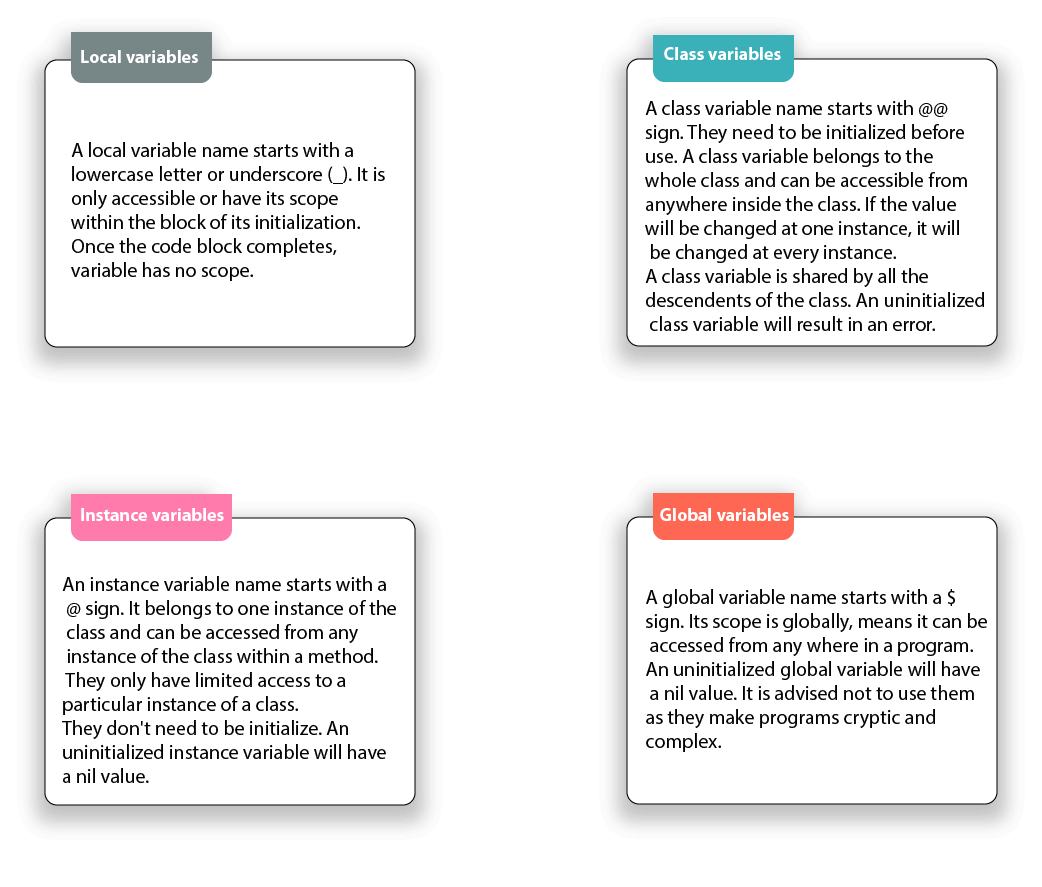
    Ruby variables are locations which hold data to be used in the programs. Each variable has a different name. These variable names are based on some naming conventions. Unlike other programming languages, there is no need to declare a variable in Ruby. A prefix is needed to indicate it.

    There are four types of variables in Ruby:

    • Local variables
    • Class variables
    • Instance variables
    • Global variables
    Ruby Variables

    Local variables

    A local variable name starts with a lowercase letter or underscore (_). It is only accessible or have its scope within the block of its initialization. Once the code block completes, variable has no scope.

    When uninitialized local variables are called, they are interpreted as call to a method that has no arguments.


    Class variables

    A class variable name starts with @@ sign. They need to be initialized before use. A class variable belongs to the whole class and can be accessible from anywhere inside the class. If the value will be changed at one instance, it will be changed at every instance.

    A class variable is shared by all the descendents of the class. An uninitialized class variable will result in an error.

    Example:

    #!/usr/bin/ruby   


    class States   
    
       @@no_of_states=0   
    
       def initialize(name)   
    
          @states_name=name   
    
          @@no_of_states += 1   
    
       end   
    
       def display()   
    
         puts "State name #@state_name"   
    
        end   
    
        def total_no_of_states()   
    
           puts "Total number of states written: #@@no_of_states"   
    
        end   
    
    end   


    # Create Objects   
    
    first=States.new("Assam")   
    
    second=States.new("Meghalaya")   
    
    third=States.new("Maharashtra")   
    
    fourth=States.new("Pondicherry")   


    # Call Methods   
    
    first.total_no_of_states()   
    
    second.total_no_of_states()   
    
    third.total_no_of_states()   
    
    fourth.total_no_of_states()

    In the above example, @@no_of_states is a class variable.

    Output:
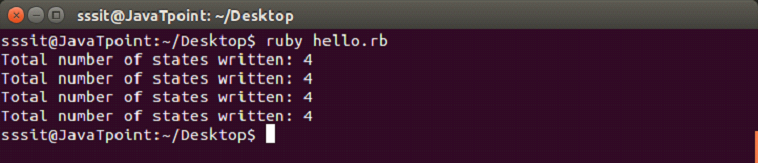
    Ruby variables 1

    Instance variables

    An instance variable name starts with a @ sign. It belongs to one instance of the class and can be accessed from any instance of the class within a method. They only have limited access to a particular instance of a class.

    They don’t need to be initialize. An uninitialized instance variable will have a nil value.

    Example:


    1. #!/usr/bin/ruby   
    2.   
    3. class States   
    4.    def initialize(name)   
    5.       @states_name=name   
    6.    end   
    7.    def display()   
    8.       puts "States name #@states_name"   
    9.     end   
    10. end   
    11.   
    12. # Create Objects   
    13. first=States.new("Assam")   
    14. second=States.new("Meghalaya")   
    15. third=States.new("Maharashtra")   
    16. fourth=States.new("Pondicherry")   
    17.   
    18. # Call Methods   
    19. first.display()   
    20. second.display()   
    21. third.display()   
    22. fourth.display()

    In the above example, @states_name is the instance variable.

    Output:

    Ruby variables 2

    Global variables

    A global variable name starts with a $ sign. Its scope is globally, means it can be accessed from any where in a program.

    An uninitialized global variable will have a nil value. It is advised not to use them as they make programs cryptic and complex.

    There are a number of predefined global variables in Ruby.

    Example:


    1. #!/usr/bin/ruby   
    2.   
    3. $global_var = "GLOBAL"   
    4. class One   
    5.   def display   
    6.      puts "Global variable in One is #$global_var"   
    7.   end   
    8. end   
    9. class Two   
    10.   def display   
    11.      puts "Global variable in Two is #$global_var"   
    12.   end   
    13. end   
    14.   
    15. oneobj = One.new   
    16. oneobj.display   
    17. twoobj = Two.new   
    18. twoobj.display

    In the above example, @states_name is the instance variable.

    Output:

    Ruby variables 3

    Summary

    LocalGlobalInstanceClass
    ScopeLimited within the block of initialization.Its scope is globally.It belongs to one instance of a class.Limited to the whole class in which they are created.
    NamingStarts with a lowercase letter or underscore (_).Starts with a $ sign.Starts with an @ sign.Starts with an @@ sign.
    InitializationNo need to initialize. An uninitialized local variable is interpreted as methods with no arguments.No need to initialize. An uninitialized global variable will have a nil value.No need to initialize. An uninitialized instance variable will have a nil value.They need to be initialized before use. An uninitialized global variable results in an error.
  • Ruby Operators

    Ruby has a built-in modern set of operators. Operators are a symbol which is used to perform different operations. For example, +, -, /, *, etc.


    Types of operators:

    • Unary operator
    • Airthmetic operator
    • Bitwise operator
    • Logical operator
    • Ternary operator
    • Assignment operator
    • Comparison operator
    • Range operator

    Unary Operator

    Unary operators expect a single operand to run on.

    OperatorDescription
    !Boolean NOT
    ~Bitwise complement
    +Unary plus

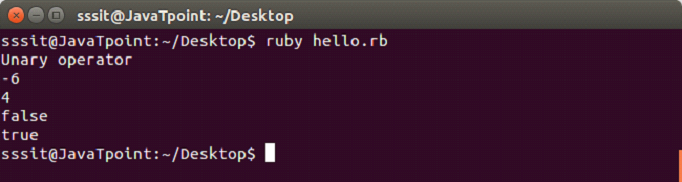
    Example

    In file hello.rb, write the following code.

    #!/usr/bin/ruby -w   


     puts("Unary operator")   
    
     puts(~5)   
    
     puts(~-5)   
    
     puts(!true)   
    
     puts(!false)

    Output:

    Ruby operators 1

    Airthmetic Operator

    Airthmetic operators take numerical values as operands and return them in a single value.

    OperatorDescription
    +Adds values from both sides of the operator.
    Subtract values from both sides of the operator.
    /Divide left side operand with right side operand.
    *Multiply values from both sides of the operator.
    **Right side operand becomes the exponent of left side operand.
    %Divide left side operand with right side operand returning remainder.

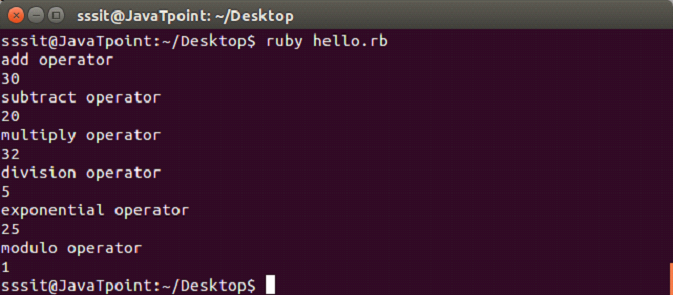
    Example

    In file hello.rb, write the following code.

    #!/usr/bin/ruby -w   


     puts("add operator")   
    
     puts(10 + 20)      
    
     puts("subtract operator")   
    
     puts(35 - 15)    
    
     puts("multiply operator")   
    
     puts(4 * 8)   
    
     puts("division operator")   
    
     puts(25 / 5)   
    
     puts("exponential operator")   
    
     puts(5 ** 2)   
    
     puts("modulo operator")   
    
     puts(25 % 4)

    Output:

    Ruby operators 2

    Bitwise Operator

    Bitwise operators work on bits operands.

    OperatorDescription
    &AND operator
    |OR operator
    <<Left shift operator
    >>Right shift operator
    ^XOR operator
    ~Complement operator

    Logical Operator

    Logical operators work on bits operands.

    OperatorDescription
    &&AND operator
    ||OR operator

    Ternary Operator

    Ternary operators first check whether given conditions are true or false, then execute the condition.

    OperatorDescription
    ?:Conditional expression

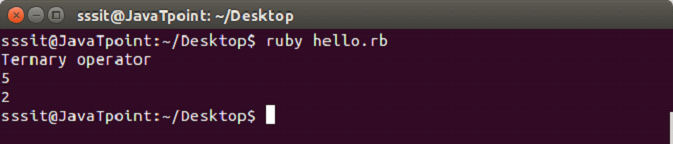
    Example

    In file hello.rb, write the following code.

    #!/usr/bin/ruby -w   


     puts("Ternary operator")   
    
     puts(2<5 ? 5:2)   
    
     puts(5<2 ? 5:2)

    Output:

    Ruby operators 3

    Assignment Operator

    Assignment operator assign a value to the operands.

    OperatorDescription
    =Simple assignment operator
    +=Add assignment operator
    -=subtract assignment operator
    *=Multiply assignment operator
    /=Divide assignment operator
    %=Modulus assignment operator
    **=Exponential assignment operator

    Comparison Operator

    Comparison operators compare two operands.

    OperatorDescription
    ==Equal operator
    !=Not equal operator
    >left operand is greater than right operand
    <Right operand is greater than left operand
    >=Left operand is greater than or equal to right operand
    <=Right operand is greater than or equal to left operand
    <=>Combined comparison operator
    .eql?Checks for equality and type of the operands
    equal?Checks for the object ID

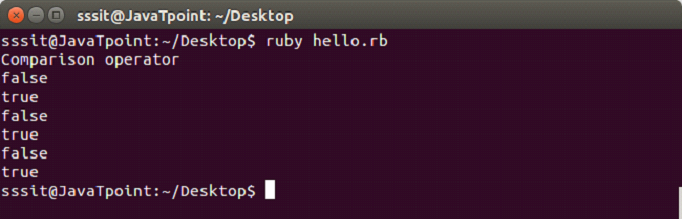
    Example

    In file hello.rb, write the following code.

    #!/usr/bin/ruby -w   


     puts("Comparison operator")   
    
     puts(2 == 5)   
    
     puts(2 != 5)   
    
     puts(2 > 5)   
    
     puts(2 < 5)   
    
     puts(2 >= 5)   
    
     puts(2 <= 5)

    Output:

    Ruby operators 4

    Range Operator

    Range operators create a range of successive values consisting of a start, end and range of values in between.

    The (..) creates a range including the last term and (…) creates a range excluding the last term.

    For example, for the range of 1..5, output will range from 1 to 5.

    and for the range of 1…5, output will range from 1 to 4.

    OperatorDescription
    ..Range is inclusive of the last term
    Range is exclusive of the last term
  • Hello Ruby Program

    Now we will write a simple program of Ruby. Before writing Hello World program, we are assuming that you have successfully installed Ruby in your system.


    Requirement for Hello Ruby Program

    • Download Ruby and install it.
    • Create a file with .rb extension.
    • Connect Ruby path to the file.
    • Run the file.

    Creating Hello Ruby Program

    1) Use any text editor and create a hello.rb file. Write the following code,

    puts "Hello Ruby !"  

    2) Connect Ruby path to the above file. We have created hello.rb file in the Desktop. So first we need to go the Desktop directory through our console.

    Ruby Hello ruby program 1

    3) Run the following command.

    ruby hello.rb  
    Ruby Hello ruby program 2

    This is final output of our Hello Ruby program.

  • Ruby Installation

    Ruby is a cross platform programming language. It is installed differently on different operating systems.

    • For UNIX like operating system, use your system’s package manager.
    • For Windows operating system, use RubyInstaller.
    • For OS X system, use third party tools (rbenv and RVM).

    We will install Ruby on Linux Ubuntu using package manager.

    Step 1 Choose the package management system which you want to install from the link 

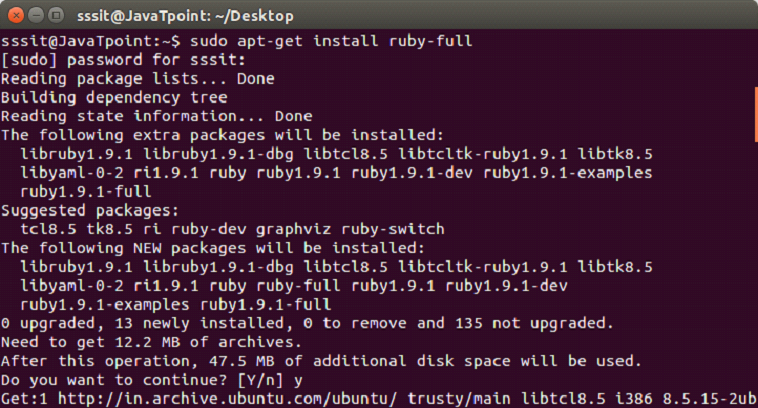
    Step 2 Debian GNU/Linux and Ubuntu use the apt package manager. Use the following command:

    1. sudo apt-get install ruby-full  

    Here, by default, the ruby-full package provides Ruby 1.9.3 version which is an old version on Debian and Ubuntu.

    Ruby installation 1

    Step 3 To know your Ruby version installed in your system, use the command,

    1. ruby -v  
    Ruby installation 2
  • Ruby vs Python

    Similarities

    • They both are high level language.
    • They both are server side scripting language.
    • Both are used for web applications.
    • Both work on multiple platforms.
    • Both have clean syntax and are easily readable.
    • Both use an interactive prompt called irb.
    • Objects are strongly and dynamically typed.
    • Both use embedded doc tools.

    Differences

    TermsRubyPython
    DefinitionRuby is an open source web application programming language.Python is a high level programming language.
    Object OrientedFully object oriented programming language.Not fully object oriented programming language.
    DeveloperYukihiro Matsumoto in 1990s.Guido Van Rossum in 1980s.
    Developing EnvironmentEclipseIDE is supported.multiple IDEs are supported.
    LibrariesIt has smaller library than Python.Has larger range of libraries.
    MixinsMixins are used.Mixins can’t be used.
    Web frameworksRuby on RailsDjango
    CommunityMainly focused on web.Focussed in academia and Linux.
    UsageApple Github Twitter Groupon Shopify ThemeForestGoogle Instagram Mozilla Firefox The Washington post Yahoo Shopzilla
    Built-in classesBuilt-in classes can be modifiedBuilt-in classes can’t be modified
    elseifelsifelif
    Unset a variableOnce a variable is set you can’t unset it back . It will be present in the symbol table as long as it is in scope.del statement help you to delete a set variable.
    yield keywordIt will execute another function that has been passed as the final argument, then immediately resume.It returns execution to the scope outside the function’s invocation. External code is responsible for resuming the function.
    Anonymous functionsSupport blocks, procs and lambdas.Support only lambdas.
    FunctionsDoesn’t have functions.It has functions.
    TuplesIt doesn’t support tuples.It support tuples.
    switch/case statementIt support switch/case statement.It doesn’t support switch/case statement.
    lambda functionIts lambda functions are larger.It support only single line lambda function.
    InheritanceSupport single inheritance.Support multiple inheritance.

  • Features of Ruby

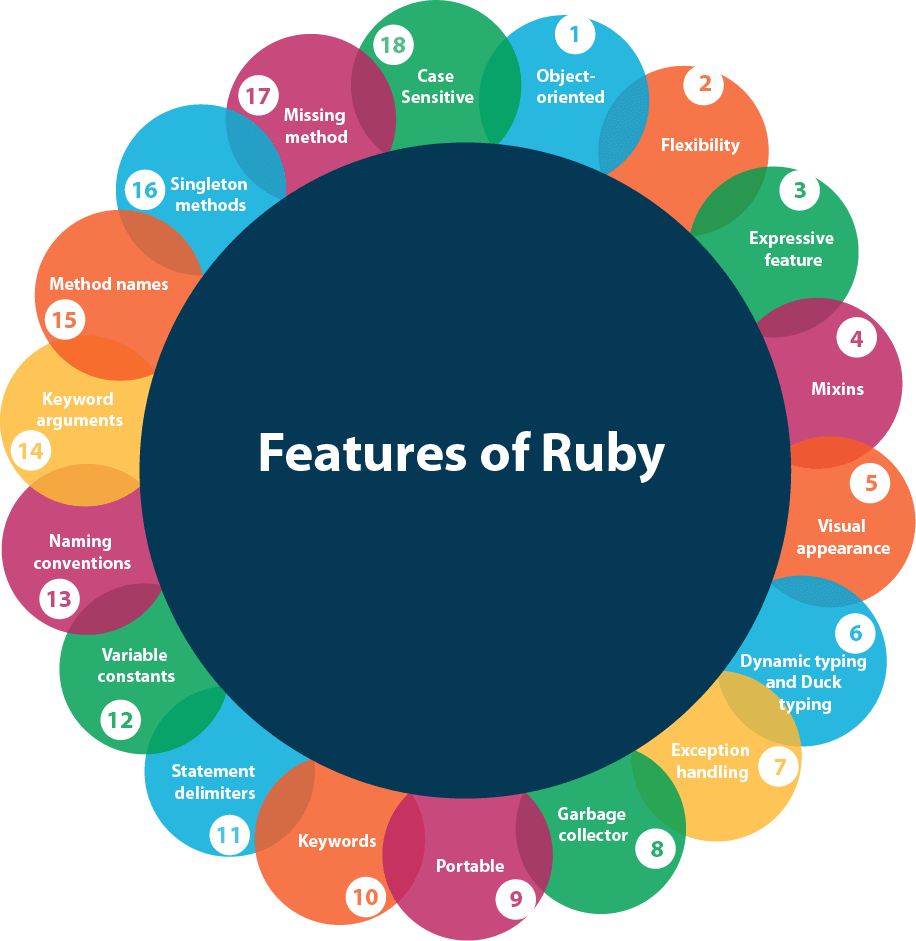
    Ruby language has many features. Some of them are explained below:

    Features of Ruby
    • Object-oriented
    • Flexibility
    • Expressive feature
    • Mixins
    • Visual appearance
    • Dynamic typing and Duck typing
    • Exception handling
    • Garbage collector
    • Portable
    • Keywords
    • Statement delimiters
    • Variable constants
    • Naming conventions
    • Keyword arguments
    • Method names
    • Singleton methods
    • Missing method
    • Case Sensitive

    Object Oriented

    Ruby is purely object oriented programming language. Each and every value is an object. Every object has a class and every class has a super class. Every code has their properties and actions. Ruby is influenced with Smalltalk language. Rules applying to objects applies to the entire Ruby.


    Flexibility

    Ruby is a flexible language as you can easily remove, redefine or add existing parts to it. It allows its users to freely alter its parts as they wish.


    Mixins

    Ruby has a feature of single inheritance only. Ruby has classes as well as modules. A module has methods but no instances. Instead, a module can be mixed into a class, which adds the method of that module to the class. It is similar to inheritance but much more flexible.


    Visual appearance

    Ruby generally prefers English keyword and some punctuation is used to decorate Ruby. It doesn’t need variable declaration.


    Dynamic typing and Duck typing

    Ruby is a dynamic programming language. Ruby programs are not compiled. All class, module and method definition are built by the code when it run.

    Ruby variables are loosely typed language, which means any variable can hold any type of object. When a method is called on an object, Ruby only looks up at the name irrespective of the type of object. This is duck typing. It allows you to make classes that pretend to be other classes.


    Variable constants

    In Ruby, constants are not really constant. If an already initialized constant will be modified in a script, it will simply trigger a warning but will not halt your program.


    Naming conventions

    Ruby defines some naming conventions for its variable, method, constant and class.

    • Constant: Starts with a capital letter.
    • Global variable: Starts with a dollar sign ($).
    • Instance variable: Starts with a (@) sign.
    • Class variable: Starts with a (@@) sign.
    • Method name: Allowed to start with a capital letter.

    Keyword arguments

    Like Python, Ruby methods can also be defined using keyword arguments.


    Method names

    Methods are allowed to end with question mark (?) or exclamation mark (!). By convention, methods that answer questions end with question mark and methods that indicates that method can change the state of the object end with exclamation mark.


    Singleton methods

    Ruby singleton methods are per-object methods. They are only available on the object you defined it on.


    Missing method

    If a method is lost, Ruby calls the method_missing method with name of the lost method.


    Statement delimiters

    Multiple statements in a single line must contain semi colon in between but not at the end of a line.


    Keywords

    In Ruby there are approximately 42 keywords which can’t be used for other purposes. They are called reserved words.


    Case Sensitive

    Ruby is a case-sensitive language. Lowercase letters and uppercase letters are different.

  • What is Ruby

    Ruby is a dynamic, open source, object oriented and reflective programming language. Ruby is considered similar to Perl and Smalltalk programming languages. It runs on all types of platforms like Windows, Mac OS and all versions of UNIX.

    It is fully object oriented programming language. Everything is an object in Ruby. Each and every code has their properties and actions. Here properties refer to variables and actions refer to methods.

    Ruby is considered to follow the principle of POLA (principle of least astonishment). It means that the language behaves in such a way to minimize the confusion for experienced users.


    History of Ruby

    Ruby is designed and developed by Yukihiro “Martz” Matsumoto in mid 1990s in Japan.


    Idea of Ruby

    Perl is a scripting language but comes under the category of Toy language. Python is not fully object oriented language. Ruby developer Yukihiro “Martz” Matsumoto wanted a programming language which is completely object oriented and should be easy to use as a scripting language. He searched for this type of language, but couldn’t find one. Hence, he developed one.


    The name “Ruby”

    The name “Ruby” originated during a chat session between Matsumoto and Keiju Ishitsuka. Two names were selected, “Coral” and “Ruby”. Matsumoto chose the later one as it was the birthstone of one of his colleagues.


    Ruby Early Years

    The first public release of Ruby 0.95 was announced on Japanese newspaper on December 21, 1995. Within next two days, three more versions were released.

    Ruby was localized to Japan. To expand it, the Ruby-Talk, first English language Ruby mailing list was created.

    In 2001, first Ruby book “Programming Ruby” was published. After its publishment, learners of Ruby throughout the world increased.

    In 2005, they released their first Ruby framework “Ruby on Rails”. The framework release was a big success and the Ruby community increased incredibly.

    Ruby 1.8.7 was released in May 2008. At this point, Ruby was at its peak so much that even Mac OS X began their shipping with built-in Ruby.


    Ruby in Present

    The current Ruby version 2.4.0 was released on Christmas in 2016. It has several new features like improvement to hash table, instance variable access, Array#max and Array#min.


    Future of Ruby

    Ruby is a great object oriented scripting programming language. Looking at its past we can say that it has a bright future if its community members continue expanding it beyond the thinking.


    Ruby Versions

    There are many Ruby versions that have been released till date. Current stable Ruby version is 2.4

    • Version 1.8 (4th Aug, 2003)
    • Version 1.9 (25th Dec, 2007)
    • Version 2.0 (24th Feb, 2013)
    • Version 2.1 (25th Dec, 2013)
    • Version 2.2 (25th Dec, 2014)
    • Version 2.3 (25th Dec, 2015)
    • Version 2.4 (25th Dec, 2016)
    • Version 3.0 (Future Release)
  • Ruby Tutorial

    Ruby tutorial provides basic and advanced concepts of Ruby. Our Ruby programming tutorial is designed for beginners and professionals both.

    Ruby is an open-source and fully object-oriented programming language.

    Our Ruby tutorial includes all topics of Ruby such as installation, example, operators, control statements, loops, comments, arrays, strings, hashes, regular expressions, file handling, exception handling, OOPs, Ranges, Iterators. etc

  • Free vs Paid WordPress Theme

    As you already know there are two types of WordPress themes, one is paid (premium) and other one is free. Both are from WordPress community but they possess some differences in their functionality. For some users free themes may be suitable and for some users premium themes may be suitable. It all depends upon their need. A huge number of WordPress themes are available as free but still people go for premium themes. There are multiple reasons why one should go for paid one.

    Let’s have a look on some of the functions of free as well as premium themes. It will help you in choosing a theme for you.


    Cost

    Free themes of course as name suggests are absolutely free. You can use them any time without any money.

    For premium you have to pay. Its range starts from $1000 which varies depending upon the designing of theme. It is good when you are earning enough from your site but if you are using your site just as a hobby then it may cost you a lot.


    Quality

    If you want your site at a good rank then you need to improve its quality.

    Free theme will not make your site unique. Same theme will be used by other sites because it is free for everyone.

    To make your site unique go for the premium one. There are some other qualities which need to be fulfilled. Like your site has to be responsive and should support different browsers. Free theme is not guaranteed to provide these qualities.


    Support

    In free themes if you need any type of help, you have to search for help and ask on forums. If someone will be willing then you may get your answer but it will take some time.

    Premium themes designer offer some support system. You will get timely support from reliable developers. Your problem will be solved very quickly.


    Update

    WordPress is constantly updated in every few months, so your themes and plugins need to be compatible with the updated version.

    Free themes may not be updated regularly. If you are using a free theme and an updated version comes, then you have two options. Either don’t update your site or install a new them. Both the options are not right.

    Premium theme developers update it on a regular basis to make it compatible with the new WordPress version. So if you are using a premium theme, then it is the responsibility of company to update it. You don’t have to worry about it.


    SEO

    SEO plays an important role in the ranking of your website. It is important for your site to have an SEO options and clean code.

    In free themes there are many structural bugs and they don’t provide inbuilt SEO options.

    Premium themes provide better coding which helps to load your site faster.


    Features

    Theme developers have to offer latest features for their customers according to the trend.

    Free themes provide limited features. Their developers do not update their theme. They are more compatible to the plugins than premium themes.

    Premium theme developers provide latest features and much more functionality than free themes. They provide an easy user interface that allows users to make any type of changes in the design of their site.


    Encrypted Links

    In free themes there are some unwanted links in the footer area. These links are irrelevant from the content of your website. It seriously affects the SEO of your site.

    Free themes developers add some links at the footer of their themes which is very annoying.


    Security

    Security should be of a high level in order to prevent your site. wordPress provides a better security by updating it every few months. An out dated theme may cause a lot of security issues.

    Free themes generally have high security threat.

    On the other hand, premium themes give high security standards to their customers.

  • How to Install WordPress Themes

    For theme installation, first you need to select a theme either free or a premium one. There are a lot of sites from where you can download a theme. Theme will be downloaded in zip format. The next process is installation process. Installation has some steps to be followed.

    There are two methods from which you can install a theme:

    • Installing WordPress using admin theme search
    • Installing WordPress using upload method

    Installing WordPress using admin theme search

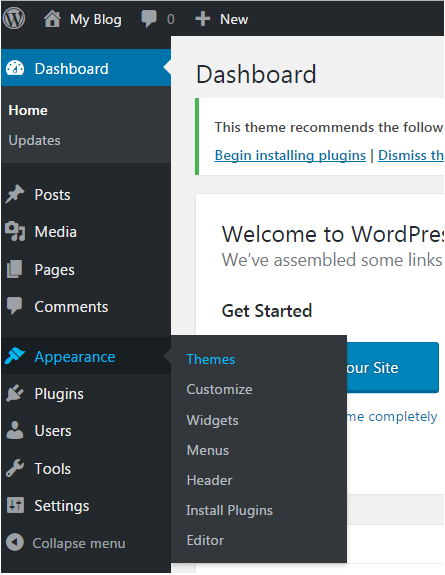
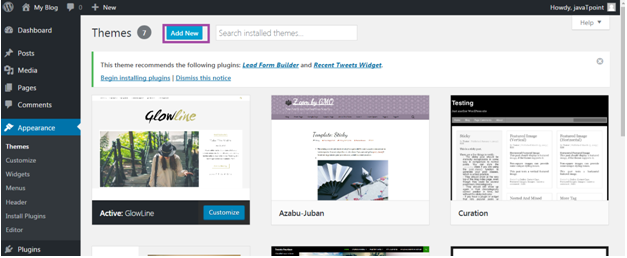
    To install free themes from WordPress.org directory, login into your account and click Appearance > Themes.

    Wordpress How to install wordpress themes1

    Look at the above snapshot, click on Themes option. Following page will appear in front of you.

    Wordpress How to install wordpress themes2

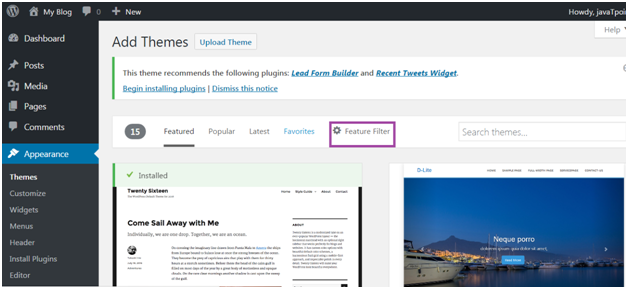
    Click on Add New button to Add New themes.

    Wordpress How to install wordpress themes3

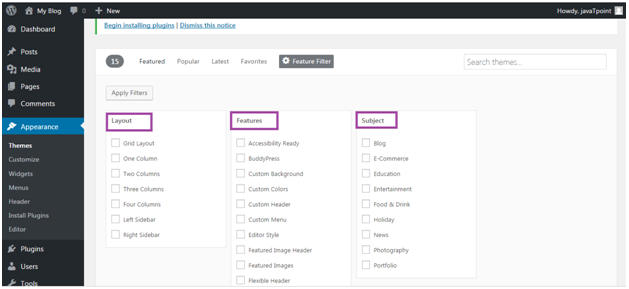
    Look at the above snapshot, here you’ll see an option for Feature Filter.

    Wordpress How to install wordpress themes4

    Look at the above snapshot, here you can filter your search for themes by applying your choice for Layout, Features and Subject.

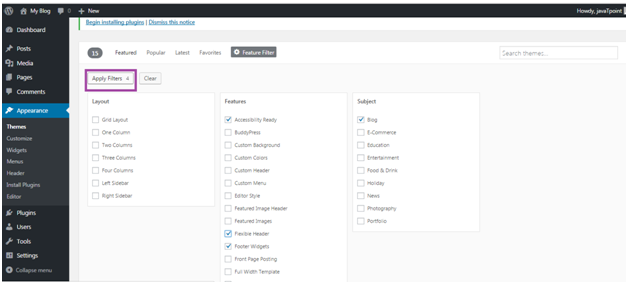
    Wordpress How to install wordpress themes5

    Look at the above snapshot, we have selected 4 filter criteria, now click on button Apply Filters 4 to apply the filters.

    Wordpress How to install wordpress themes6

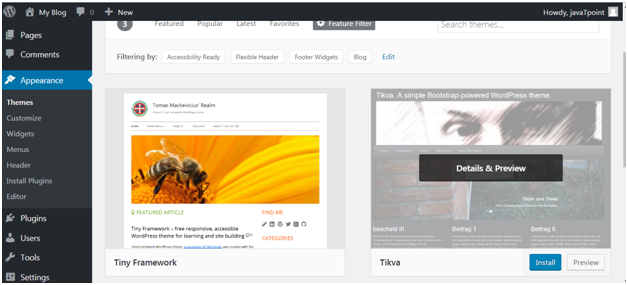
    Look at the above snapshot, select a theme and take your mouse above it. Click on Install button.

    Wordpress How to install wordpress themes7

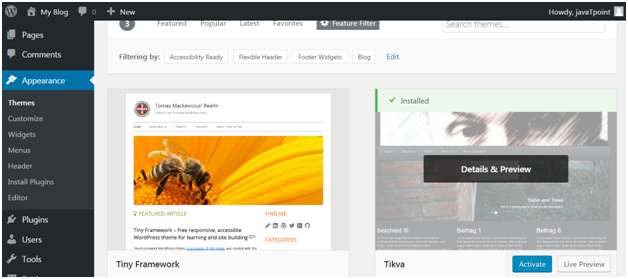
    Look at the above snapshot, our theme is installed. To activate it click on Activate button. And you have successfully activated your WordPress theme.


    Installing WordPress using upload method

    The above method was only to install free themes that are available in WordPress directory only. But if you want to install premium themes, then you have to choose this option which includes following steps. This method can be used to install premium as well as free themes.


    Downloading theme

    WordPress site itself has a large collection of themes. All the themes on the WordPress site is fully examined and tested. If you are not satisfied with these themes you can go to other sites to download a theme. Make sure you select trusted site to download a theme as anyone can create a theme for WordPress.

    Themes are downloaded in the zip format.

    Go to wordpress.org site.

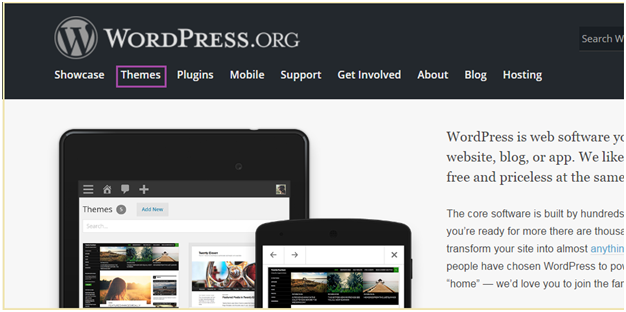
    Wordpress How to install wordpress themes8

    Look at the above snapshot, this is the site. Here click on Themes. You will be directed to the following page.

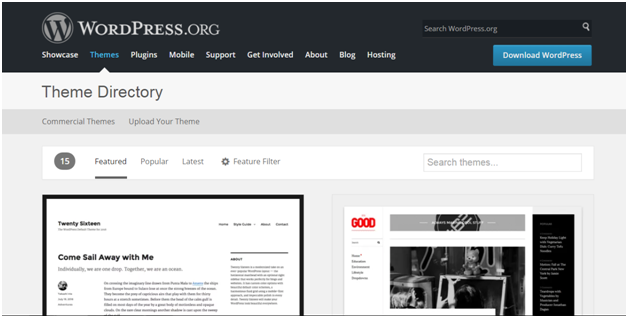
    Wordpress How to install wordpress themes9

    Look at the above snapshot, on this page you’ll have a lot of options to select themes.

    Select a theme and then click on Download button.

    Theme will be downloaded in zip format in your system.


    AD

    Installing theme

    To install the downloaded theme, you have to login to your WordPress and click on Appearance > Themes.

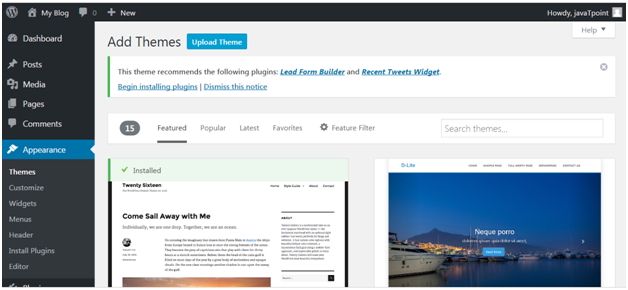
    Now click on Add New button, following screen will appear in front of you.

    Wordpress How to install wordpress themes10

    Look at the above snapshot, click on Upload Theme button.

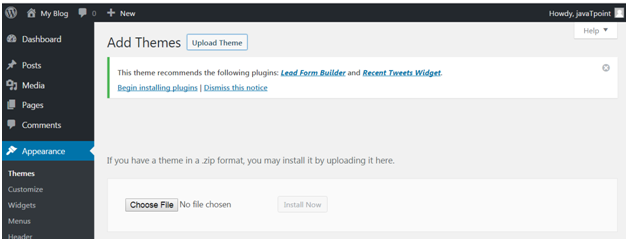
    Wordpress How to install wordpress themes11

    Look at the above snapshot, choose the file that you installed and click Install Now.

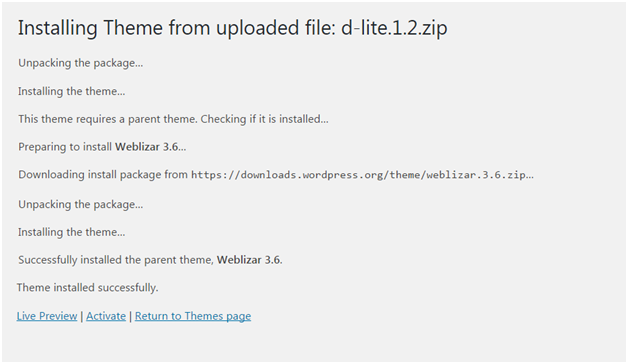
    Wordpress How to install wordpress themes12

    Look at the above snapshot, once your theme is installed, you will get a successfully installed message. Now click on Activate button, and your theme will be successfully installed.

    Now you can customize it according to your choice.